3-43
1
1
3
Useful Function
5
6
Other Useful Functions
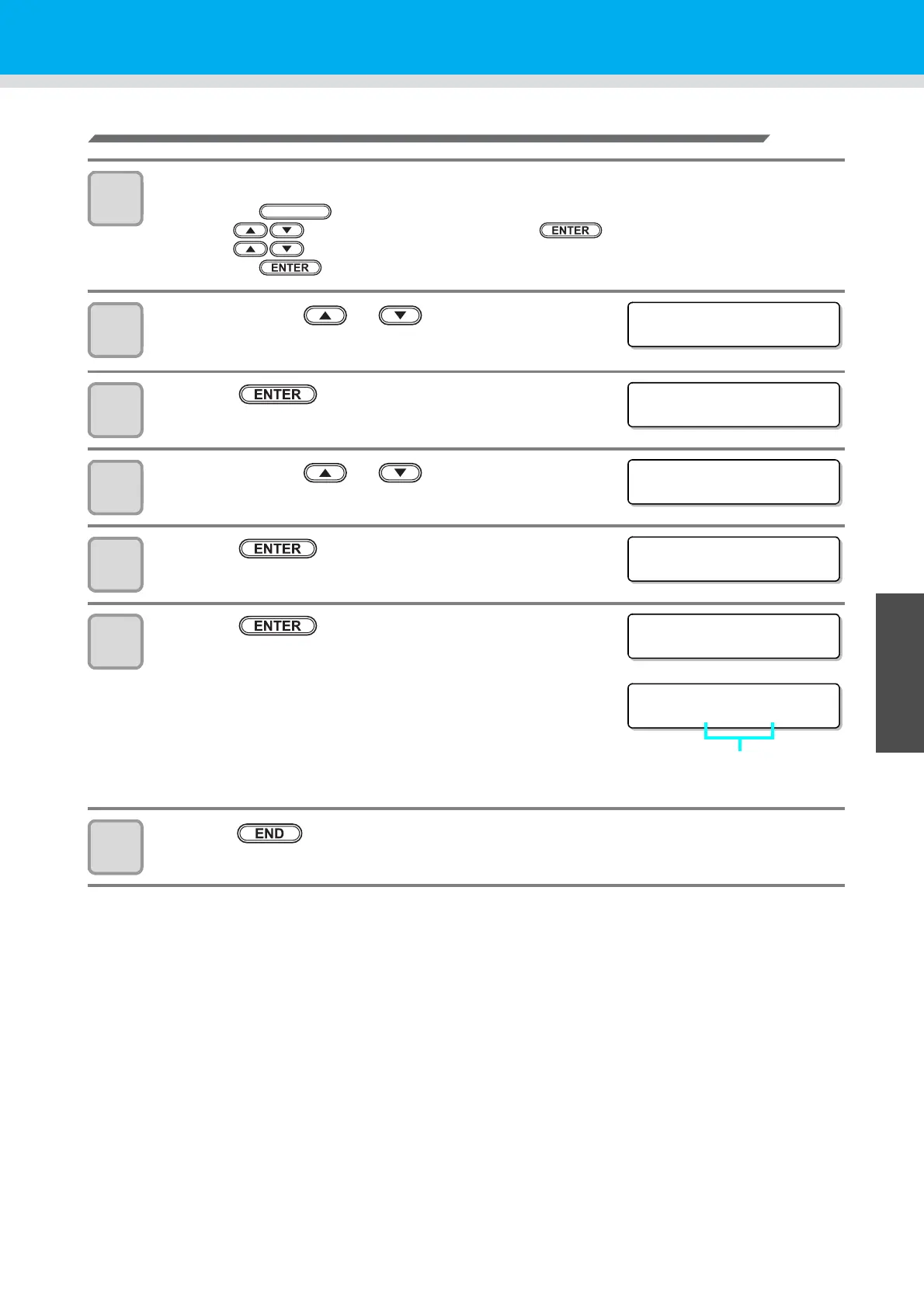
Send a test e-mail
1
Select [INTERFACE] of the set up menu.
(1) Press the key in LOCAL.
(2) Press to select [SET UP] and press the key.
(3) Press to select [INTERFACE].
(4) Press the key.
2
Press the jog key or to select [EVENT
MAIL] .
3
Press the key.
4
Press the jog key or to select [Test] .
5
Press the key.
6
Press the key.
• The sent result is displayed.
• If sending test e-mail has failed, an error code is displayed.
Refer to the next page to solve the problem.
7
Press the key several times for terminating this function.
FUNCTION
<INTER FACE>
EVENT MA I L [ ENT ]
<EVENT MA I L>
De l i v e r y [ ENT ]
<EVENT MA I L>
TEST [ENT]
Transmi t Tes
EXECUTE [ENT]
Transmi t Tes
Succes s
Transmi t Tes
Fa i l ed : 12345
Error code



 To Next Page