9.7.RS-422/485 interface
257
External equipment
9
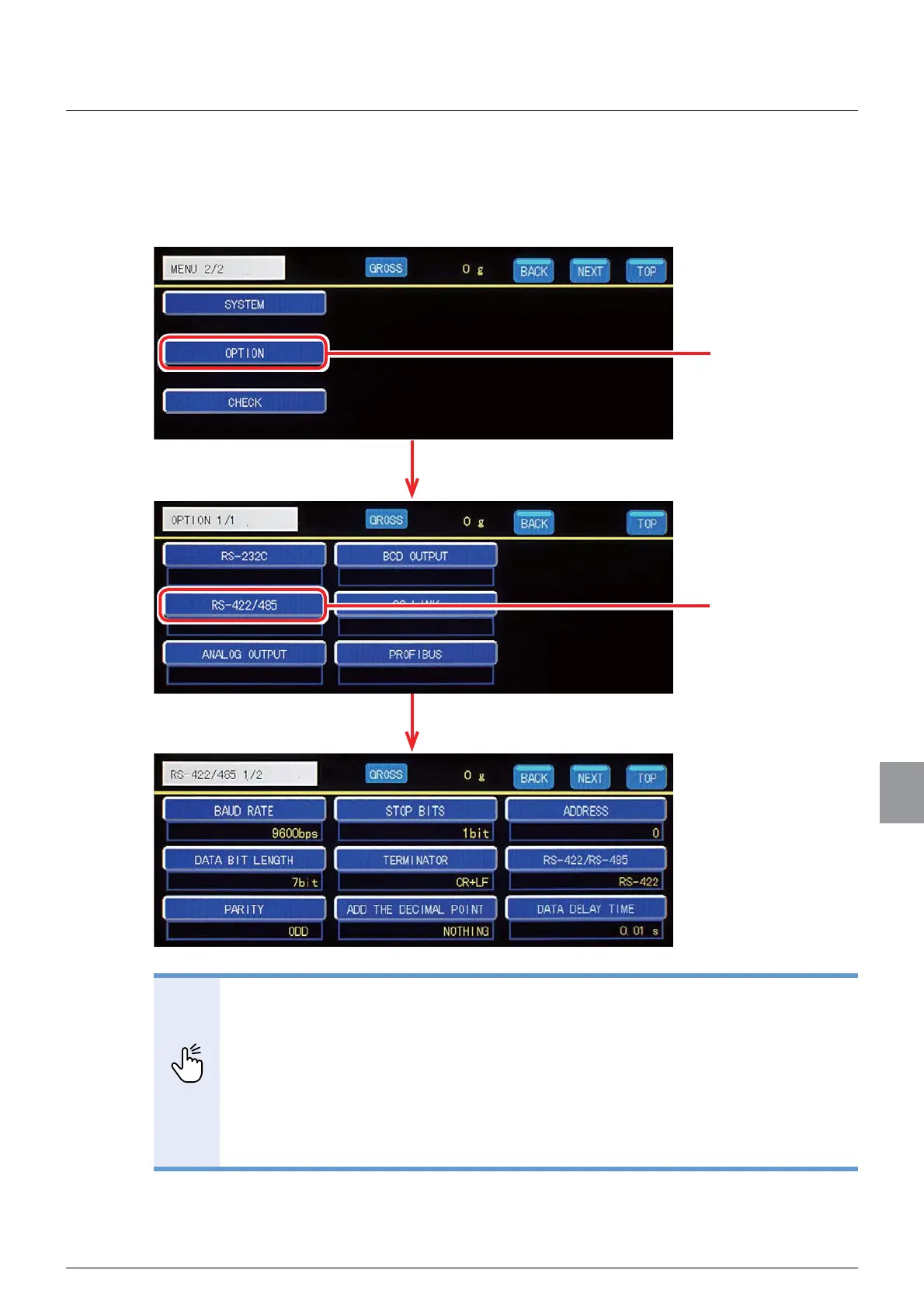
The communication settings of the RS-422/485 interface are set on the RS-422/485
communication setting screen. To display the RS-422/485 communication setting screen, tap
[OPTION] on [MENU 2/2], and then tap [RS-422/485] on the option setting screen 1/1.
-
POINT
- To set the settings other than [RS-422/RS-485], follow the same procedures
described in "9.1.3. Communication setting" on the RS-422/485 communication
setting screen.
- Communication with the RS-422/485 interface is executed only during weighing
operation. The error command is returned except during weighing operation.
&6'%GRHVQRWFRQWUROWKHFRPPXQLFDWLRQÀRZ
- The CTS/RTS signal is not used.
;ÀRZFRQWUROLVQRWH[HFXWHG
- The communication operation is interactive.
Tap [OPTION].
The option setting screen will be displayed.
The RS-422/485 communication setting screen will be displayed.
Tap [RS-422/485].



 To Next Page