4.4.Adjustment after calibration
40
Calibration
4
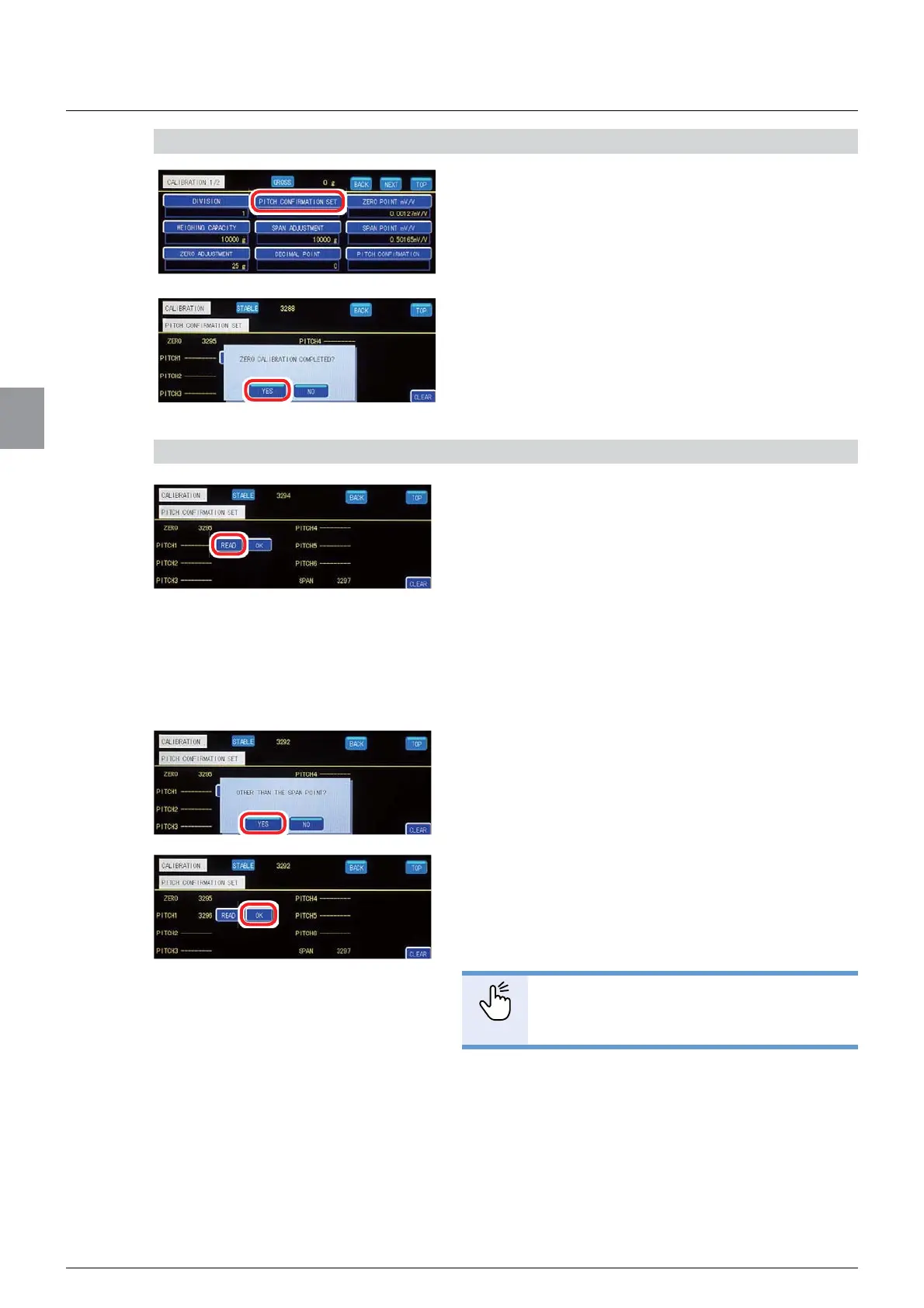
1) Display [PITCH CONFIRMATION SET] screen
1. Tap [PITCH CONFIRMATION SET] on
[CALIBRATION 1/2].
A message [ZERO CALIBRATION COMPLETED?]
will be displayed.
2. Tap [YES].
[PITCH CONFIRMATION SET] screen will be
displayed.
2) Register pitch points
1. Place a load to register for the pitch point on
the weighing device.
Wait until the [STABLE] lamp lights on [PITCH
CONFIRMATION SET] screen.
2. Tap [READ] of the number of the pitch to
register.
A message [OTHER THAN THE SPAN POINT?] will
be displayed.
3. Tap [YES].
The pitch point has been registered, and the A/D
count value of the load appears.
&RQ¿UPWKDWWKHGLVSOD\HG$'FRXQWYDOXHLV
correct, then tap [OK].
The A/D count value of the selected pitch point has
EHHQFRQ¿UPHG
POINT
- To register more than one pitch point,
repeat the step 2).



 To Next Page