Installation
133
Mitel 415/430 as of R4.1
syd-0580/1.2 – R4.1 – 08.2016
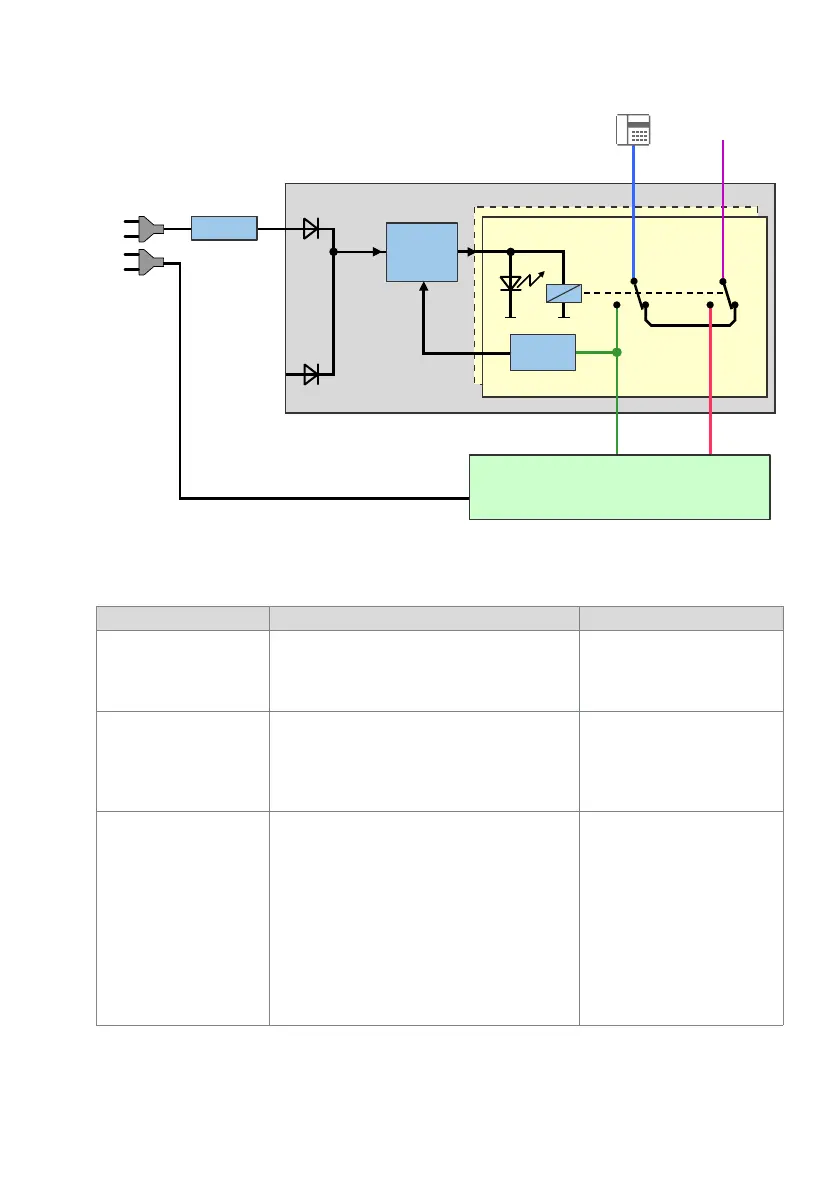
Fig. 59 Block diagram, EFOP fan-out-panel
Tab. 63 LED on the EFOP fan-out-panel
8 LEDs (2 x LED 1...4) Meaning Result
All LEDs lit Normal operation All the emergency phones and
the analogue exchange lines are
connected with the ports of the
communication server.
Individual LEDs off There is no power to these FXS lines. Possible
causes:
• The FXS card is defective.
• Individual FXS lines to the communication server
are interrupted.
The emergency phones on these
ports are directly connected with
the corresponding analogue
exchange lines.
All LEDs off All the FXS lines are without power. Possible
causes:
• The power supply to the communication server
has failed or there is a complete mains power out-
age.
• As a result of a defect the communication server
is temporarily or permanently out of service.
• All the ports are switched off due to overloading.
• One or more FXS cards are defective.
• All the FXS lines to the communication server are
interrupted.
All the emergency phones are
directly connected with the corre-
sponding analogue exchange
lines.
FXO
FXS
1 … 8
1 … 8
Voltage
detection
Control
AC / DC
1 … 8
1 … 8
1 … 8
EFOP
115/230 VAC
Mains power
PSTN
Communication server



 To Next Page