Installation
91
Mitel 415/430 as of R4.1
syd-0580/1.2 – R4.1 – 08.2016
4. 2. 7. 2 Installing the fan
Materials required:
• Fan from the Mitel 430 rack-mounting kit
• 2 screws from the Mitel 430 rack-mounting set
• Screwdriver
To install the fan proceed as follows:
1. Shut down the communication server (see "
Shutdown Mode", page 206) and dis-
connect it from the power supply.
Warning
Be sure to observe the "Safety regulations", page 84.
2. Remove the housing cover.
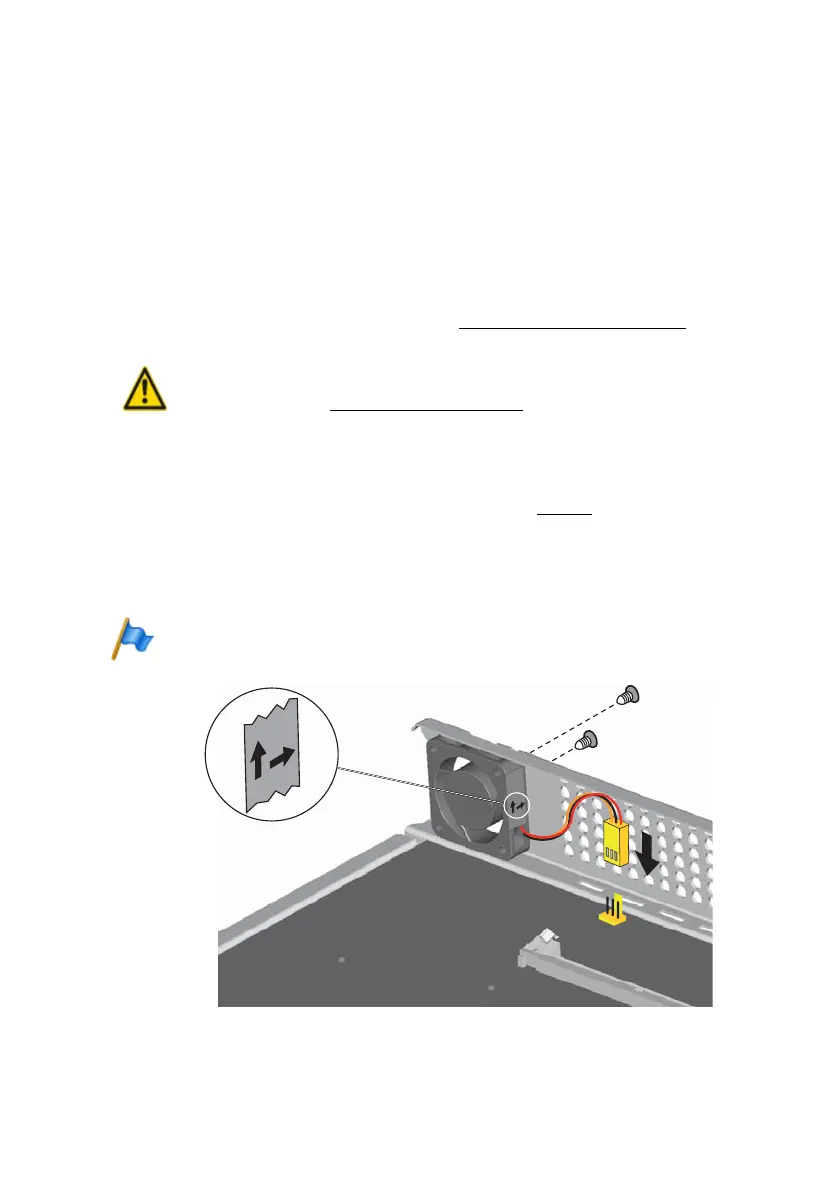
3. Use the two screws to fit the fan to the inside of the housing. Take note of the arrows
on the fan. They indicate the direction of rotation and the air flow. The air must flow
out of the housing of the communication server (see Fig. 17
).
4. Plug the fan connector into the socket marked "FAN" on the mainboard.
5. Fit the housing cover.
6. Reconnect the communication server to the power supply.
Note
The fan only turns if required by the equipment temperature.
Fig. 17 Installing the fan in Mitel 430



 To Next Page