Operation and Maintenance
207
Mitel 415/430 as of R4.1
syd-0580/1.2 – R4.1 – 08.2016
Tab. 100 Combination patterns in Boot Mode
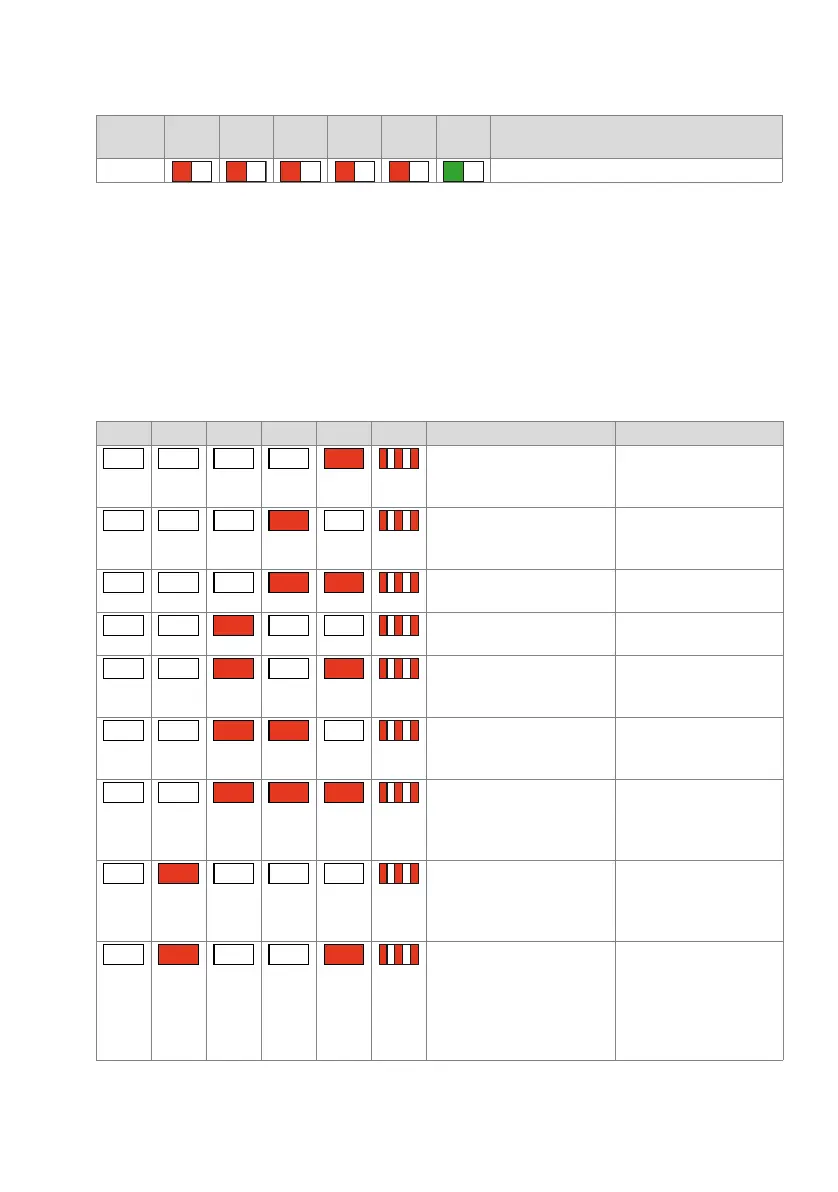
6. 4. 3. 10 Error Mode
The system switches to Error Mode if a problem or error occurs that prevents the sys-
tem’s normal operation. This can be a hardware error or a software installation error.
The Error Mode is indicated by the red SYS-LED flashing very rapidly and is exited
only once the error is remedied. In many cases this involves a system restart.
The different errors are binary coded and are indicated by the LEDs (F0...F4).
Tab. 101 Error Mode combination patterns
Pattern
No.
F0 F1 F2 F3 F4 SYS Meaning
[22] Shutdown Mode active
F0 F1 F2 F3 F4 SYS Category / Description Remedy
Hardware:
No licence: EIM card missing
or defective
Insert or replace EIM card
Hardware:
No IP address data on the EIM
card
Run a first start or replace
EIM card
Hardware:
EIM card not compatible
Replace EIM card
Hardware:
DRAM defective
Replace communications
server
Hardware:
BBT Integrity Check: No free
replacement blocks available
Replace communications
server
Hardware:
BBT Integrity Check: Incon-
sistent Bad Block Table
Replace communications
server
Hardware:
BBT Integrity Check: ECC has
detected an uncorrectable
read error
Replace communications
server
Hardware:
BBT Integrity Check: Block 0
is faulty; the Bad Block Table
cannot be used
Replace communications
server
Software:
Version transfer not possible:
The country and/or sales
channel in the EIM card does
not match the configuration
data in the Flash
Using WebAdmin set a dif-
ferent EIM card and / or
sales channel.
– – – –
– – –
–
– – –
– –
– –
– –
–
– –
–
– –
–
– – –
–
– –



 To Next Page