Installation
126
Mitel 415/430 as of R4.1
syd-0580/1.2 – R4.1 – 08.2016
Terminals
The ETSI protocol must be set in the interface configuration.
Up to 8 terminals of different types can be connected to one S bus.
• Standard ISDN terminals
• ISDN Terminal Adapter
• PC with ISDN card
• Group 4 fax machines
1)
, etc.
Two call connections are possible simultaneously for each S bus.
4. 7. 3. 3 FXS terminal interfaces
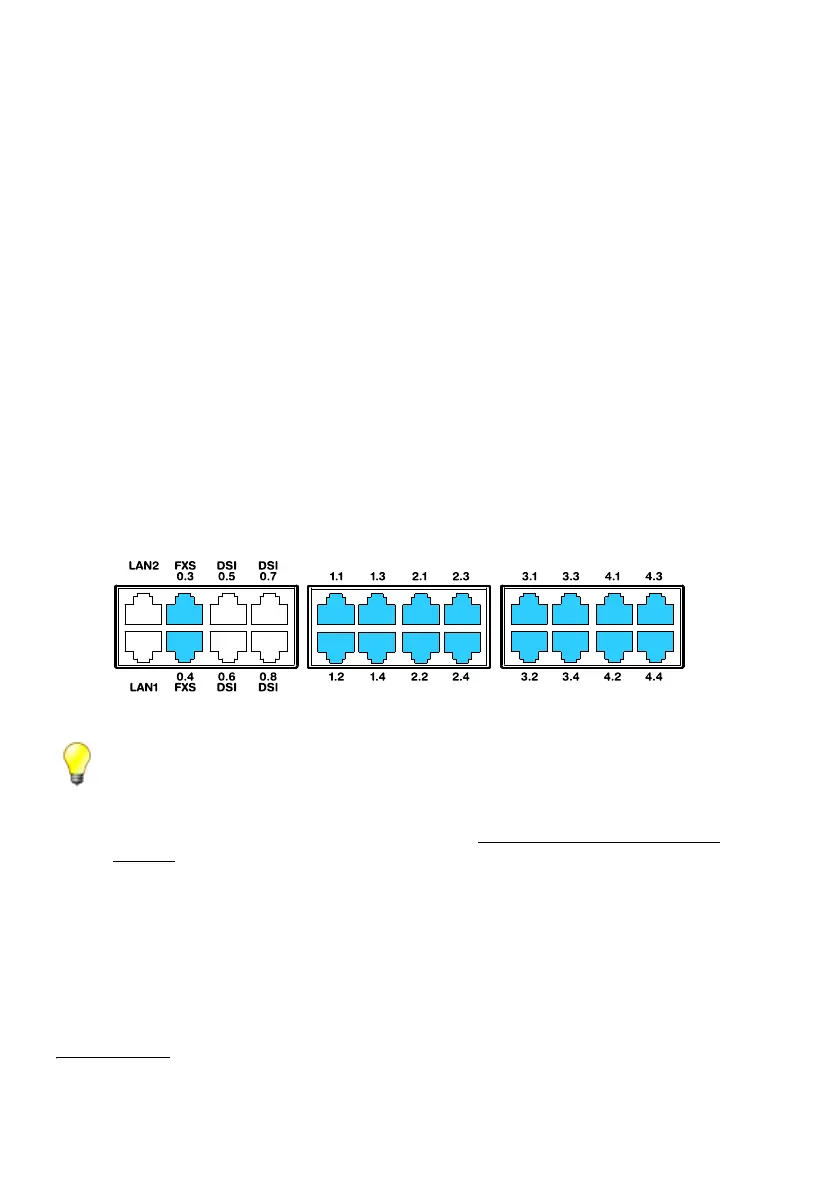
The FXS terminal interfaces of the mainboard are permanently routed to the front
panel and labelled accordingly. With the appropriate interface cards and Wiring Adapt-
ers, additional FXS terminal interfaces can also be made available at the RJ45 sockets
1.x...4.x (with Mitel 415 only 1.x and 2.x). The possible RJ45 sockets are highlighted in
colour in the figure below.
Fig. 52 Connection possibilities for FXS terminal interfaces
Tip
To be able to make emergency calls even in the event of a mains power failure, you have the
possibility of running up to 8 analogue FXS lines via the EFOP emergency fan-out panel. In the
event of a power failure the EFOP switches the connected analogue phones automatically and
directly over to the analogue FXO exchange lines (see "Emergency fan-out-panel (EFOP)",
page 132).
1) Not possible within an AIN



 To Next Page