Installation
151
Mitel 415/430 as of R4.1
syd-0580/1.2 – R4.1 – 08.2016
4. 8. 6. 2 MiVoice 5361 / 5370 / 5380
These IP system phones can be both desktop-mounted and wall-mounted.
Mounting the phone
The following points are described in detail in the User’s Guides for MiVoice 5361 /
5370 / 5380:
• Set-up as a desk phone (choice of two different set-up angles)
• Wall mounting
• Connecting one or more MiVoice M530 or MiVoice M535 expansion key modules.
• Connection of a headset to DHSG standard.
Note:
To prevent any damage to the phone, always disconnect the phone from the power supply
first before connecting a headset to DHSG standard.
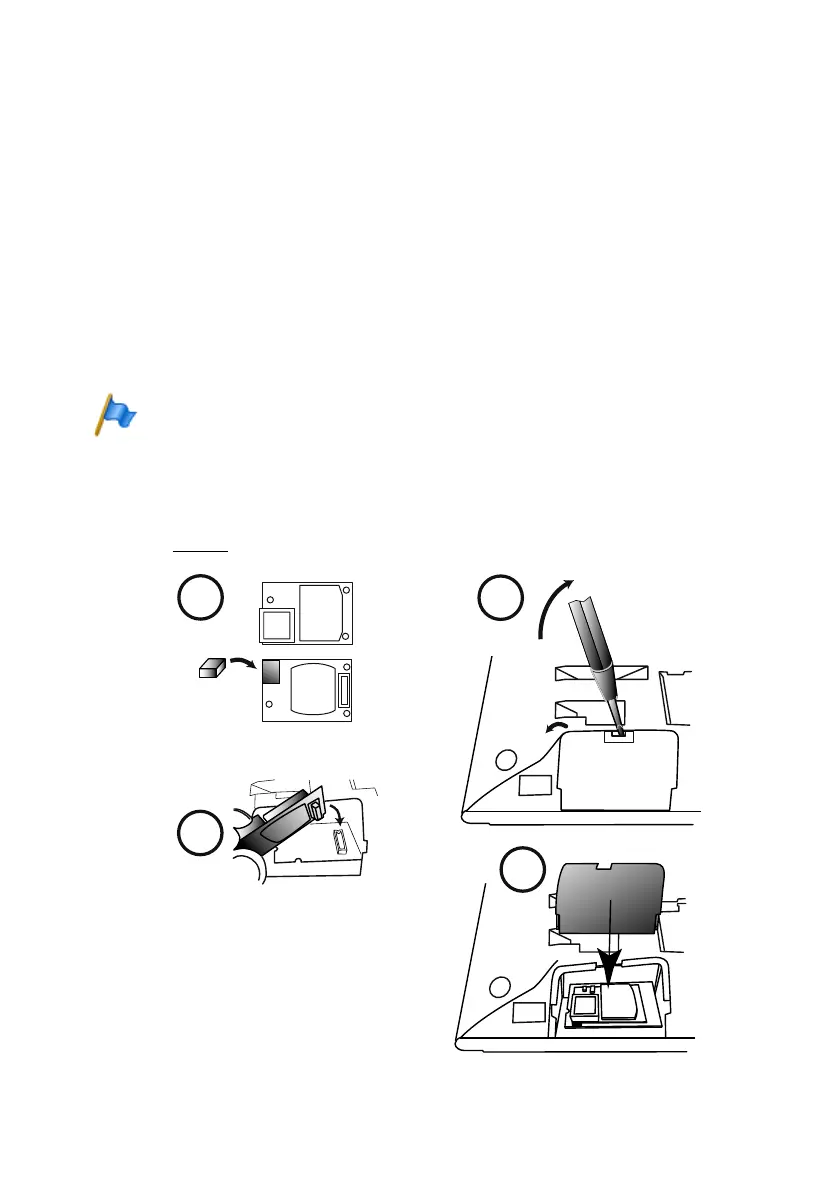
Mounting the Bluetooth module
The MiVoice 5380 can also be equipped with a Bluetooth module as an option. To in-
stall (see Fig. 68
), proceed as follows:
Fig. 68 Assembly of the Bluetooth module



 To Next Page