Operation and Maintenance
203
Mitel 415/430 as of R4.1
syd-0580/1.2 – R4.1 – 08.2016
6. 4. 3. 1 Startup Mode
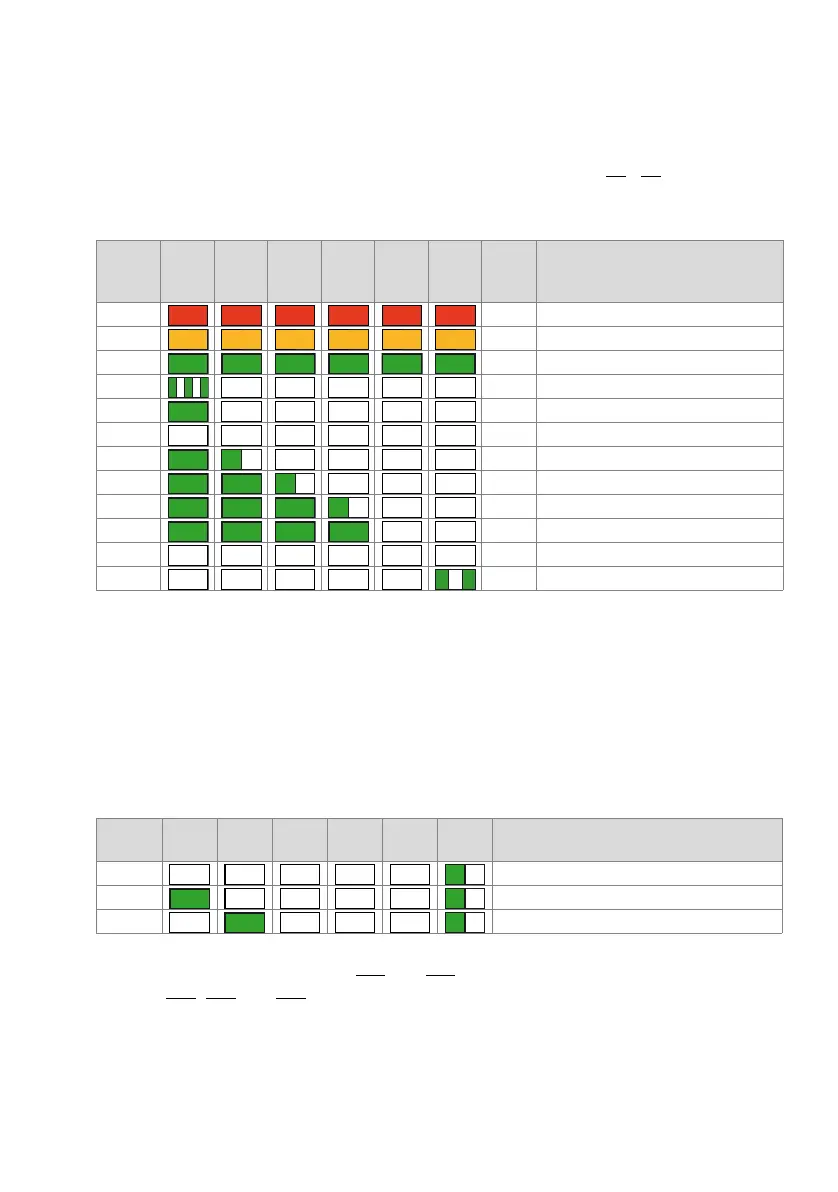
Startup begins as soon as power is supplied or after a restart/first start, and ends when
the system enters Normal Mode. The LED combination patterns [1]...[9] indicate the in-
dividual start-up phases in chronological order and also serve as a progress indicator.
Tab. 92 Combination patterns during startup
The startup phase is now completed and the system switches to Normal Mode. The pi-
lot key now accepts inputs; the terminal displays are visible shortly thereafter.
6. 4. 3. 2 Normal Mode
Normal Mode means that the system software is running fault-free. Depending on the
situation the LEDs display the following combination patterns:
Tab. 93 Combination patterns in Normal Mode
Mutual combinations of patterns [12] and [13] are possible as are combinations with
patterns [14], [15] and [16].
Pattern
No.
F0 F1 F2 F3 F4 SYS
Dura-
tion
[s]
Meaning
[1] ~3 Red LED test
[2] ~1,5 Orange LED test
[3] ~1,5 Green LED test
[4] ~7 RAM self-test
~3
~15
[5] ~3 Startup State
[6] ~1 Preparing system software loading
[7] ~3 Loading the system software
[8] ~1 System software successfully loaded
~10
[9] ~60 System software starting up
Pattern
No.
F0 F1 F2 F3 F4 SYS Meaning
[11] System in normal operation
[12] At least one internal port seized
[13] At least one external port seized
– – – – –
– – – – –
– – – – – –
– – – –
– – –
– –
– –
– – – – – –
– – – – –
– – – – –
– – – –
–
– – –



 To Next Page