Operation and Maintenance
204
Mitel 415/430 as of R4.1
syd-0580/1.2 – R4.1 – 08.2016
6. 4. 3. 3 Feature Mode
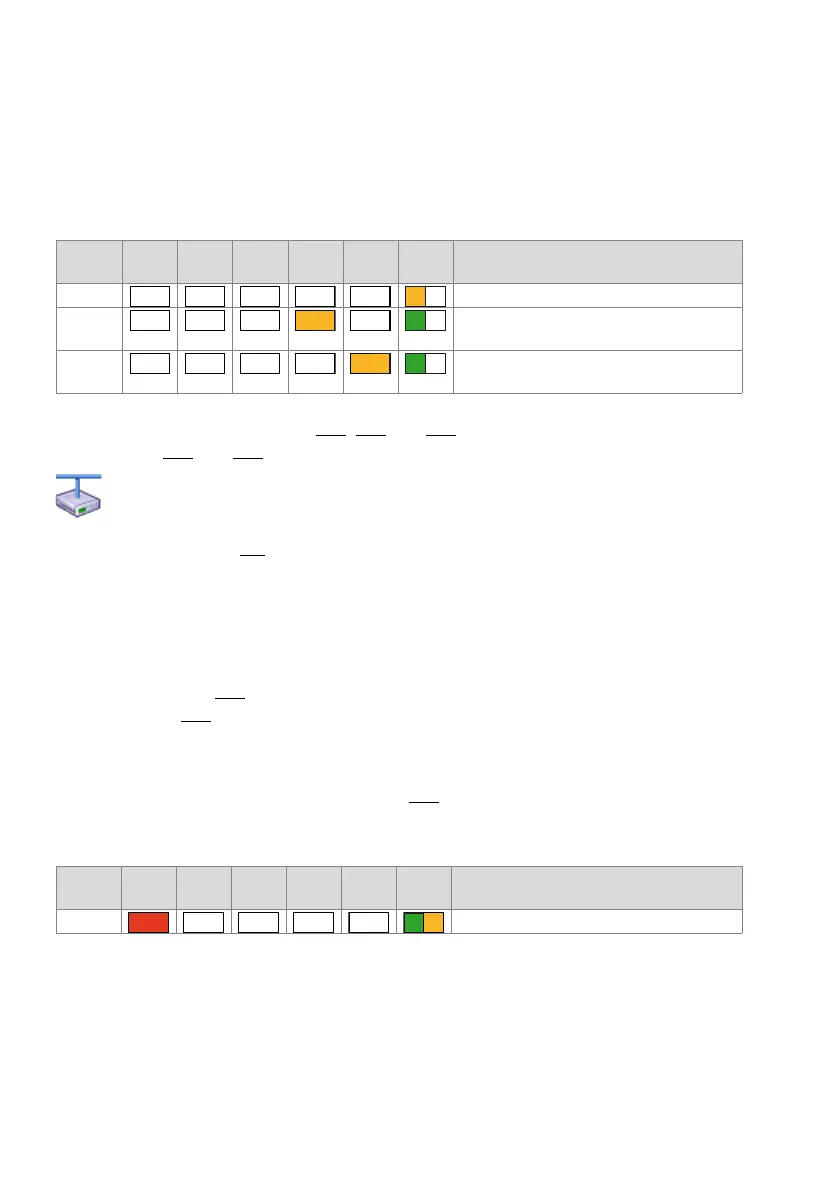
Feature Mode means that the system software is running fault-free, but that a special
function (feature) is active. Depending on the function the LEDs display the following
combination patterns:
Tab. 94 Combination patterns in Feature Mode
Mutual combinations of patterns [14], [15] and [16] are possible as are combinations
with patterns [12] and [13].
Mitel Advanced Intelligent Network:
In an AIN the offline mode of a satellite is indicated by the green-orange flashing SYS-LED.
Combinations with the patterns of the Normal Mode and Feature Mode are possible.
Exception: Pattern [14] (prebarred system) takes priority over the offline mode display.
6. 4. 3. 4 Application Command Mode
The Application Command Mode can be used to shut down or restart the communica-
tion server with prior database backup. It is also used to enable or disable password-
free access (pattern[15]
15) and remote access to the AIN via an external dial-up con-
nection (pattern[16]).
The Application Command Mode is indicated by the SYS-LED flashing green-orange.
The Application Command Mode is entered pressing and holding down the control key
(LC) in Normal Modus. Combination pattern [17] is displayed once the Application
Command Mode has been entered.
Tab. 95 Patterns after entering the Application Command Mode
The Application Command Mode is exited automatically if no input is made within 20
seconds; the system returns to Normal Mode.
Pattern
No.
F0 F1 F2 F3 F4 SYS Meaning
[14] System is prebarred
[15] Enable the password-free access for configura-
tion via Ethernet.
[16] Remote access to AIN enabled via an external
dial-up connection.
Pattern
No.
F0 F1 F2 F3 F4 SYS Meaning
[17] Application Command Mode active
– – – – –
– – –
–
– – – –
– – – –



 To Next Page