Operation and Maintenance
242
Mitel 415/430 as of R4.1
syd-0580/1.2 – R4.1 – 08.2016
6. 5. 2. 9 Overload code displays Office 135 / Office 160
The overload code displays on the cordless phones Office 135 and Office 160 can be
activated and deactivated using the following key combination (toggle function):
Long-click key 5 and then long-click key 3 (long = long-click = 2 seconds).
The overload code display is always deactivated after system initialization.
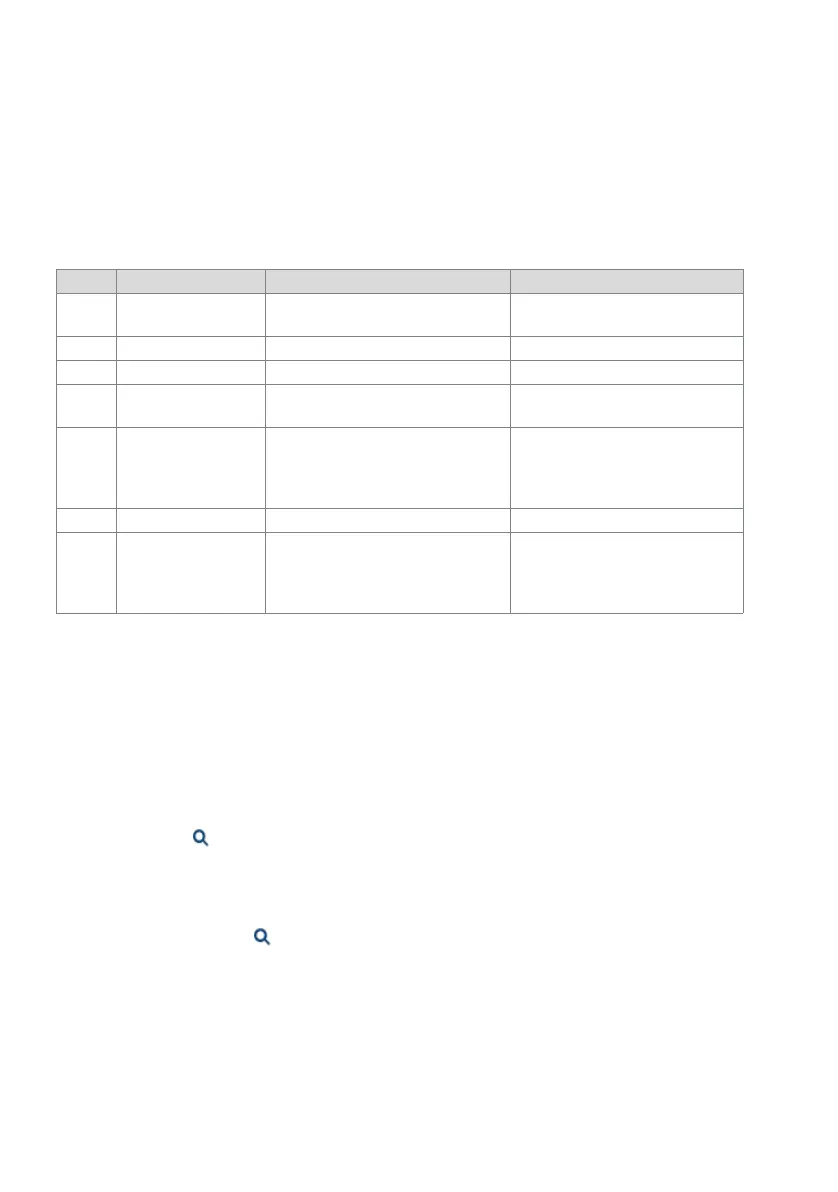
Tab. 112 DECT overload code displays Office 135
6. 5. 3 Other aids
6. 5. 3. 1 System logs
During operation or in the event of a malfunction the communication server stores the
current operating data in the file system in the directory /home/mivo400/logs.
You can open, view and back up these log files on any storage device, in WebAdmin in
the System logs( =1w) view.
6. 5. 3. 2 File system state
In the File system state ( =e3) view you can see the thematically structured file sys-
tem's memory load. In an AIN the file systems for all nodes can be viewed.
Code Name Error description Error handling
05 / 06 IPEI Not Accepted Cordless phone already registered with
the system under a different number.
• Delete cordless phone registration.
• Try again
10 Authentication failed Registration error Try again
51 DL 04 Expiry Timer (on cordless phone) has expired Try again
70 Timer Expired MM timer in system has expired (during
registration)
Try again
44 Failure to set up traffic
bearer
Connection cannot be set up as too
many cordless phones are phoning
within the same range
• Try again
• If still unsuccessful after several
attempts, restart cordless phone
and try again.
45 No Quiet Channel No channel available, same as code 44 Same measures as for code 44
80 Reject Location Area.
Not allowed. Mis-used
to indicate wrong
"design" version.
Wrong mode during logon. Logon to the system < I5
• Office 135: Longclick "Home"
Logon to the system > I5:
• Office 135: Shortclick "Home"



 To Next Page