Installation
92
Mitel 415/430 as of R4.1
syd-0580/1.2 – R4.1 – 08.2016
4. 2. 7. 3 Installing the cable cover
Materials required:
• Cable cover set for Mitel 415/430
• Screwdriver
To install the cable cover proceed as follows:
1. Pull off the screw covers on the left and right of the front panel.
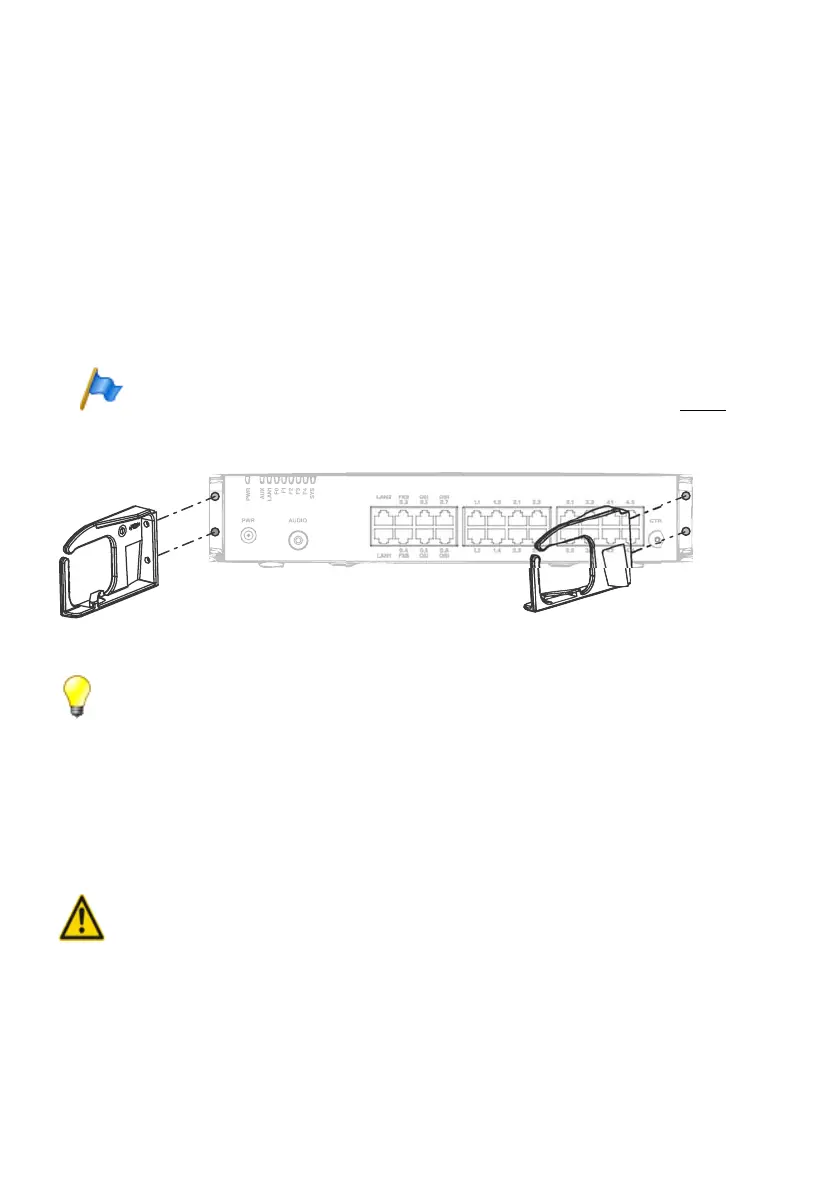
2. Use the M4 screws of the cable cover set to secure the brackets for the cable cover
to the communication server.
Note
The two brackets are not identical. Compare the cable brackets with the figures in Fig. 18.
3. Fit the cable cover over the brackets from above until they are felt to engage.
Fig. 18 Installing the brackets for the cable cover
Tip
To remove the cable cover reach into the side openings of the cover, gently press the two
(engaged) lugs outwards and remove the cover.
4. 3 Earthing and protecting the communication server
The protective earth and equipotential bonding are important integral parts of the
safety concept: Standard EN 60950 relevant to safety matters stipulates protective
earthing.
Warning
High leakage currents can occur as a result of connecting to the communication network.
Establish an earth connection before connecting to the communications network.
Disconnect the communication server from the communications network before carrying out
maintenance work.



 To Next Page