Operation and Maintenance
239
Mitel 415/430 as of R4.1
syd-0580/1.2 – R4.1 – 08.2016
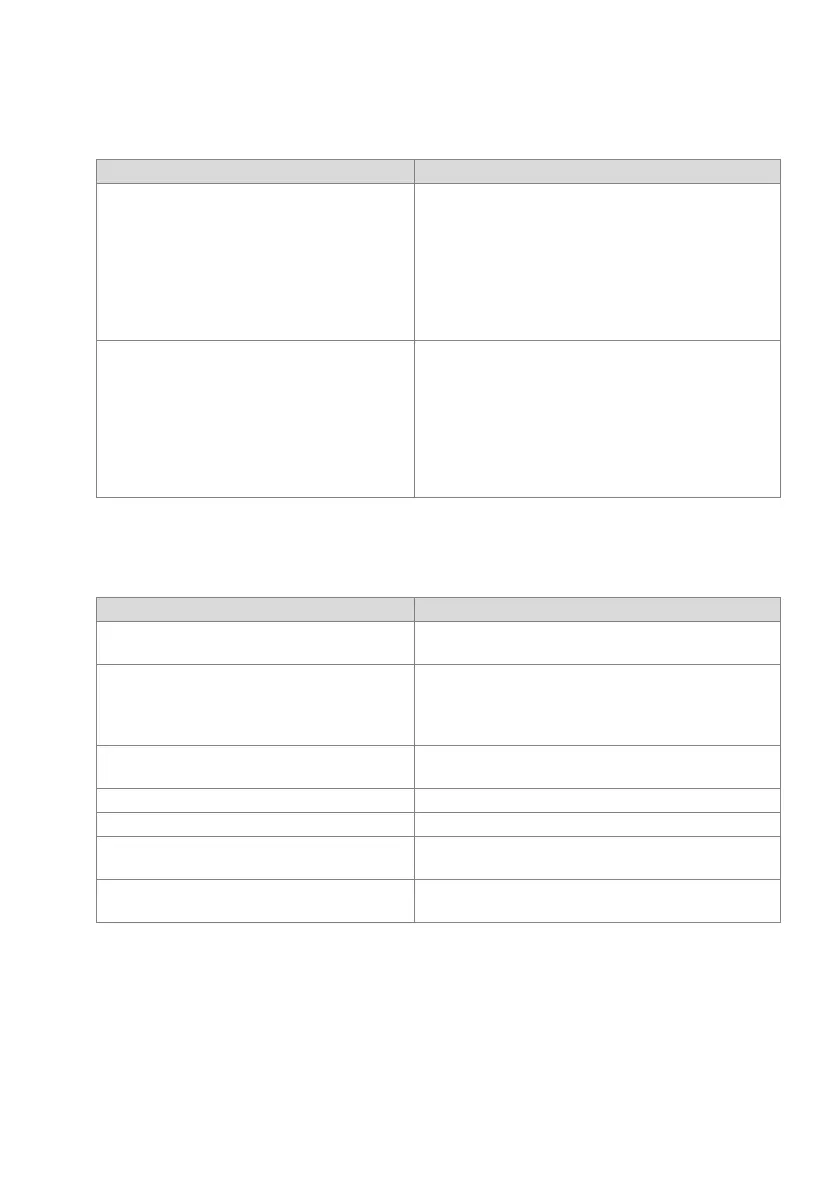
6. 5. 2. 5 Malfunction of the Mitel DECT radio unit
Tab. 108 Malfunction of the Mitel DECT radio unit
6. 5. 2. 6 Malfunctions of Mitel DECT cordless phones
Tab. 109 Malfunctions of Mitel DECT cordless phones
Error description Error cause / error handling
No radio connection in a coverage area. Check LED on radio unit:
LED is flashing red (short red phase):
• Check power supply / line length of DSI bus cable
LED is flashing red (long red phase):
• Check DSI bus cable
• Unplug DSI bus cable for one minute, then reconnect
LED is flashing green (long green phase):
• All B channels busy
Radio unit not activated. LED on radio unit is flashing red/green (various patterns):
• Radio unit in startup phase
LED on radio unit is flashing red (long red phase):
• Radio unit defective
If LED on radio unit not flashing:
• Check trunk connections
• Radio unit defective
• LED of the radio units deactivated throughout the system
Error description Error cause / error handling
No display. • Switch cordless phone on and test
• Replace or charge battery
No radio link to radio unit; no aerial symbol. Check coverage area (within range of a radio unit).
• Check radio units in this section
Cordless phone not registered with the system
• Cordless phone registered
Impossible to dial. Keypad blocked (keylock)
• Unlock keypad
No dial tone. • Check radio units in this section
Poor connection quality (echo effect). • Turn back loudspeaker opposite (for call parties)
Cordless phone beeps approx. every 10 s during a
call (or in standby) while battery indicator is flashing.
• Replace battery immediately, either after or during the call
(see cordless phone user’s guide)
Call breaking up. You are moving out of range.
• Find a location with a better radio contact



 To Next Page