Operation and Maintenance
238
Mitel 415/430 as of R4.1
syd-0580/1.2 – R4.1 – 08.2016
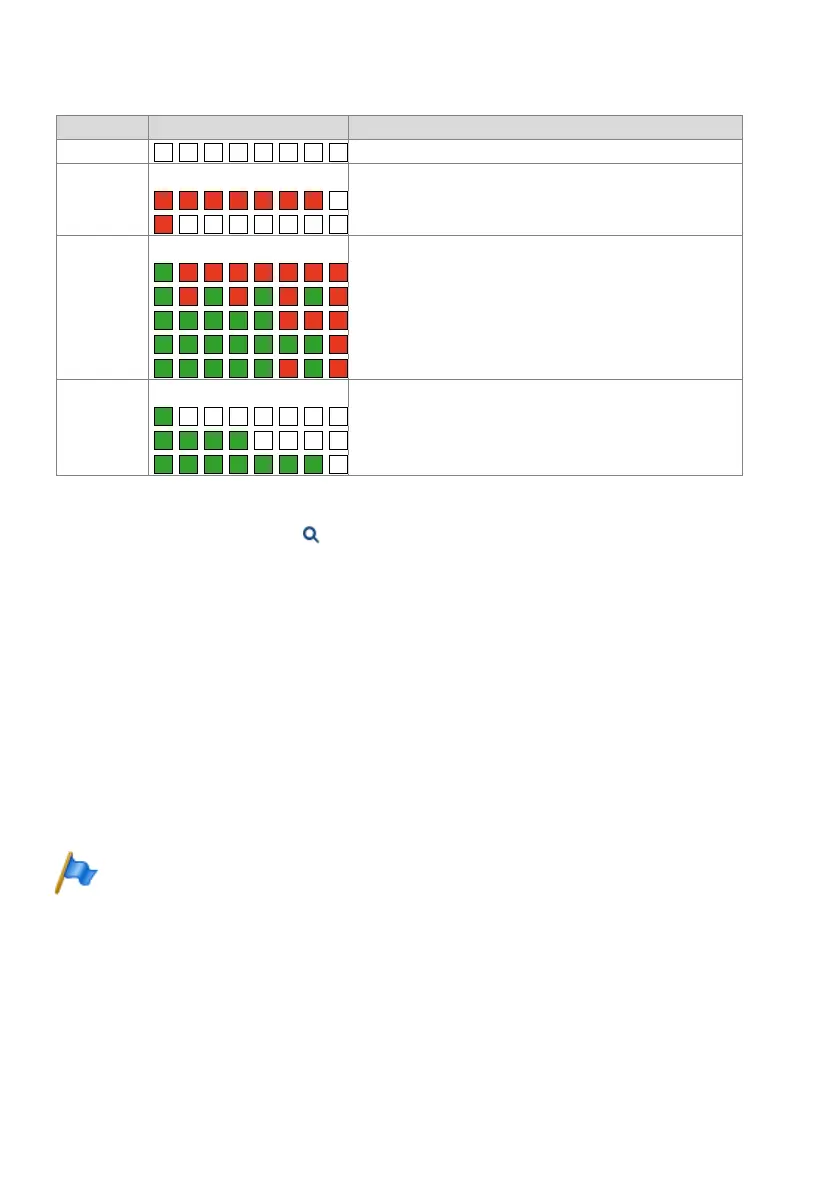
Tab. 107 Flashing sequences of the status LED on the DECT radio unit
An orange status LED indicates that DECT signalling is active, i.e. DECT sequences
are currently being transmitted between the cordless phone and the radio unit. Exam-
ples:
• With each keystroke on the cordless phone the LED briefly lights up orange.
• During a cordless phone firmware download the orange LED remains lit until the
download is completed.
On an SB-8ANT radio unit the middle LED indicates whether the internal or external
antennas are active. If the LED is lit green, the external antennas are active.
Note:
After the system initialization the radio unit starts in status "DSI ok". It is only ready to operate
once at least one DECT user has been entered in the numbering plan or once in WebAdmin the
parameter DECT system status has been set to Active.
State Cycle Meaning
No flashing LED switched off / software not running / RU not connected
Red Error:
DSI bus not in order
Power supply error or DSI line too long
Green / red Startup process:
DSI ok
Software is uploaded
Synchronizing
DECT is being started
HF Power Down / DECT System Status Passive
1)
1) This operating state appears in the following situations:
- During a configuration data upload
- After a system first-start
- If in WebAdmin in the DECT view ( =sa) the parameter DECT system status is set to Passive.
- If no location area is assigned to a radio unit - (This may happen after adding a radio unit to a system with
several Location Areas, which is the case when a radio unit has already been set in a Location Area unequal
0). In this case the added radio unit has to be manually allocated to the selected Location Area.)
Green Normal operation (requirement: LED not switched off):
All B channels available
1 to 3 B channels busy
3 B channels busy



 To Next Page