EasyManua.ls Logo

MTE PTS 400.3 PLUS - Virtual Keyboard

Default Icon
306 pages
Print Icon
To Next Page IconTo Next Page
To Previous Page IconTo Previous Page
Loading...
PTS 400.3 PLUS Operation Manual_R02 Page 28/306
4.1.2 Virtual keyboard
The PRS 600.3 has no keypad. Any operation can be done by the touch screen of the two displays.
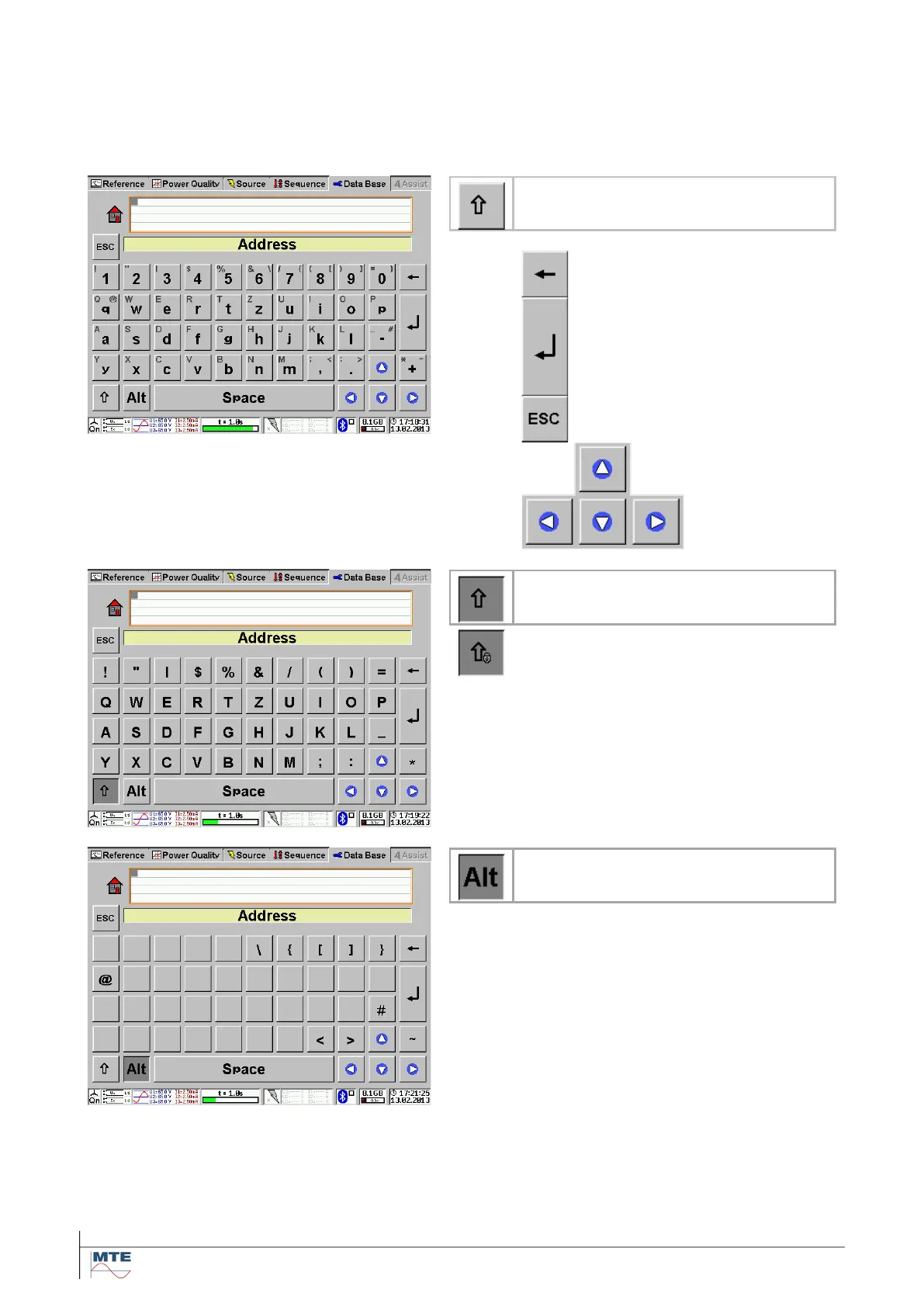
For data input (numbers or text) a virtual keyboard is displayed.
(Optionally an external mouse or keyboard can be connected via USB).
Selectable layouts:
Lower case letters / numbers (de-
fault)
Delete one character to the left
Enter to accept input of data
and back to the calling menu
Escape to cancel input of data
and keep old entries.
Cursor keys to
navigate within
input fields and
used to make
selections.
Upper case letters
Locked upper case letters
Press twice on Shift key
Special characters
Details to the use of the virtual keyboard at data input see [4.3].

Table of Contents