PTS 400.3 PLUS Operation Manual_R02 Page 30/306
4.1.4 Basic applications of Cursor and Enter keys and Functional Buttons (FB)
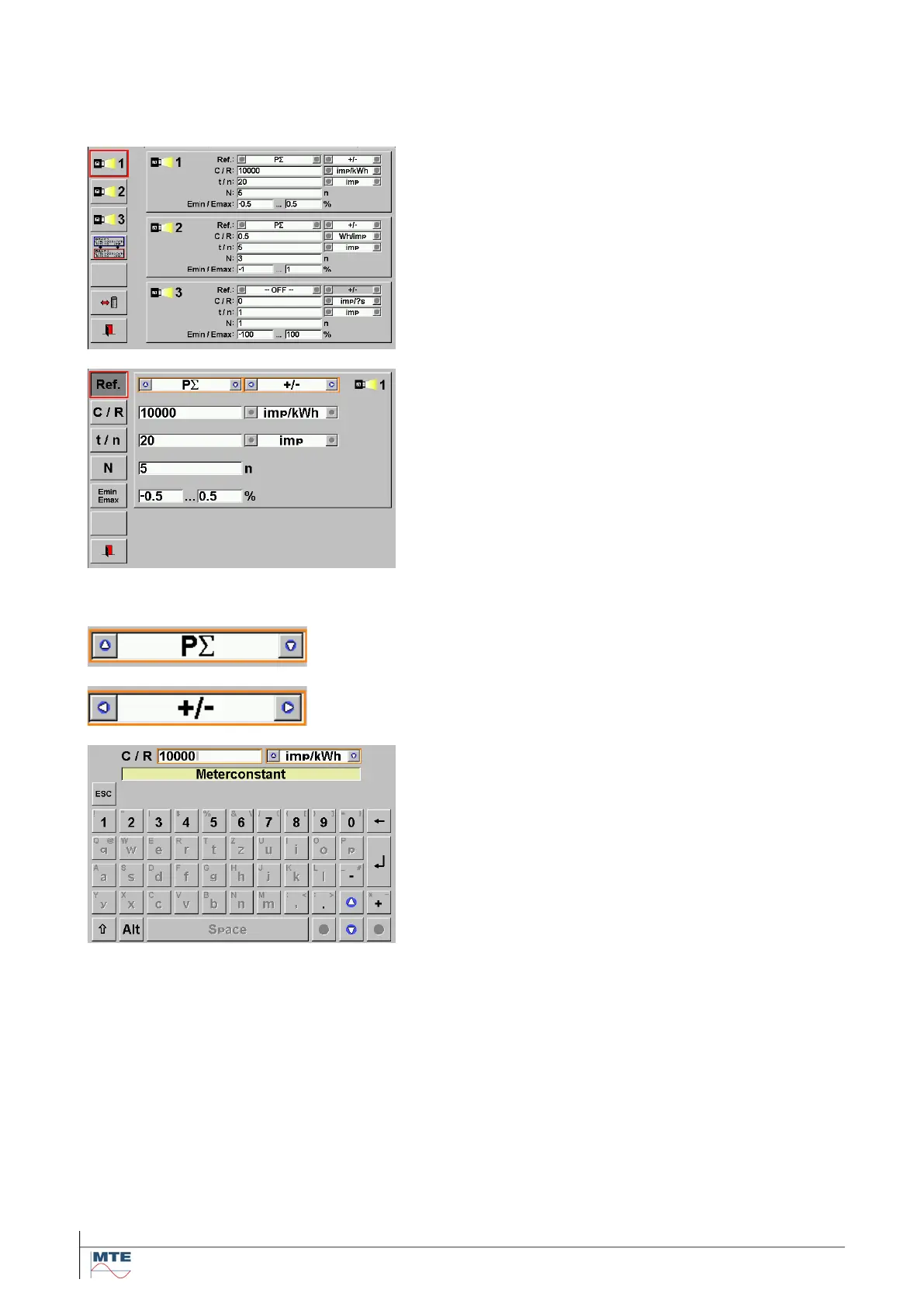
Selection of functional button, display region or display field with touch screen. Numerical input and
selection out of predefined settings with touch screen and/or virtual keyboard.
Selection of display regions
Select display region
Either press the red framed FB or press into the dis-
play region.
Select fields inside the region
Either press the red framed FB or press into the corre-
sponding field.
Selection out of predefined settings with cursor
keys
Change values by pressing up/down cursor keys (cy-
clical mode)
Change values by pressing left/right cursor key (cycli-
cal mode)
Numerical data input with virtual keyboard
In this example:
Change numerical value by entering desired number
with the virtual keyboard.
Change unit value by pressing up/down cursor keys.
Press Enter button to save the new value and to re-
turn to previous menu.



 To Next Page