PTS 400.3 PLUS Operation Manual_R02 Page 55/306
Installation and configuration of Universal Serial Bus USB
This chapter describes the installation of the USB driver on the PC and how the Software CALegra-
tion needs to be configured to use the USB interface.
The first time the PRS 600.3 is connected to a PC with the USB cable, the installation of a driver is
asked.
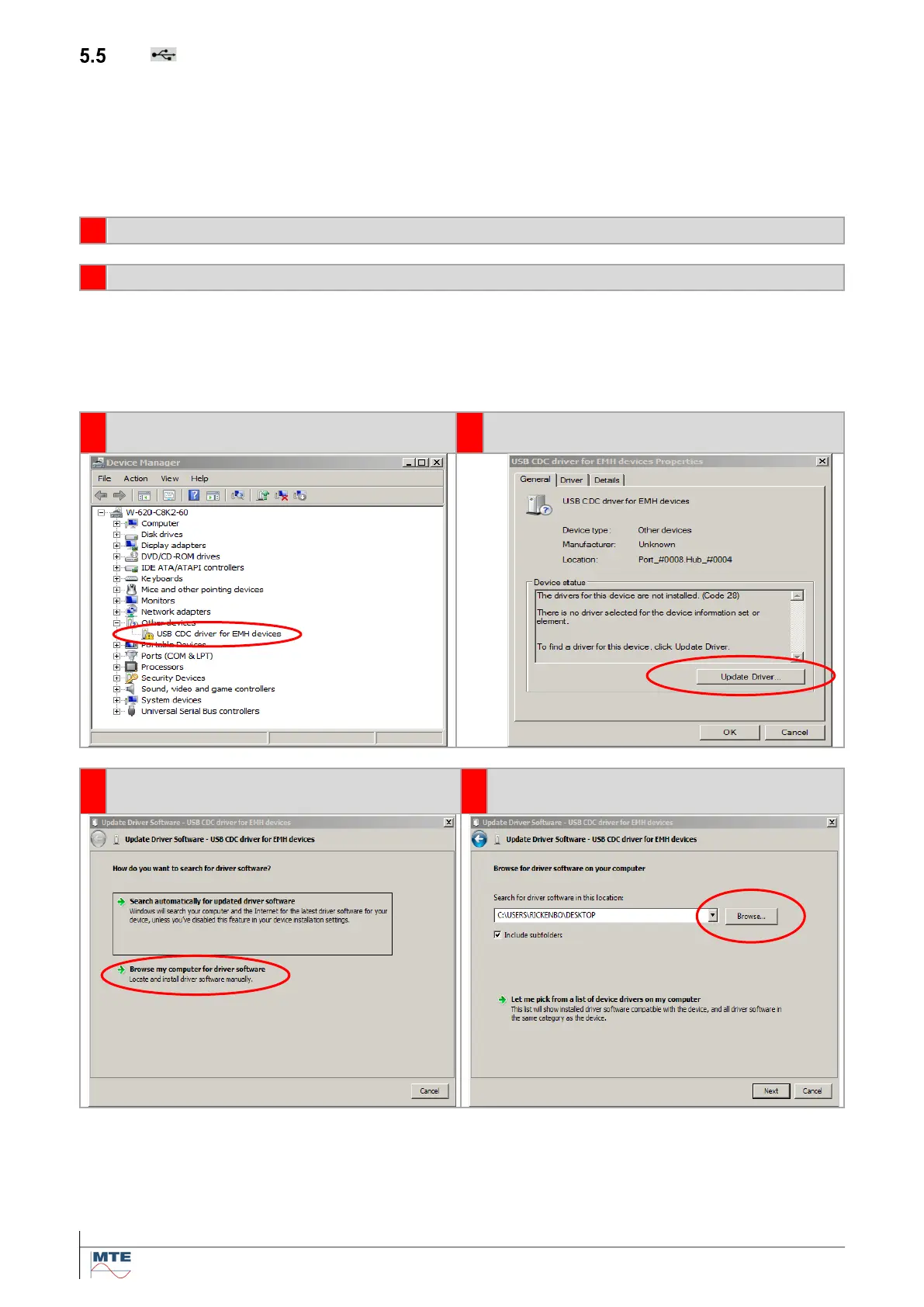
5.5.1 Installation of USB driver in Windows 7 / 8
Connect the PRS 600.3 to a free USB port of the PC
In Widows 7: a. Go to Start → Control Panel → Device Manager
b. Right click on My Computer and select Manage, then click on Device Manager
In Windows 8: a. Right click on Start (Windows) button → select Device Manager
b. Press on keyboard Windows + X keys and select Device Manager
Double Click on USB CDC driver for
EMH devices
Select Browse my Computer for driver
software



 To Next Page