PTS 400.3 PLUS Operation Manual_R02 Page 44/306
Clock setup (time and date)
5.1.1 Daylight saving time
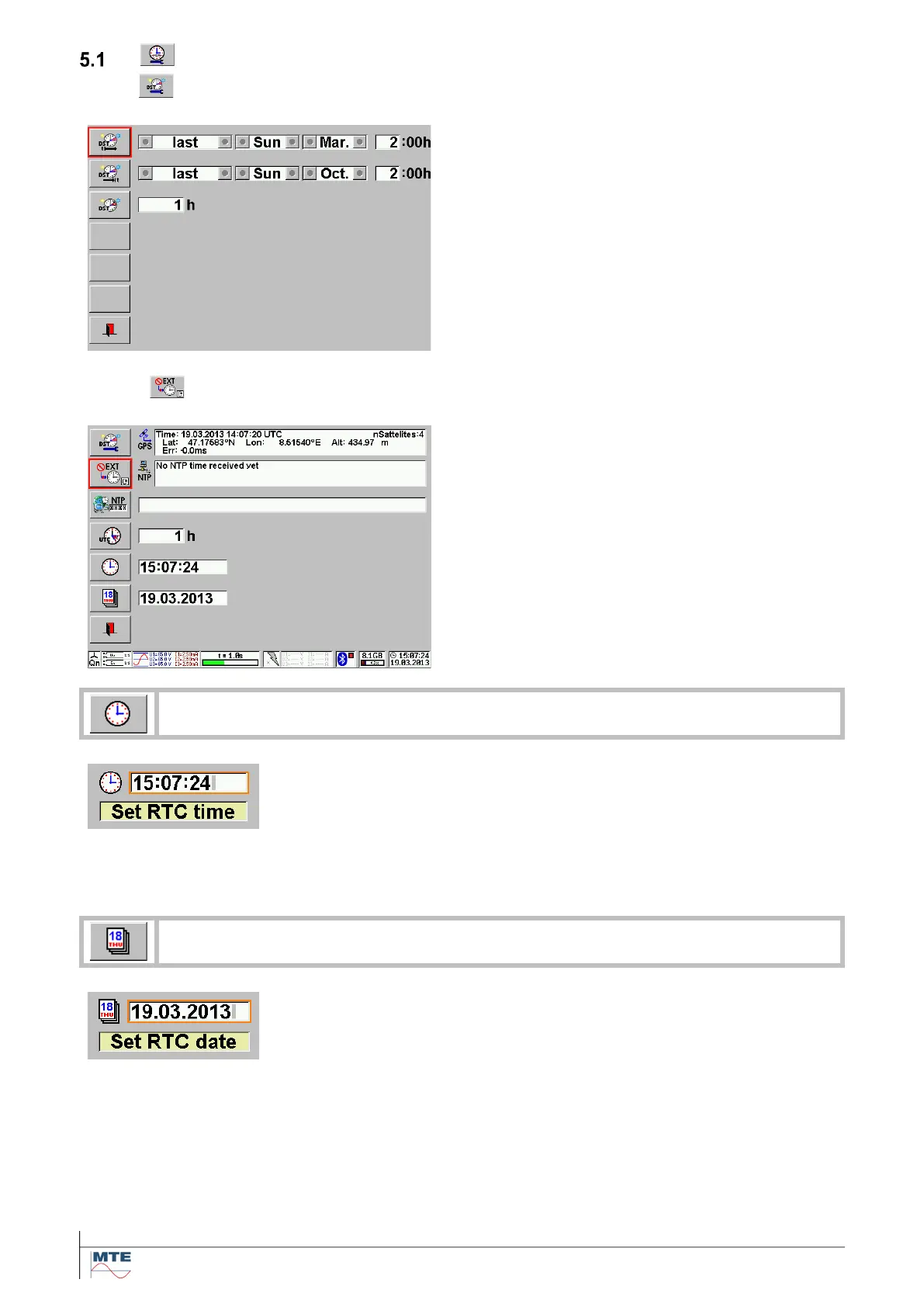
Daylight saving time setup
• Enter the begin of daylight saving time
• Enter the end of daylight saving time
• Enter time offset of daylight saving time
Manual clock setup
The status indication in the right lower corner
shows a clock symbol. The clock used as time
stamp for recordings is based on the internal Real
Time Clock (RTC).
The correct clock time and the date must be manu-
ally entered by the user.
Note: Time and date can be reset, if the instrument
was not used for longer time. Check the settings
before use.
The clock is stopped and the actual time is displayed.
Enter the new time in the format hh:mm:ss. The separator (:) will be gen-
erated automatically.
h: hour, m: minute, s: second
The clock restarts with the entered time when the enter key is pressed to
terminate the input.
Enter the date in the format dd.mm.yyyy. The separator (.) will be gener-
ated automatically.
d: day, m: month, y: year



 To Next Page