PTS 400.3 PLUS Operation Manual_R02 Page 35/306
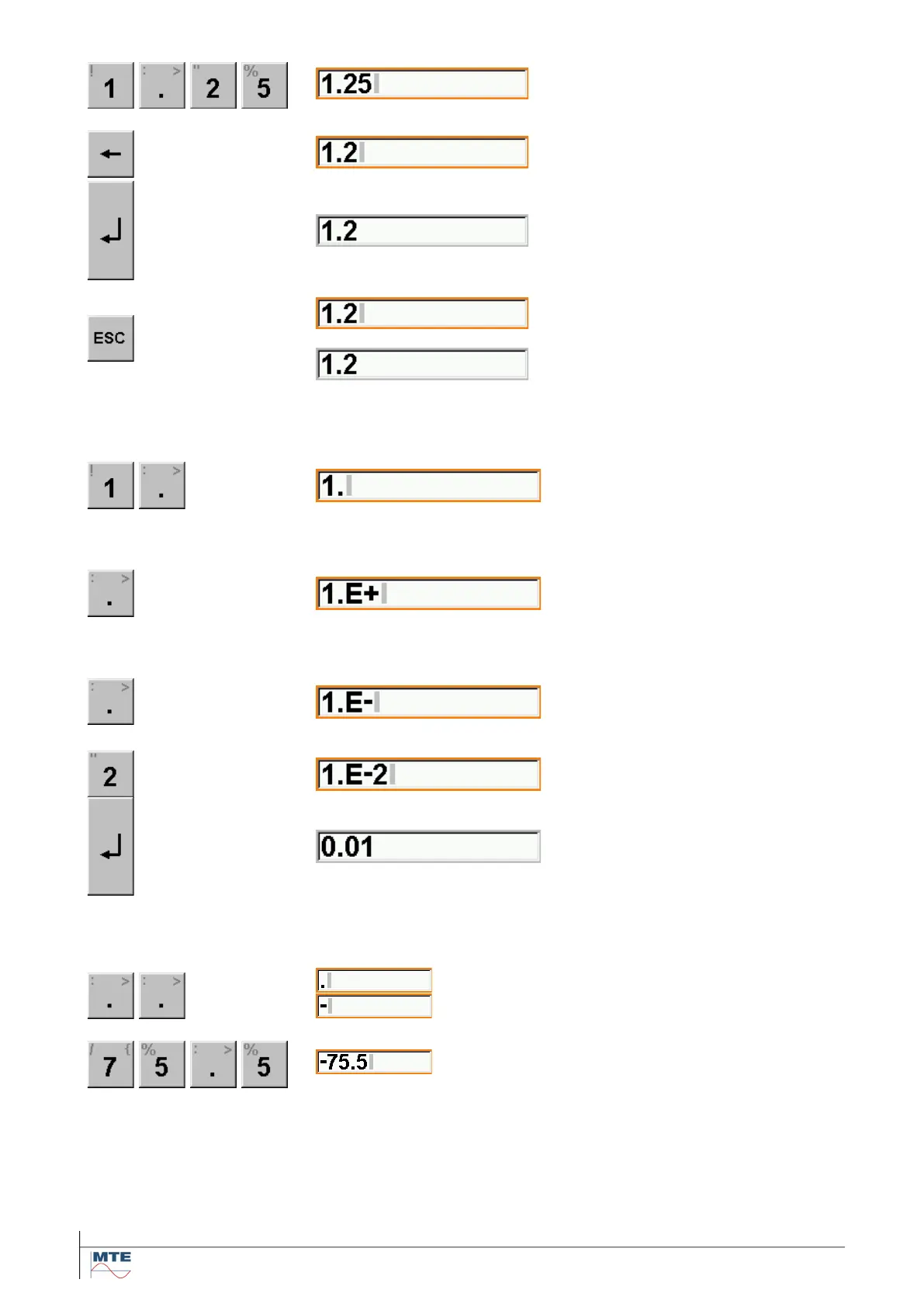
Enter the desired value by touching
the virtual keyboard. The first en-
tered digit replaces the previous
value.
Incorrectly entered inputs can be
cleared with the Delete key, digit by
digit.
The input is completed by pressing
the Enter key. The red frame and
the grey cursor sign disappear and
the new value is saved.
If an input should be activated by
mistake, the input function can be
aborted by pressing the Escape
key.
In this case the original value is re-
tained.
Input of numbers with exponent
Decimal point:
If immediately after a number has
been entered, the point key is de-
pressed, a decimal point is inserted
Positive exponent:
If the point key is operated a second
time immediately after a decimal
point has been entered, an E+ is in-
serted for a positive exponent.
Negative exponent:
If the point key is pressed again af-
ter the E+ is displayed, an E- is in-
serted for a negative exponent.
The input is completed by pressing
the enter key. The red frame and the
grey cursor sign disappear and the
new value is saved.
Input of minus sign
E.g. input of phase angle settings.
Minus sign with point key: If at
start of input the decimal point key is
depressed twice a minus sign is in-
serted.
If the point key is operated a third
time a normal decimal point is in-
serted.



 To Next Page