PTS 400.3 PLUS Operation Manual_R02 Page 38/306
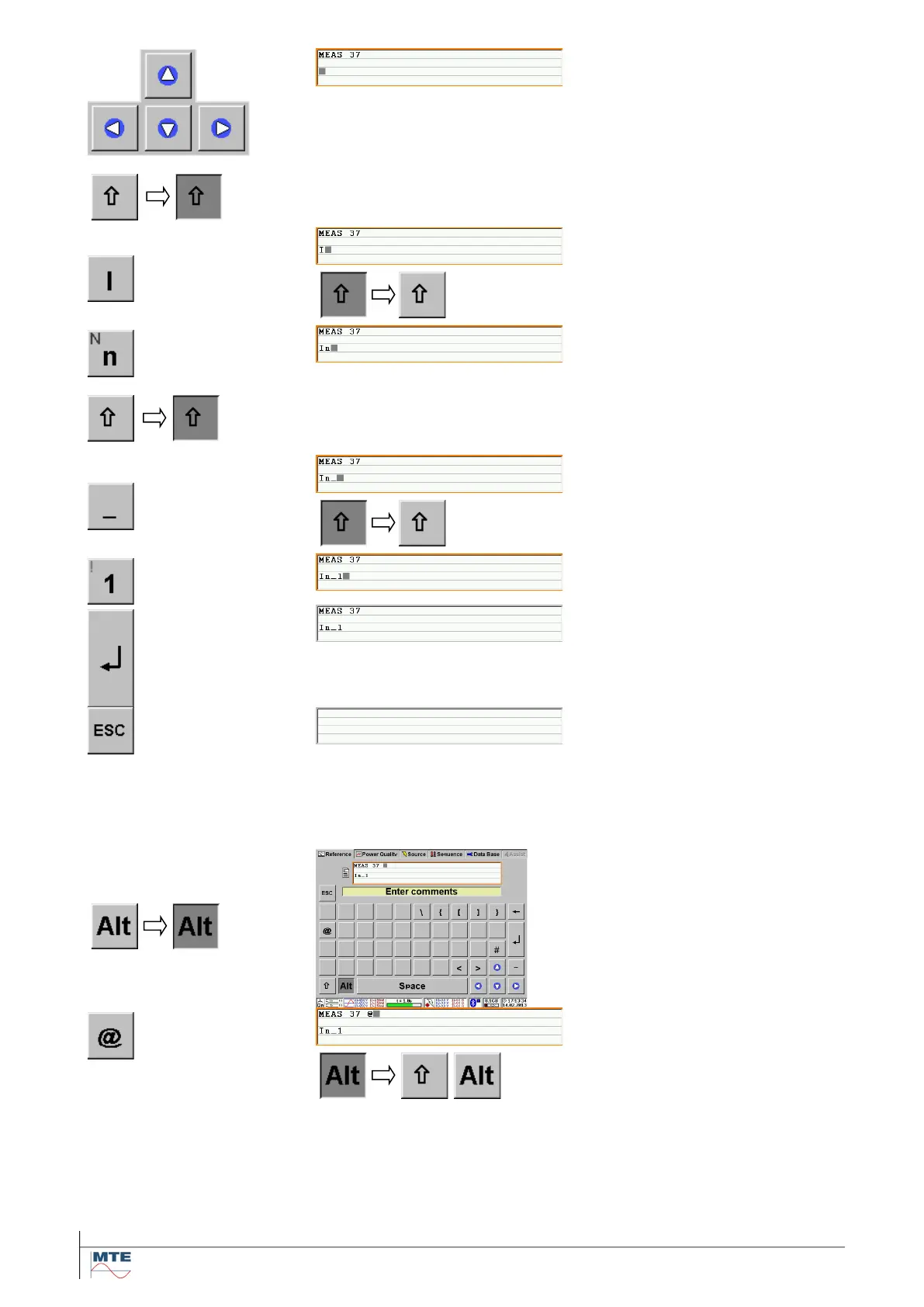
Move the cursor to other line
Touch the new position directly or
use the up/down and left/right
cursor keys to move the cursor to
the new position, the beginning of
the third line.
Change to capital letters
Touch the shift key once to acti-
vate capital letters
After the input of one capital let-
ter, the layout is automatically
changed back to lower case let-
ters.
Input lower case letters
This is the default input format.
Change to capital letters again to
access the underline sign.
Touch the shift key once to acti-
vate capital letters
After the input of the underline
sign, the layout is automatically
changed back to lower case let-
ters.
Terminate input
Press the enter key to accept and
terminate the input. The virtual
keyboard disappears.
Cancel Input
Touch the Escape key to cancel
the input function.
The original data is retained.
Touch the Alt key to activate the
layout with special signs.
After the input of one special
sign, the layout is automatically
changed back to lower case let-
ters.



 To Next Page