PTS 400.3 PLUS Operation Manual_R02 Page 47/306
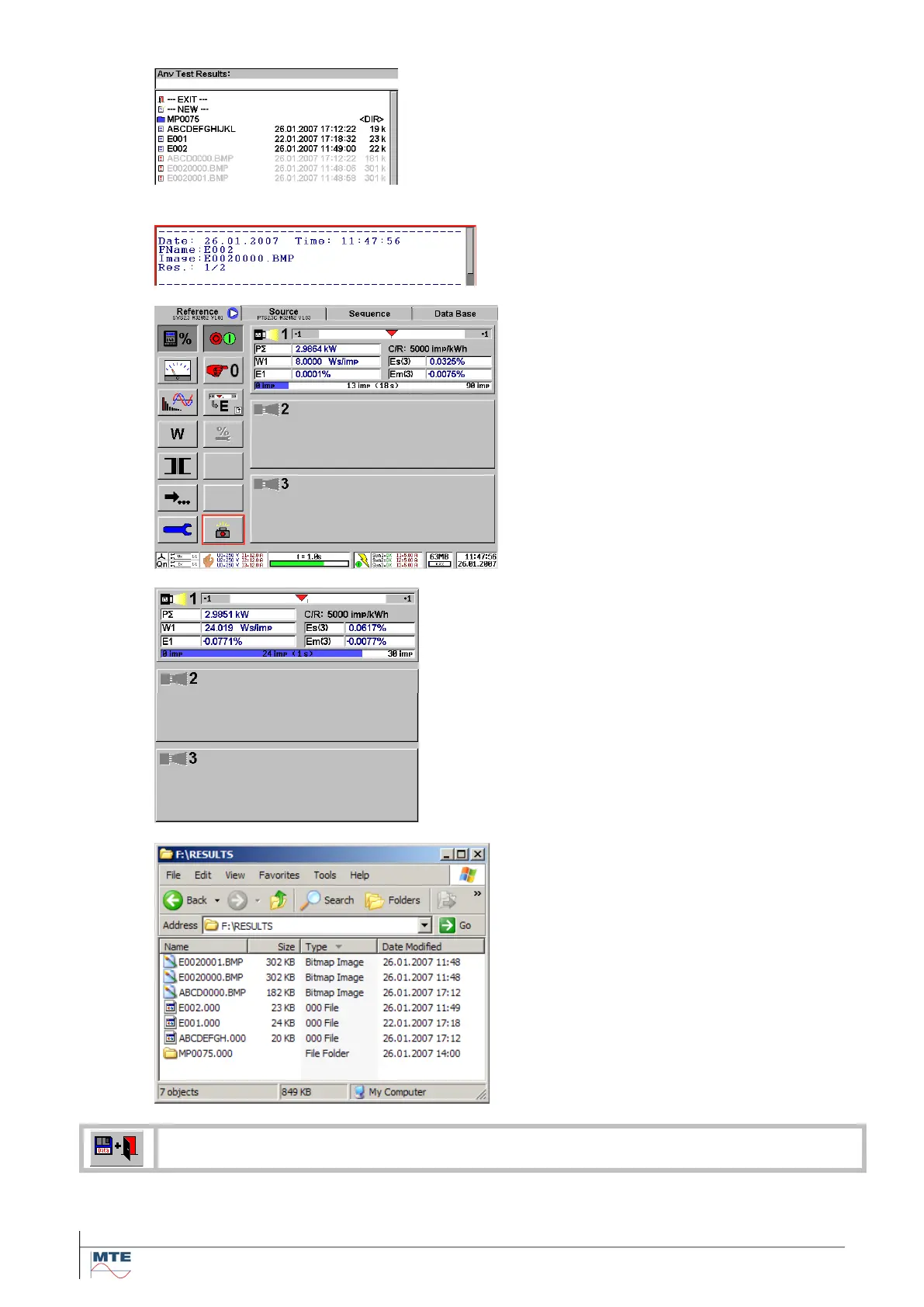
Result directory
Result files and image files are stored in
the same directory. The grey shown im-
age files *.BMP cannot be viewed on the
instrument itself with the result preview
function.
If a result file is deleted, then also all
linked image files are deleted.
Header of results at print preview
The link between result file (E002) and im-
age file (E0020000.BMP) is shown.
Display image
The full display is saved (size 302 kB).
The image E0020000.BMP was captured
together with the results (same time and
date in status as in header of results).
Result image
Only the result section of the display is
saved (size 182 kB).
Directories on CF card
The images are stored in the directory
RESULTS.
The images can directly be accessed by
the PC with a CF card reader. The images
can be copied or moved to any directory
on the PC and can be used for documen-
tation of the measurements (e.g. inserted
in a word document).



 To Next Page