MultiSmart Installation & Operation Manual
22.4 IP Address & Routing Settings
Navigate to:
Enter the IP Address and Subnet mask in this menu using the keypad. The subnet mask is usually
255.255.255.0 for standard networks.
The current routing table entries are visible in this screen. If the remote hosts to which the MultiSmart is
talking are on the same network, we do not need to update the routing table. If the routing table is updated, a
restart is required for the changes to come into effect.
If the MultiSmart is in a network which has a dedicated Gateway for all communications, enter the IP address
of the Gateway as the New Gateway, add 0.0.0.0 as the New Netmask, and leave the New Target field
blank. Select Add to update the routing table. This effectively means that all the IP traffic, after reboot, will go
through the gateway.
If the MultiSmart needs to go through the Gateway for communicating to specific target networks, and ignore
that Gateway for communications to other networks, enter the Gateway IP address in the New Gateway, add
255.255.255.0 as the New Netmask, and add the target IP address in the New Target with the last part of it
as zero. For example if the target IP address is 192.168.3.54 enter the New Target as 192.168.3.0. Press
Add to update the routing table and restart the MultiSmart.
If an existing routing table needs to be deleted, scroll down to highlight the routing entry and press Delete. A
restart is again required for this change to come into effect.
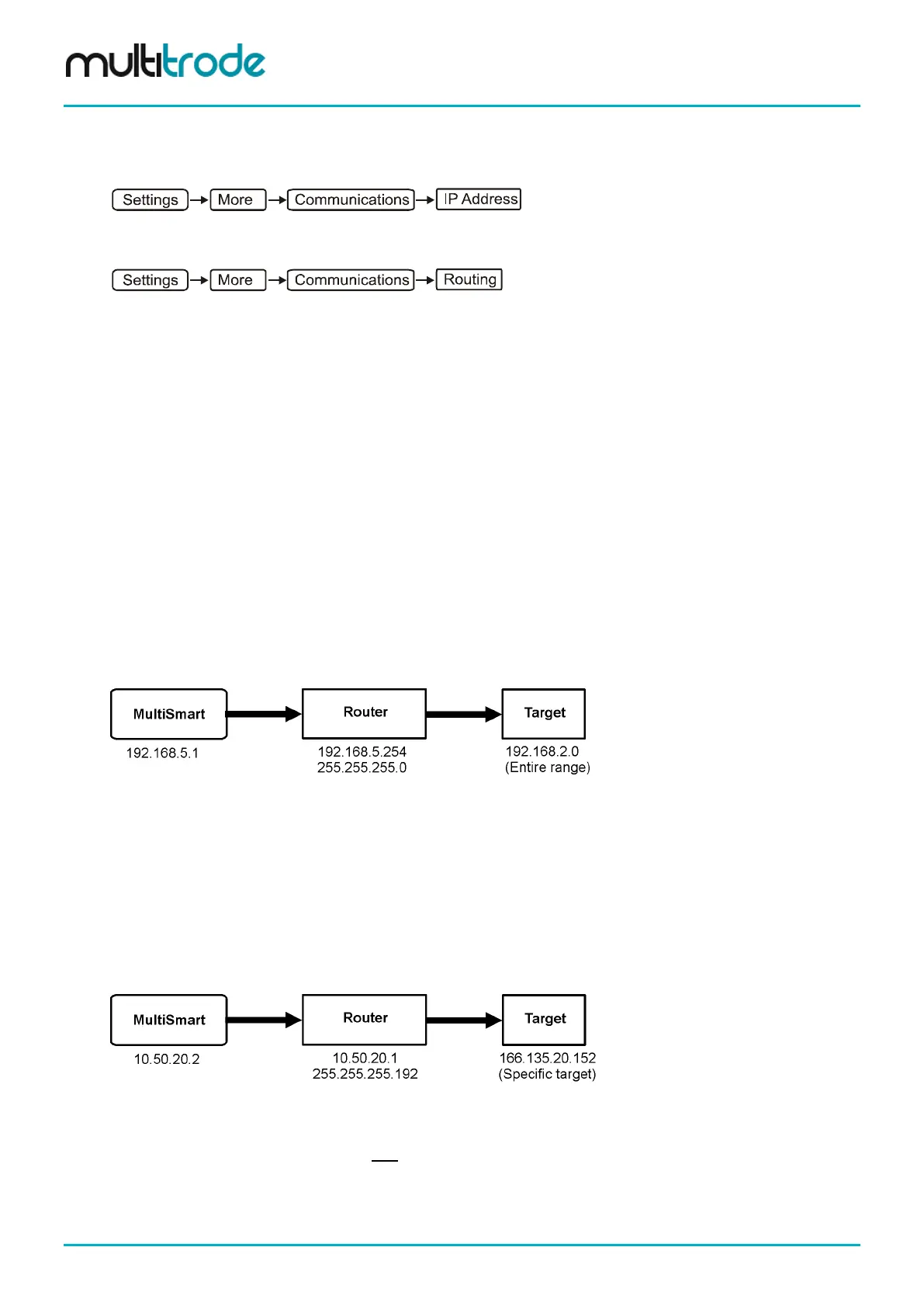
Example 1: Targeting a Private Subnet
You are using a cellular router with an IP address of 192.168.5.254 and a subnet mask of 255.255.255.0 and
the MultiSmart is using an IP address of 192.168.5.1. The target is an entire subnet of 192.168.2.0.
Enter into the MultiSmart IP Routing Table:
• New Gateway: 192.168.5.254
• New Netmask: 255.255.255.0
• New Target: 192.168.2.0
Example 2: Targeting a Specific IP Address
You are connected to a router with an IP address of 10.50.20.1 with a subnet of 255.255.255.192 and your
target is a specific computer on the internet with an IP address of 166.135.20.152. The MultiSmart has an IP
address of 10.50.20.2.
Enter into the MultiSmart IP Routing Table:
• New Gateway: 10.50.20.1
•
New Netmask: 255.255.255.255
• New Target: 166.135.20.152
Page 200 of 260 MultiSmart_IO_Manual_R20



 To Next Page