MultiSmart Installation & Operation Manual
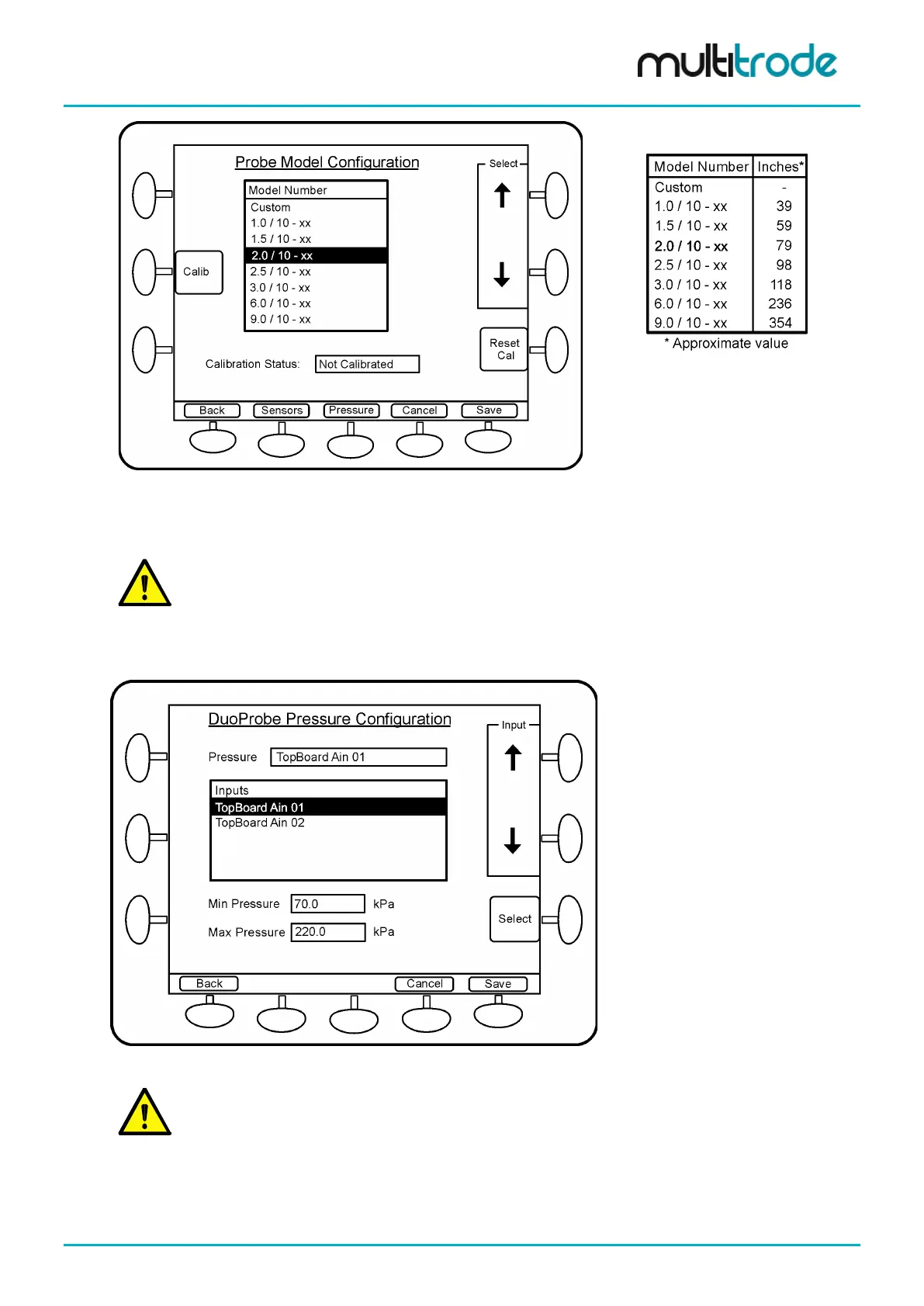
Figure 117 – DuoProbe Model Selection
Table 13 – Probe
Length in Inches
The Sensors button allows the digital inputs to be reconfigured – this is not necessary if the defaults are
used on DuoProbe 1 (Dins 2 to 11).
NOTE: If the standard MultiSmart wiring diagram is followed for the DuoProbe interfacing, there is no
need to change the default digital inputs (Din 2 to 11). However if a 2
nd
DuoProbe is defined, it is
essential that the correct digital inputs are assigned to the 2
nd
DuoProbe.
Press the Pressure button to select the analog input to be used for the DuoProbe.
Scroll down to the appropriate analog input (e.g. TopBoard Ain 01) and press Select and Save.
Figure 118 – Analog Input Selection for DuoProbe
The analog input for the pressure transducer is
automatically assigned when selected through
the Setup Wizard
.
Perform a Restart (Settings / More / More / Restart Unit).
The DuoProbe is now configured. “NO CAL” flashes in the Well on the main screen until the first automatic
calibration is performed.
MultiSmart_IO_Manual_R20 Page 115 of 260



 To Next Page