MultiSmart Installation & Operation Manual
Highlight a point and pressing the Details button displays more detailed information for the selected point.
For example, if an analog value (input register) is selected, then the raw and scaled values can be compared
from this screen.
14.8 Configuring Level Devices
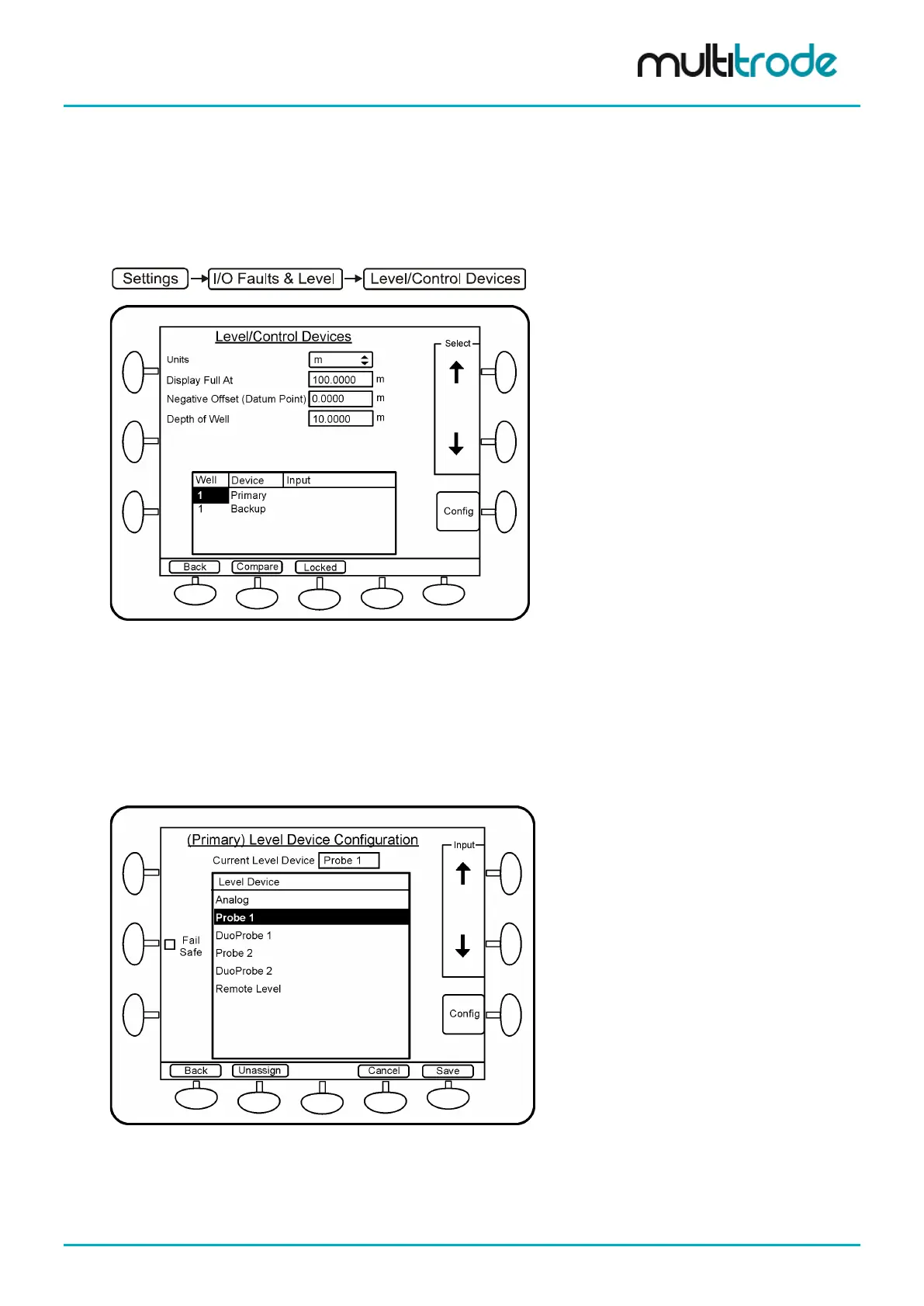
Navigate to the Level Devices screen. From this menu the primary and backup level devices can be
assigned or unassigned.
Figure 110 – Level Devices Screen
From this screen the following can be configured:
• level units (in, ft, m, % or custom)
• level at which the bar graph shows full
• range of the device (except % which is always 0 – 100%)
To configure the primary level device scroll down, highlight Primary, and press the Config button.
The (Primary) Level Device Configuration screen loads:
Figure 111 – Selection of the Primary Level Device
• Scroll down to the appropriate device in the list
• For Probes, FailSafe can be enabled (requires a compatible probe & firmware version 2.2.2 or later)
• Press Save, if a restart message is displayed, press Restart Later
MultiSmart_IO_Manual_R20 Page 109 of 260



 To Next Page