7-36 Specifying default settings
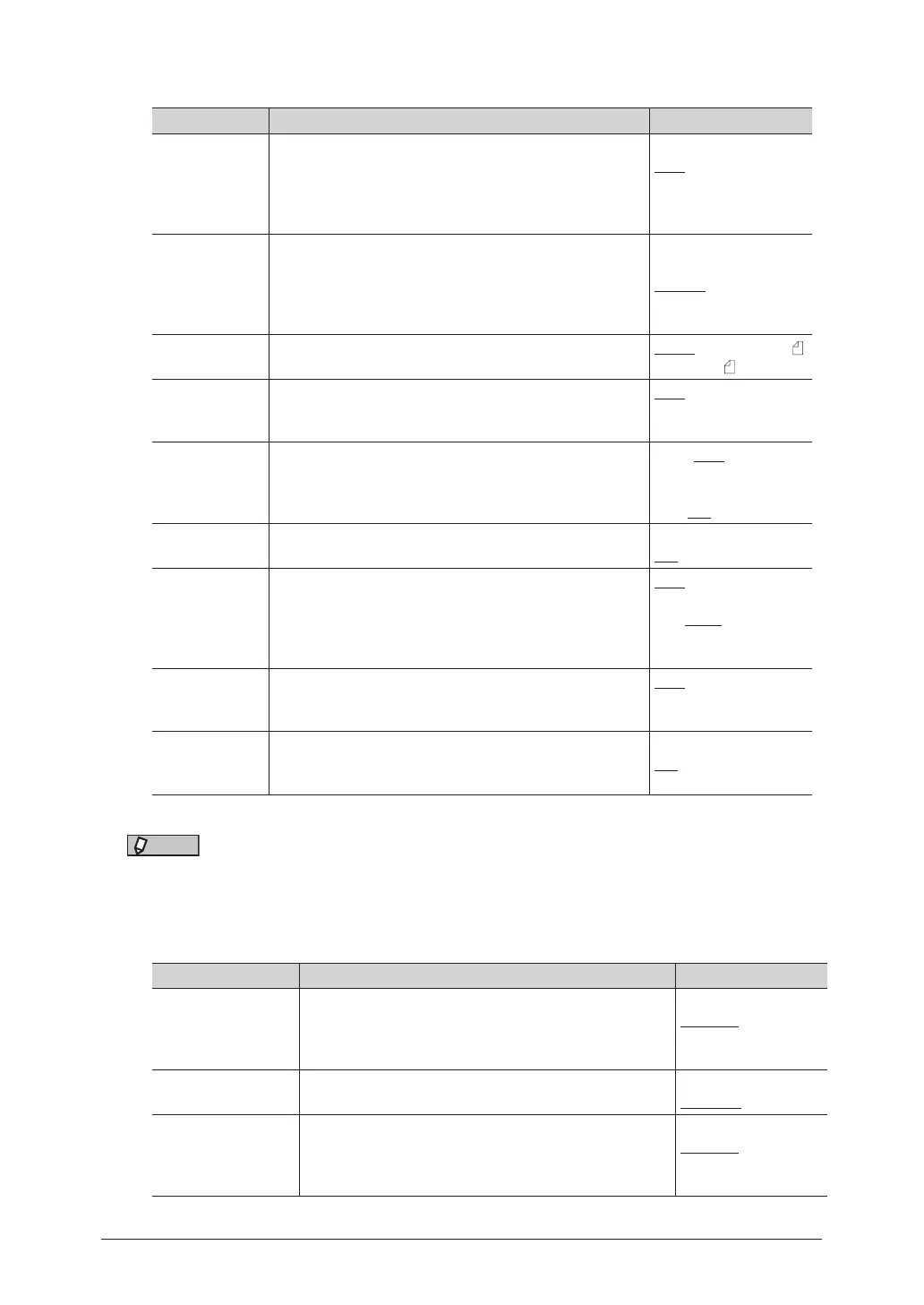
List of default transmission settings
Function Description Settings
Resolution This sets the default resolution when a document is
scanned.
Normal
Fine
Super Fine
Photo
Background
Contrast This sets the default contrast when a document is
scanned.
Lightest
Lighter
Normal
Darker
Darkest
Scan Size Set the default scan size setting. Letter, Legal, H.LTR ,
A4, F4, A5
Stamp
*1
You can stamp on a document that has been scanned (or
transmitted) using the automatic document feeder and
check it has been scanned (or transmitted).
OFF
ON
Next Doc. You can scan a series of separate documents and
transmit them as a single document.
ADF stands for automatic document feeder.
FBS stands for document glass (Flat Bed Scanner).
ADF: OFF
ON
FBS: OFF
ON
TTI The sender name printed at the top of a document
received at the destination.
OFF
ON
Cover Page A cover page containing a simple message can be
attached to the documents.
OFF
ON
Doc.1
Doc.2
Doc.3
Tx Report The transmission result is printed. Or can be checked
via e-mail.
OFF
Print
e-mail
Memory Tx This sets whether to give the priority to memory
transmission or to real-time transmissions when
sending faxes.
OFF
ON
*1 Stamp function is optional.
NOTE
Underlined values are the default settings specified at the time of shipment.
List of other default settings
Function Description Settings
Redial Attempts This sets the number of redials when the other
machine cannot be connected to, for example, when
the other line is busy. Set the redial interval in “Redial
Interval”.
0 - 14 time(s):
2 time(s)
Redial Interval This sets the redial interval. 0 - 5 Minutes :
1 Minute
Number of Rings This sets the number of times the machine rings until
fax reception starts when the reception mode is set to
Fax. The number of rings becomes more than the set
number when the machine is in the sleep mode.
0 - 10 time(s):
2 time(s)



 To Next Page