5-6 Specifying destinations
Searching for server destinations
You can search for and select destinations from an LDAP (Lightweight Directory Access
Protocol) server and address book destinations. There are two methods for searching
for destinations; “simple search”, which enables you to search by entering part of the
destination, and “advanced search”, which enables you to search by setting detailed
conditions.
NOTE
•Register the LDAP server in advance. For details, see chapter 2, “Registering LDAP
servers” in “Specifying the network settings” in the Administrator’s Guide.
•When the icon is displayed on the screen, press it to see description of the screen.
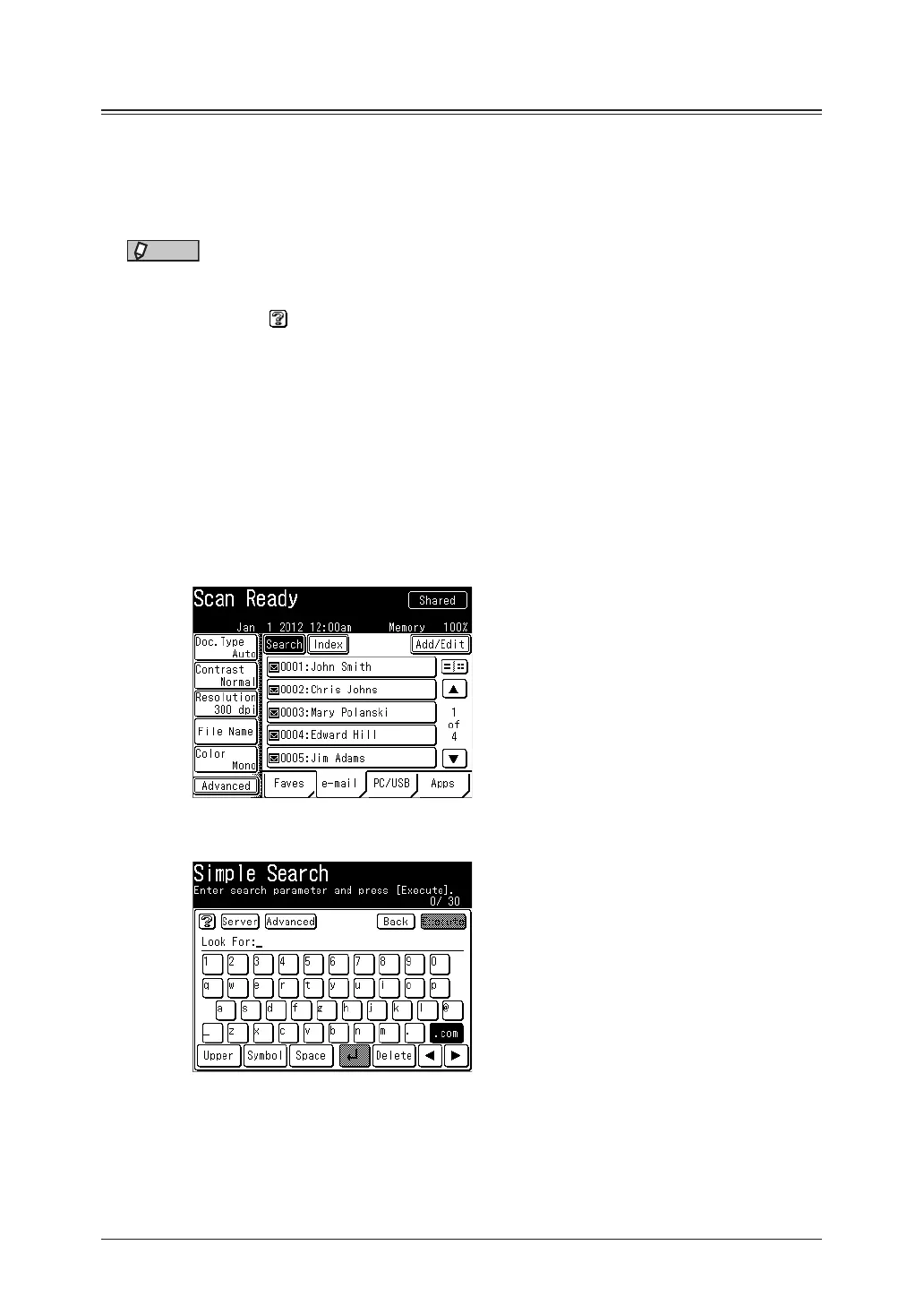
Simple searching
Enter part of the name or e-mail address to search for.
1
Press [Scan] or [Fax] on My MFP Menu screen.
If My MFP Menu screen is not displayed, press <Mode> repeatedly until “Scan Ready” or “Fax
Ready” screen is displayed.
2
On scan ready screen, press [e-mail] to display the address book.
3
Press [Search].
4
Enter part of the name or the e-mail address to search for, and press [Execute].
•Up to 30 characters can be entered.
•For details on entering characters, see chapter 1, “Entering characters” in the
Administrator’s Guide.
•You can press [Server] on the search screen to change the server to perform searching.
Normally perform searching using the specified server.



 To Next Page