11 Appendix
Pos: 100.1 /Bedienungsan leitungen/Gerät e spezifisch/Dr ucker/Printer Dri ver & Cables to PC/Ü2_How to comple tely remove printer dri vers from Windows Vista and W indows 7 @ 3\mod_12982770862 28_912.doc @ 30442 @ 2
11.1 How to completely remove printer drivers from Windows Vista
and Windows 7
1. Open the
Windows Print
Management
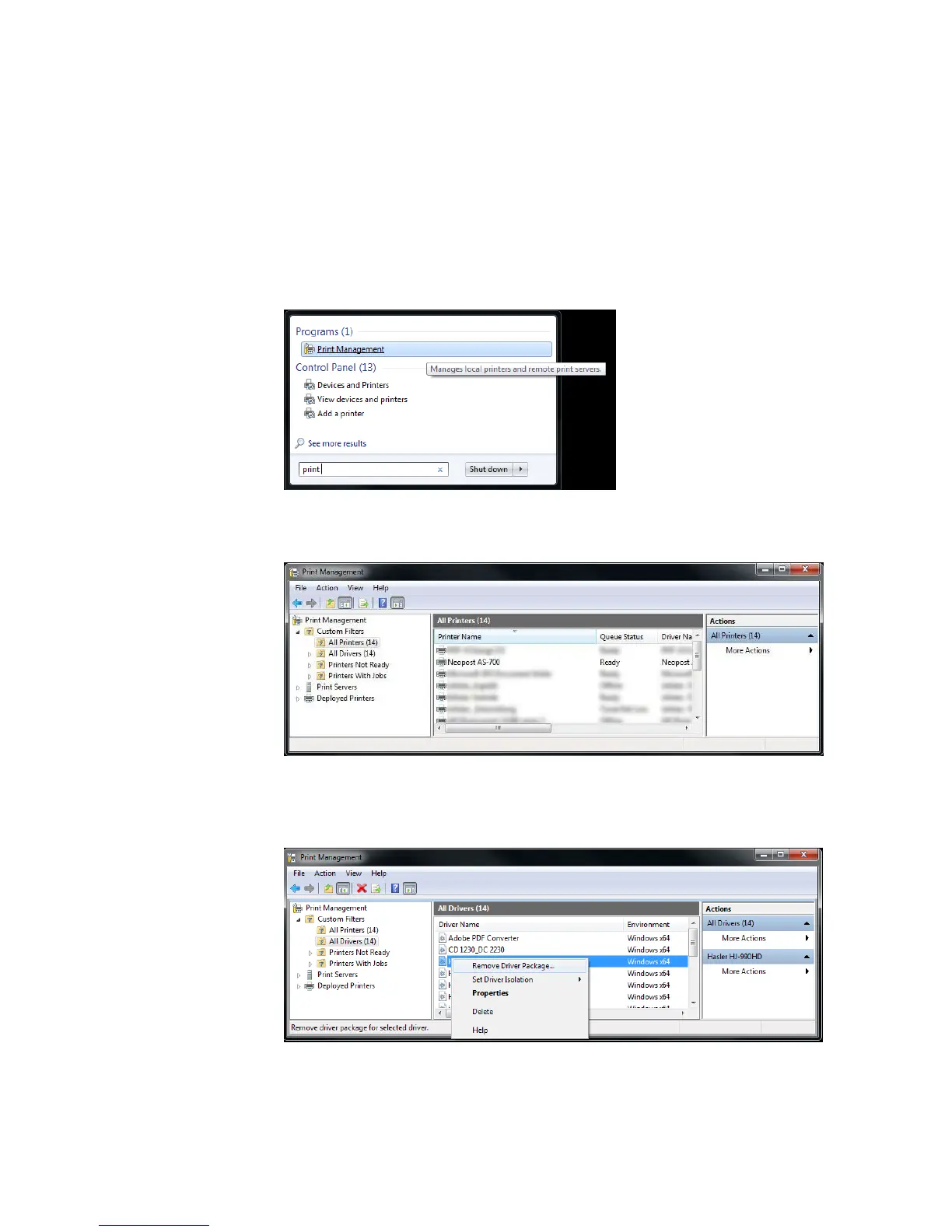
• Type “print” into the search box and click on the program “Print
Management”.
2. Delete
printers
• Select the folder “All Printers (xx)”.
• Delete your address printer from the list of printers.
3. Remove
driver package
• Select the folder “All Drivers (xx)”.
• Right-click on the driver of your address printer and select
“Remove Driver Package...”. Do NOT select “Delete”!
• A new dialogue window will open. Confirm by clicking on “Delete”.



 To Next Page