52 User Manual Version 3.1
ADJUST TOF
The “Top of form” (TOF) sensor or paper sensor detects the edge of every fed paper and
controls the timing of the print heads. To ensure a correct positioning of the printed image
an adjustment value is set in this menu.
To make an adjustment press Quick
+ (Test Print). The AS-710 will now print an
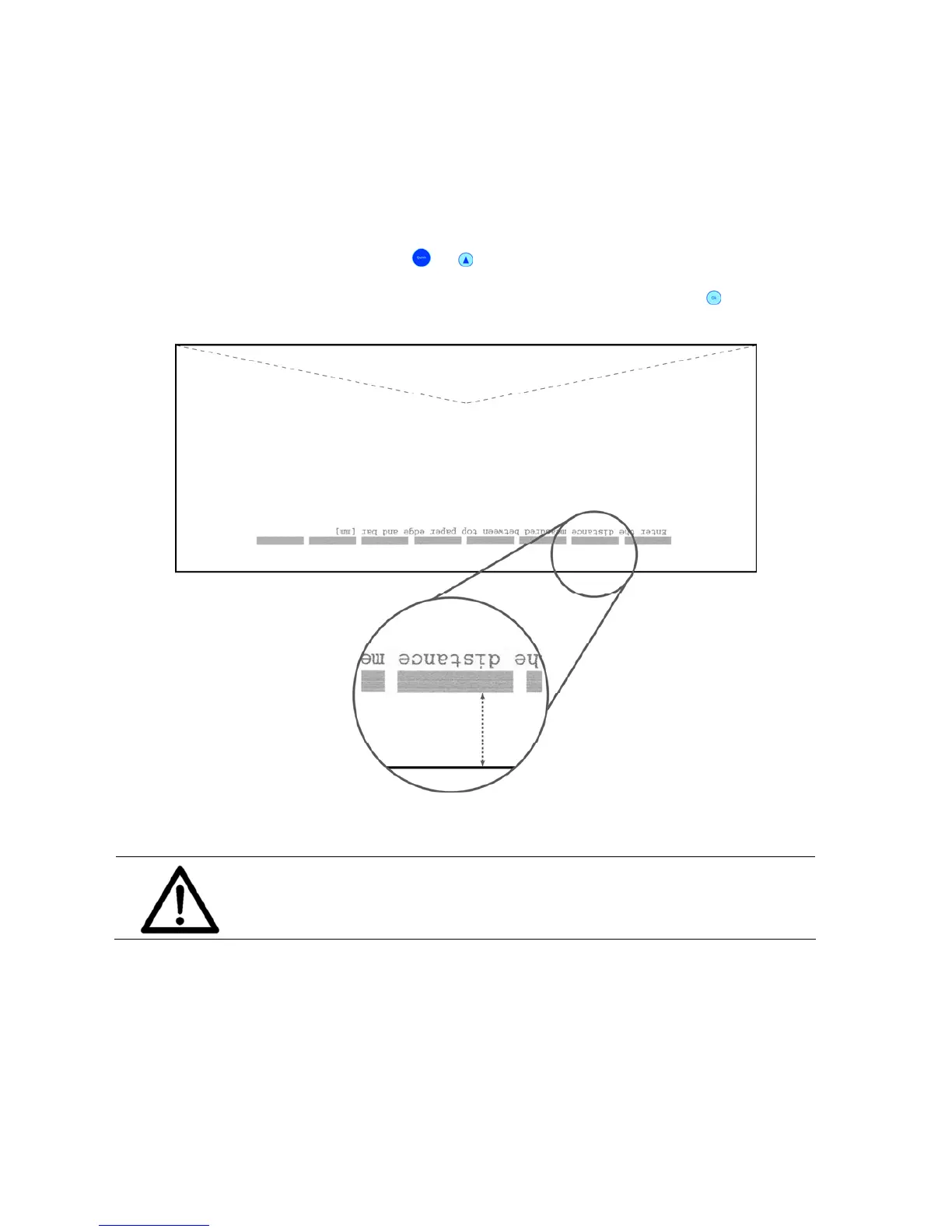
adjustment page. Measure the distance between the paper edge and the printed bars (see
Figure 21). Enter the measured distance in the printer menu and press the Ok
key.
Figure 21: ADJUST TOF
Pos: 61.29 /Bedienungsan leitungen/Gerät e spezifisch/Druc ker/Menüpunkte Druc ker/Menü_Drucker_W arning_Factroy_setti ng @ 1\mod_1259054235982_ 912.doc @ 7641 @
Factory setting
This is a default setting, entered at the initiation of the machine in the
factory. The user should change this setting only in case of a printer
malfunction and after consulting a technician.
Pos: 61.30 /Bedienungsan leitungen/Gerät e spezifisch/Druc ker/Menüpunkte Druc ker/Ü2/Ü2_1500_BOOT_DE FAULTS @ 0\mod_125448397690 2_912.doc @ 4057 @



 To Next Page