88 User Manual Version 3.1
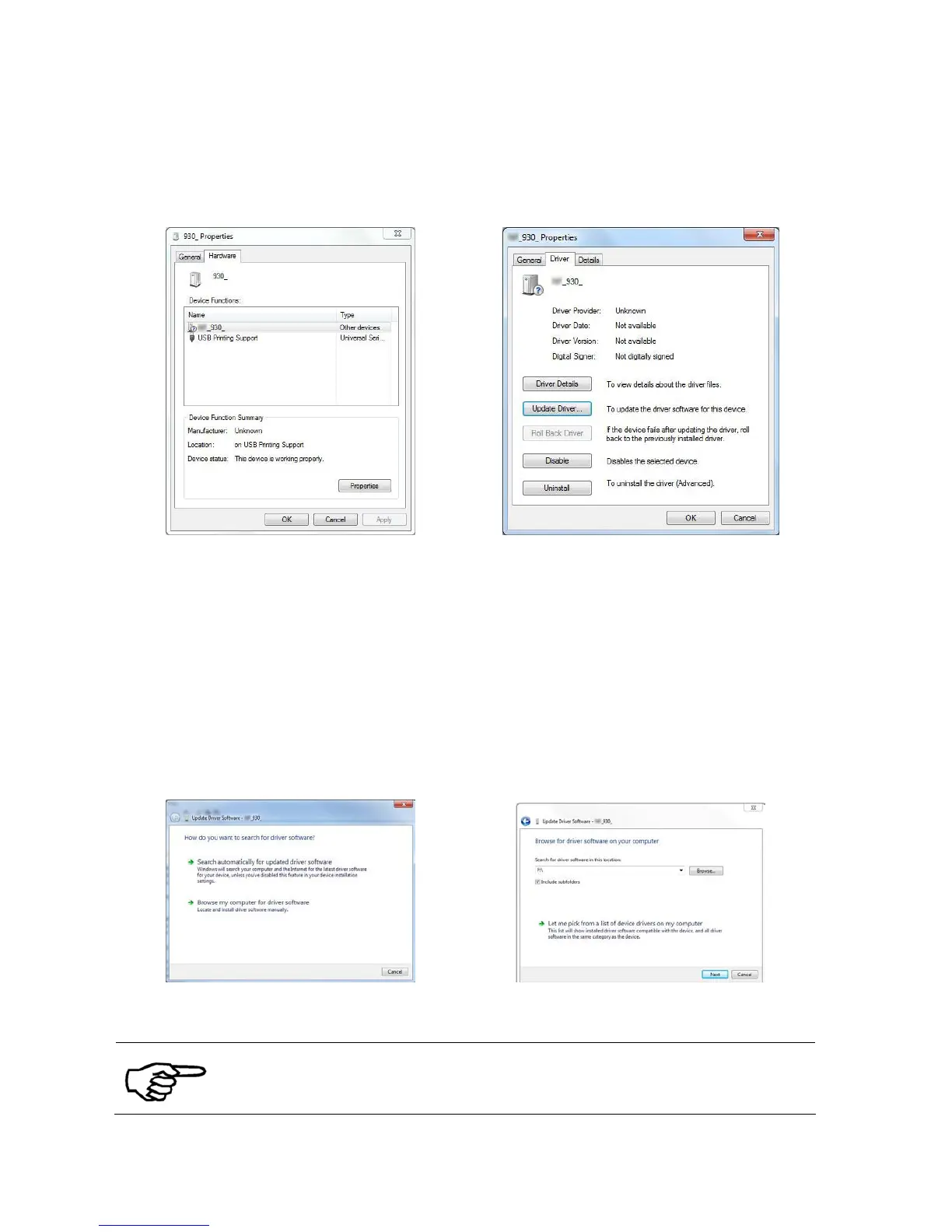
• Switch to the tab “Driver” and select the button “Update driver”
(see Figure 36). The “Update Driver Software” Wizard will appear.
Figure 35: Properties of unspecified device Figure 36: Update the printer driver
4. Update
Driver
Software
Wizard
• Choose the option “Browse my computer for driver software” (see
Figure 37).
• Select your CD-ROM drive and then click on “Next”. Let the Wizard
look for appropriate drivers. Choose the driver for your Neopost
printer and click on “Next” (see Figure 38).
• Windows will now locate and install the driver. After the procedure
the printer is ready to use.
Figure 37: Update Driver Software Wizard Figure 38: Select the driver source
During the installation, the Wizard might prompt that the driver is not
approved by Windows. Please continue the installation by clicking on
“Continue Anyway”
Pos: 62.3 /Bedienungsan leitungen/Geräte s pezifisch/Druc ker/Printer Dri ver & Cables to PC/USB 2.0 (619)/7.X _Ü2_How to use the USB interf ace_ONLY_619 @ 3\mod_129587 7712574_912.doc @ 29696 @ 2



 To Next Page