5.2 Installing the ink cartridge
Pos: 49 /Bedienungsanlei tungen/Geräte spezi fisch/Druc ker/AS-710/5.2b_How to insta ll the ink cartri dge_Shuttle Head_Step 1 @ 2\mod _1270115132425_912. doc @ 14260 @
Open the
safety cover
• Open the transparent safety cover.
• The printer will display:
SAFTEY COVER OPEN!
CODE: 49
• The cartridge carriage will move to a convenient position to insert
an ink cartridge.
Pos: 50 /Bedienungsanlei tungen/Geräte spezi fisch/Druc ker/5.2b_How to install the ink c artridge_Allge mein_SHUTTLE HEAD_ONLY @ 2\ mod_1270560715084_912. doc @ 14316 @
Cartridge mounting
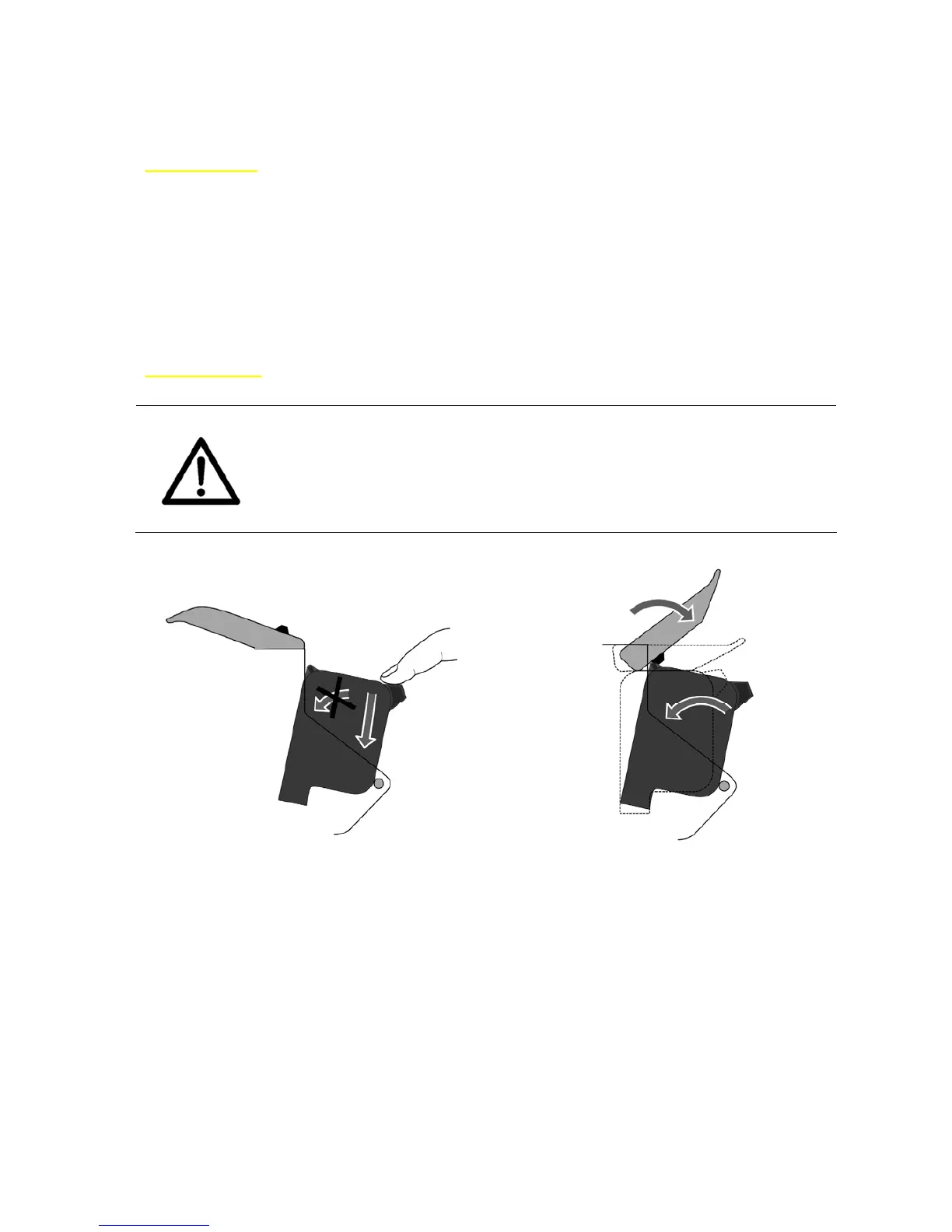
The restraining lever ensures a safe contact between the ink cartridge
and the electronics of the AS-710.
Please do not force the ink cartridge to its final position by hand
To avoid connection problems and damage, please install the
cartridge as seen in Figure 8 and Figure 9.
Figure 8: Inserting the ink cartridge Figure 9: Lock the restraining lever



 To Next Page