86 User Manual Version 3.1
2. Connect the
PC to the
printer
• Make sure that your printer is turned off.
• Connect the printer with the USB cable to your PC.
• Turn on the printer. Check if the printer shows OnlinUSB in the
bottom line of the main display.
If not press the Ok
key to turn the printer online.
If the printer shows OnlinTCP in the bottom line of the main
display use the menu PRINTER CONFIG. > BOOT DEFAULTS >
COMMUNICATION to select the USB interface.
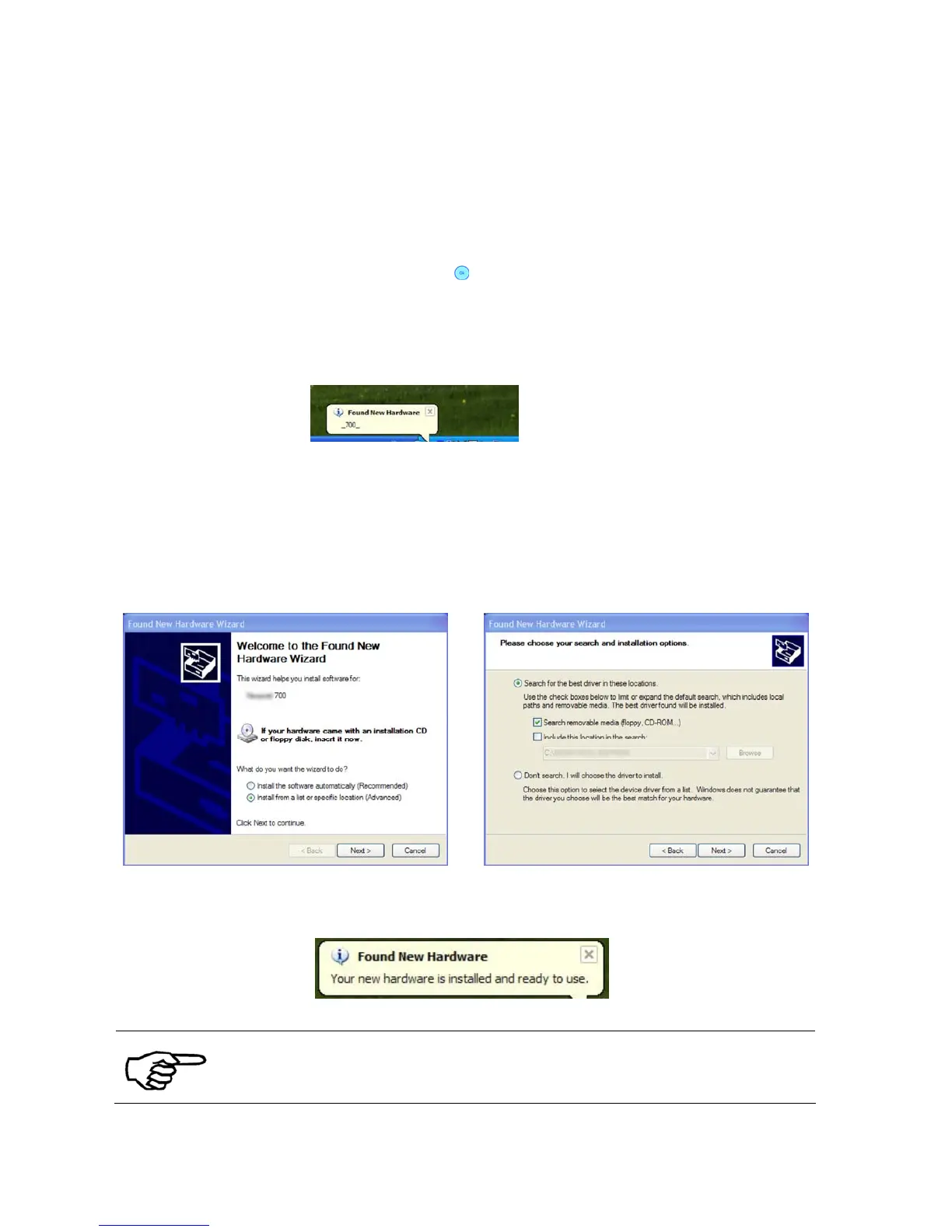
• Wait for the automatic detection of the new hardware.
• Proceed with the installation of the printer driver.
3. Install the
driver with the
New Hardware
Wizard
• Follow the steps of the New Hardware Wizard of Windows XP/Vista
• If asked select the installation choices as shown in Figure 33 and
Figure 34. The Wizard will search the content of the CD-ROM for
the drivers and will install them.
Figure 33: New Hardware Wizard Figure 34: Recommended install procedure
• After the installation the printer is ready to use.
During the installation, the Wizard might prompt that the driver is not
approved by Windows. Please continue the installation by clicking on
“Continue Anyway”



 To Next Page