Home
Oce
Printer
PlotWave 340
Page 285
Oce PlotWave 340 - Page 285
384 pages
Manual
Save Page as PDF
To Next Page
To Next Page
To Previous Page
To Previous Page
Loading...
If yes, continue with step 9.
5.
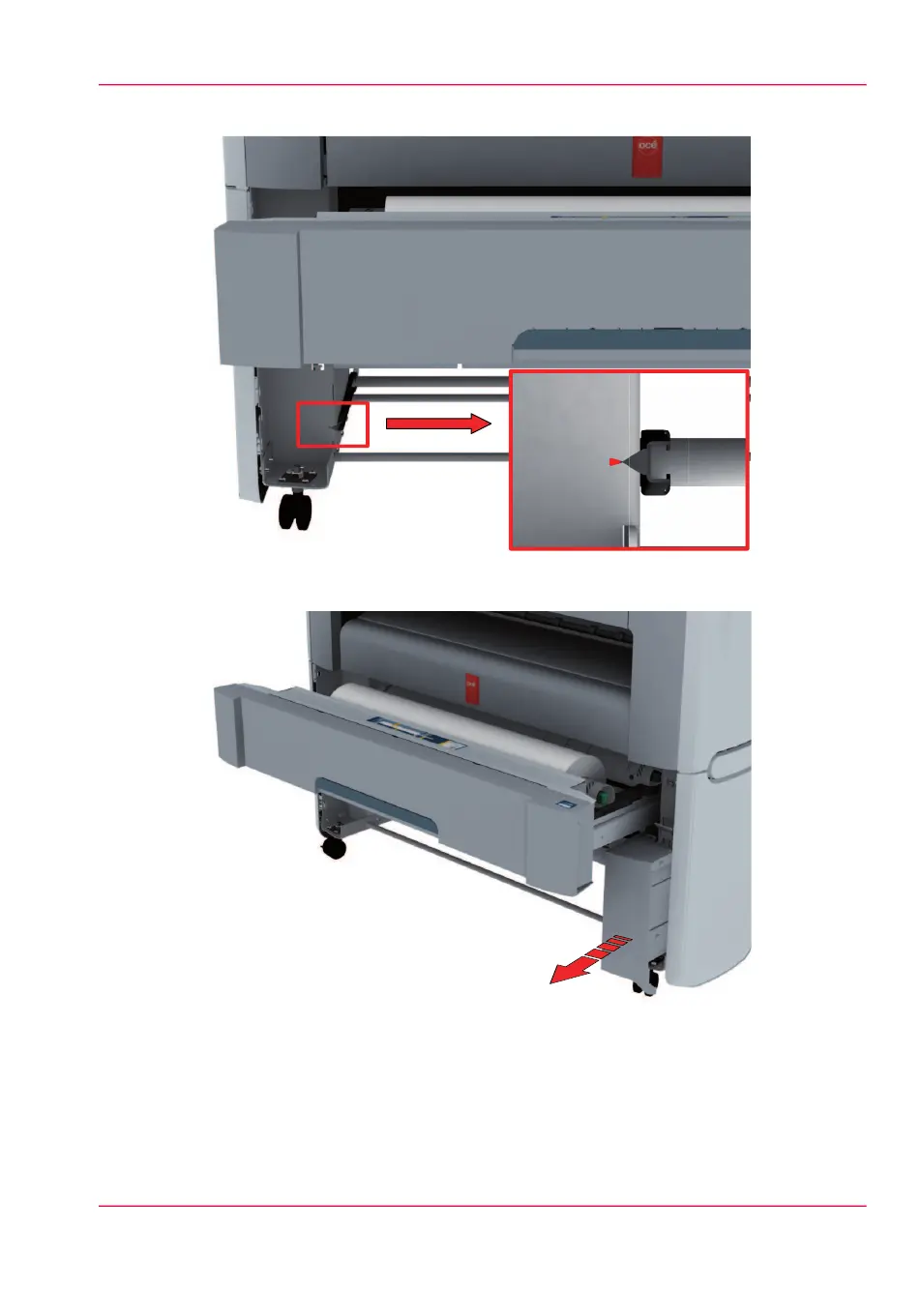
Slide the lower right front cover (11) to remove it, and get
access to the tools you need
for the adjustment procedure.
Chapter 5 - Maintain the Printing System
285
Move and re-adjust the printing system
284
286
Table of Contents
Main Page
Default Chapter
4
Table of Contents
4
Chapter 1 Introduction
11
Notes for the Reader
12
Online Support for Your Product
14
Available Documentation
16
Chapter 2 Get to Know the Printing System
19
Introduction
20
The Océ Plotwave 340/360
20
The Key Concepts
21
Connect Your Printing System
25
Working Area [Footprint]
25
Connect the Mains Supply Cable and the Network Cable
26
Switch on the Printing System
27
The Hardware
28
The Components of the Printer (Front)
28
The Components of the Printer (Left Side)
30
The Components of the Printer (Back)
31
The Media Drawer
32
The User Panel: Océ Clearconnect
33
The Output Delivery
35
The Components of the Scanner (Optional)
37
The Front Original Tray (Optional)
38
The Folder (Optional)
40
The Printing System
40
The Printing System
41
The Printing System Consumables
42
Océ Clearconnect: the Multi-Touch User Panel
43
Introduction to Océ Clearconnect
43
The Printing System
44
The Home Screen
45
The Smart Access
47
Presets and Advanced Settings
50
The Settings Concept
53
The Locations
55
Preview Your Job
58
The Jobs Queue and the System Menu
59
Quick Start: Default Jobs
62
The Smart Inbox Process for Copy, Scan, and Print Jobs
62
Do a Default Copy Job
65
Do a Default Scan Job
67
Do a Default Print Job
69
The Cloud
71
Chapter 3 Define Your Workflow with Océ Express Webtools
75
Introduction
76
Océ Express Webtools
76
The System Requirements
77
The 'Jobs' Tab
79
The Smart Inbox
81
The Job States
83
The 'System' Tab
85
The System Monitor
86
The 'Preferences' Tab
89
The 'Configuration' Tab
90
The 'Support' Tab
91
Define Your Printing System Default Settings
92
About the Default Settings in Océ Express Webtools
92
Set Another Language for Océ Express Webtools
93
How to Edit a Setting
95
View and Check the Settings
96
Save the Settings in a File
97
Load the Settings from a File
98
Restore the Factory Defaults
99
Set the Print Job Default Settings
100
Set the Copy Job Default Settings
104
Set the Scan Job Default Settings
105
Manage Jobs on Your Printing System
107
The 'Smart Inbox' and the Queue Concept
107
Use Smart Inboxes in a Multiple-User Environment
111
Use Smart Inboxes in a Repro Environment
113
Use Smart Inboxes in a Multiple-User and Repro Environment
115
Create and Open a Smart Inbox for Print Jobs
117
Create and Open a Smart Inbox for Scan Jobs
119
Store Print, Copy, and Scan Jobs in the Smart Inbox
120
Close or Delete a 'Smart Inbox
122
Configure Your Network and Security Settings
123
Configure the Network Settings in Océ Express Webtools
123
Access and Passwords
124
User Roles and Authorisations
124
Log in as an Authorised User
125
Change the Password for Authorised Users
126
Shut down or Restart the System
127
Secure Protocols
128
Define the IP-Type
128
Enable Access Control
129
Access Control and Ipsec Settings
130
Remote Security
132
Remote Security: Generate a CA-Signed Certificate Request
133
Remote Security: Import a CA-Signed Certificate
135
E-Shredding
137
Enable or Disable the E-Shredding Function
137
Select the E-Shredding Algorithm
138
Specify the Number of Overwrite Passes
139
Configure the Presets and Stamping
140
What You Need to Know about Presets
140
Set the Copy Presets
141
Set the Scan Presets
143
Set the Print Presets
145
File Type
147
Create a Stamp
150
Configure External Locations
151
Configure Your Locations
151
Enable or Disable USB
152
Create an External Location
153
Error Messages When Validation Fails
155
Configure the Printer Settings
157
Configure the Regional Settings
157
Configure the 'User Panel Time-Out
158
Configure the Automatic Wake-Up
159
Configure the Sleep Mode Time-Out
160
Configure the 'Media Request Time-Out
161
Configure the Media Sizes
162
Configure the Pen Settings
163
Configure Mobile Printing and Scanning
164
Océ Mobile Webtools
164
Configure Océ Express Webtools Settings for a Mobile Connec- Tion
166
Generate the 'Quick Response Card
168
Connect Your Mobile Device to Océ Mobile Webtools
170
Optimise Your Print Quality and Print Productivity
172
Set the 'PDF Transparency Flattening
172
Set the 'PDF Wipeout Correction
173
Set the 'Long Plot Mode
174
Set the 'Automatic Roll Switch
175
Set the 'Spool Threshold
176
Set the 'Rotation' Mode
177
Set the 'Alignment' Mode
178
Set the Link Speed and Duplex Mode
179
Chapter 4 Use the Printing System
181
What You Need to Know before You Start a Job
182
How to Feed an Original
184
How to Auto-Feed an Original
186
How to Use the Carrier Sheet
187
Print Jobs - Job Submission Tools
189
Use Océ Publisher Express to Send a Print Job
189
Use the Smart Inbox to Send a Print Job
192
Use Océ Publisher Select to Send a Print Job
193
Use the Océ Wide Format Printer Driver for Microsoft Windows to Send a Print Job
195
Use the Océ Postscript
197
Driver to Send a Print Job
197
Use Océ Publisher Mobile to Send a Print Job
199
Print from Your Mobile Device
202
Use FTP to Send a Print Job
204
Use LPR to Send a Print Job
206
Use the Cloud to Send a Print Job
207
Basic Print Jobs - Default
208
Do a Default Print Job
208
Direct Print
210
Print from a USB Mass Storage Device
212
Extended Print Jobs - Presets
213
Print Presets on the User Panel
213
Extended Print Jobs - Advanced Settings
214
Advanced Settings for Print Jobs
214
Basic Copy Jobs - Default
219
Advised Settings for Copy Jobs
219
Do a Default Copy Job
221
Extended Copy Jobs - Presets
223
Copy Presets on the User Panel
223
Make a Half Size Copy
224
Copy by Set
225
Extended Copy Jobs - Advanced Settings
226
Advanced Settings for Copy Jobs
226
Make a Copy and Add a Strip
236
Make a Copy and Remove a Strip
238
Make a Copy of a Specific Area of an Original
240
Make a Copy and Remove a Specific Area of an Original
242
Make a Copy and Scale to Another Size
243
Make a Copy on a Cut Sheet
245
Make a Copy with a Stamp
247
Basic Scan Jobs - Default
248
Advised Settings for Scan Jobs
248
Do a Default Scan Job
250
Extended Scan Jobs - Locations and Presets
252
Scan Presets on the User Panel
252
Scan a Photo to 'JPEG' Format
253
Scan CAD Colour to 'TIFF' Format
254
Scan to a USB Mass Storage Device
255
Scan to an External Location
256
Scan to a Smart Inbox and Collect Your File
258
Save a Scanned Document on Your Mobile Device
261
Extended Scan Jobs - Advanced Settings
262
Available Settings for Scan Jobs
262
File Type
269
Make a Scan and Remove a Strip
272
Pause, Stop, or Clear the System
274
Pause, Resume, or Stop an Active Job
274
Clear the System
276
Chapter 5 Maintain the Printing System
277
Update Your System
278
Update the System Software
278
Move the Printing System
280
Switch off the Printing System
280
Disconnect the Network Cable and the Mains Supply Cable
282
Move and Re-Adjust the Printing System
283
Connect the Mains Supply Cable and the Network Cable
289
Switch on the Printing System
290
Replace the Media
291
The Media Drawer
291
Remove a Media Roll
293
Unpack the Media Roll
297
Load a Media Roll (Position 1)
299
Load a Media Roll (Position 2)
304
Change the Media Type and Media Size
309
Refill the Toner
310
Replace the Residual Toner Container
313
Maintain the Scanner
315
Clean the Scanner
315
Calibrate the Scanner
319
Chapter 6 License Management
321
Introduction to License Management
322
Check Your Licenses
323
Save the Currently Active Licenses
324
Install a New License
325
Chapter 7 Account Management
327
An Overview of Océ Account Center
328
Océ Account Console
330
Introduction to Océ Account Console
330
Summary of Océ Account Console
331
Enable Account Management in Océ Express Webtools
334
Accounting Workflow
336
Chapter 8 Support
337
Counter History
338
View Events
340
Event Messages
341
Remote Service
345
Solve Problems
348
How to Solve Problems with Jobs
348
Clear an Original Jam in the Scanner
349
Clear a Media Jam in the Heater Section
350
Clear a Media Jam in the Media Bypass Section
352
Clear a Media Jam in the Roll Feed Section
355
Print a Demo Print
356
Print a Test Print
357
Print the Print Density Chart
358
Chapter 9 Specifications of the Printer
359
Specifications
360
Preferred Océ Media Types and Sizes
365
Chapter 10 Contact
367
Online Support for Your Product
368
Reader's Comment Sheet
370
Other manuals for Oce PlotWave 340
Operation Guide
336 pages
Related product manuals
Oce plotwave 345
300 pages
Oce PlotWave 300
340 pages
Oce PlotWave 350
380 pages
Oce PlotWave 360
384 pages
Oce plotwave 365
300 pages
Oce PlotWave 900
396 pages
Oce PlotWave 750
401 pages
Oce 9300
121 pages
Oce TDS700
432 pages
Oce CS2436
870 pages
Oce ColorWave 600
440 pages
Oce Arizona 360 GT
268 pages



 To Next Page