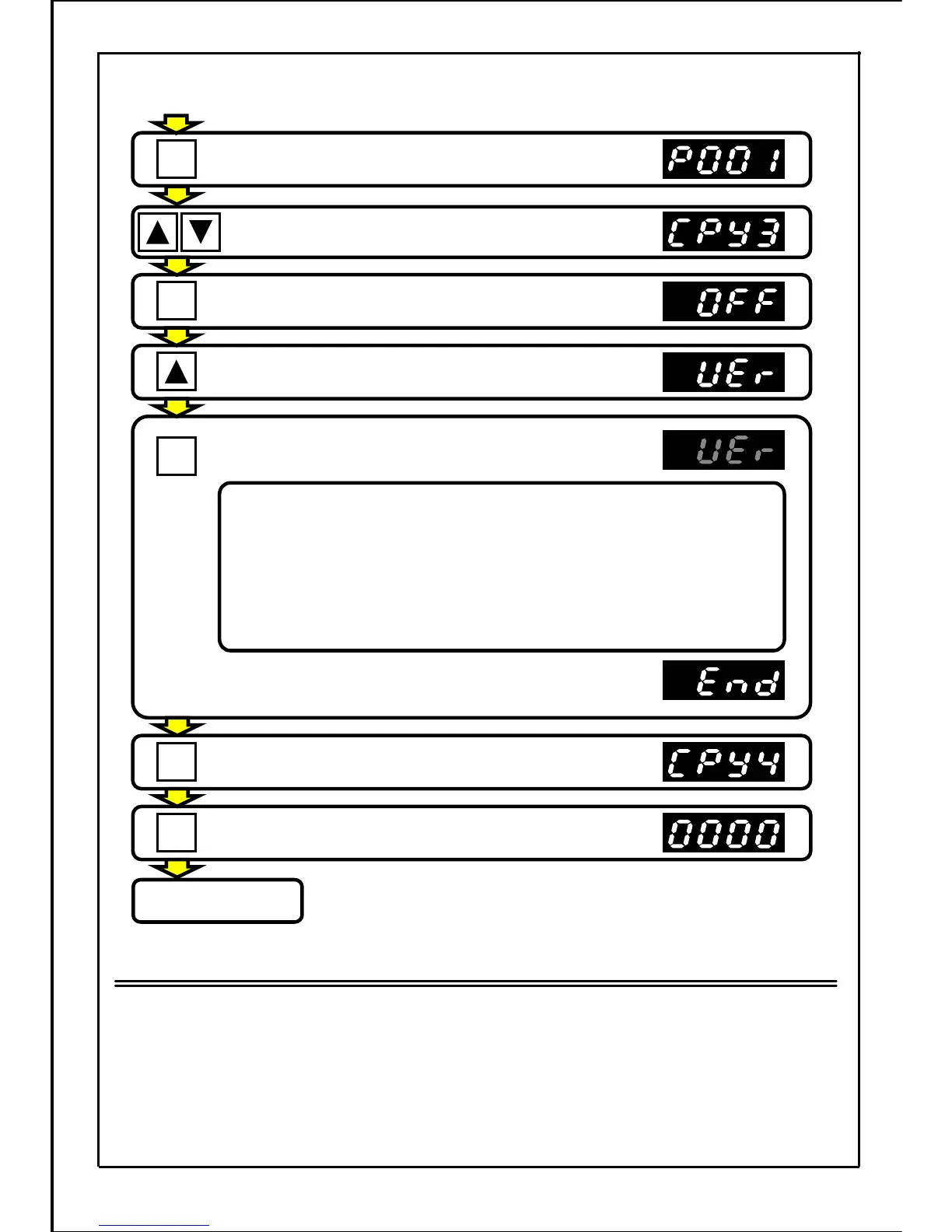
Press the MODE button.
Press the UP・DOWN button and the show
value is set to "CPY3".
Press the SET button.
(Current setting value is displayed.)
Press the UP button and the displayed value
is set to "VEr".
Press the SET button to start the check.
Check indication will flicker.
Press the SET button. (Increment in CPY4)
[Continued from previous page]
● Compare the data in various cases
・
Compare the data in various cases and the displayed parameter No.
will flicker.
・
In this case, while the UP button is held down, the main unit data will
be displayed. While the DOWN button is held down, built-in memory
data inside the operation panel will be displayed.
・
Press the SET button and the next data will start the verification again.
・
Press the MODE button to stop the verification and "CPY3" will be
displayed.
When all check ends, "End" will be displayed.
Press the MODE button and enter the operation
preparation completed state.
Operation preparation
completed state
・・・
The normal stop state will be entered and the inverter can be run.
(Operation status display mode)
Note
・ If a run signal enters during checking, the operation will not be activated. After the operation
preparation completed state is returned to, OP trip will occur.
・ The function cannot be used during operation. Always use this function in the stopped state.
151
MODE
MODE
SET
SET
SET







 To Next Page