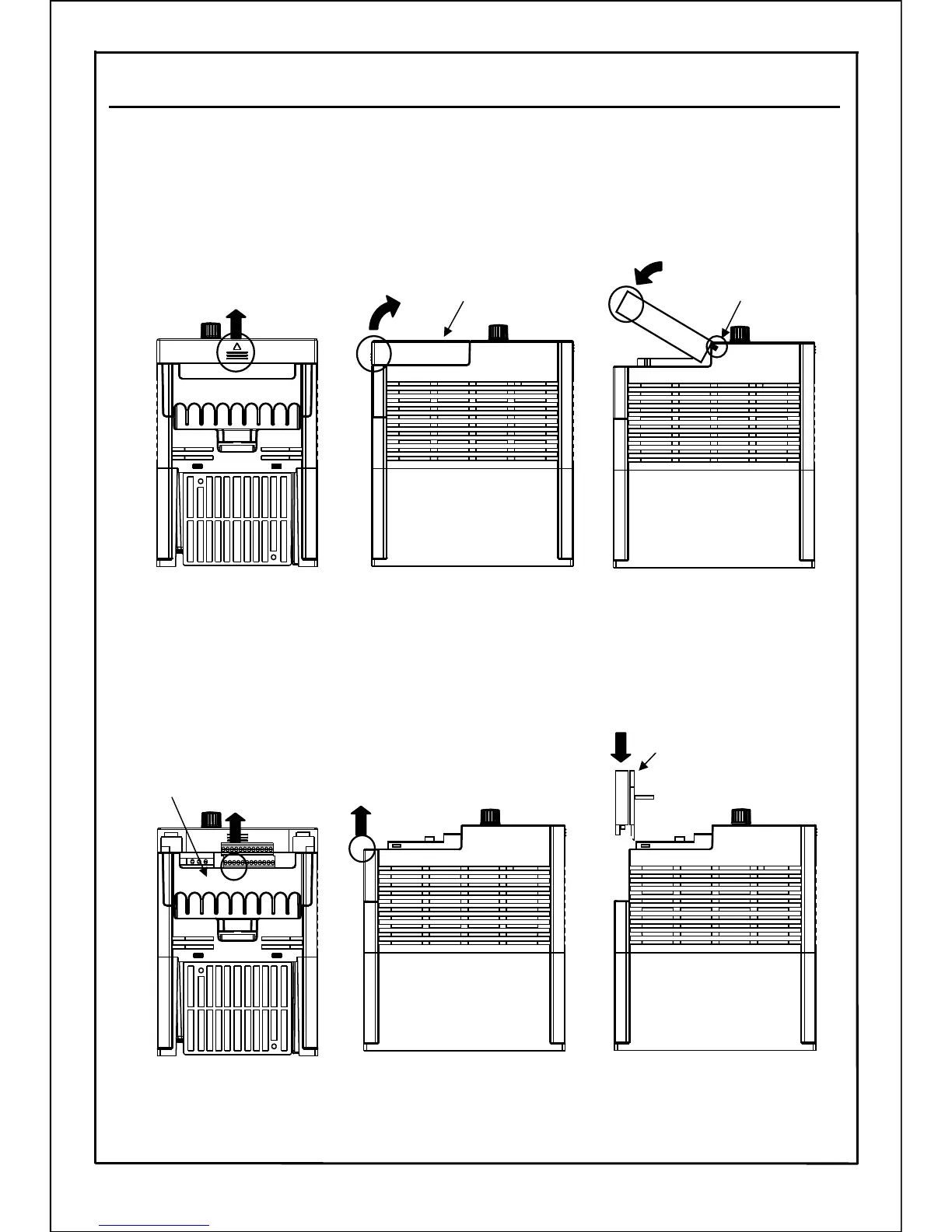
● Removal and installation of terminal cover 1 (Control circuit terminal cover)
[Removal] ① Lightly press up the center bottom edge of the terminal cover 1.
[Installation] ② Insert the mounting jaw of terminal cover 1 into the slot on the frame.
Lightly press down the center top edge of the terminal cover 1.
②
● Removal and installation of terminal cover 2 (Main circuit terminal cover)
[Removal] ① Lightly press up the center part of the terminal cover 2 till the mounting
jaw comes loose.
[Installation] ② Insert the mounting jaw of terminal cover 2 into the slot on the frame.
Lightly press down the terminal cover 2.
①
①
Mounting jaw (two)
Mounting jaw (two)
Terminal cover 1
Terminal cover2
①
①
Note) After installation, confirm that the terminal cover 1 and 2 are fitted.
“PULL”
②
16
5-3. Removal and Installation of Terminal Cover







 To Next Page