The motor and motor load fluctuation could change significantly and
the motor may suddenly start or stop when data is being changed
during operation.
(Before making changes, ensure personal safety at all times. )
Failure to do so could lead to injury.
Under item "Changeable in Operation" in "9-2 Function Parameter Table", the ○ mark
indicates parameters that can be changed during operation.
[Setting example: Change change 1
st
deceleration time from 5.0s to 10.0s.]
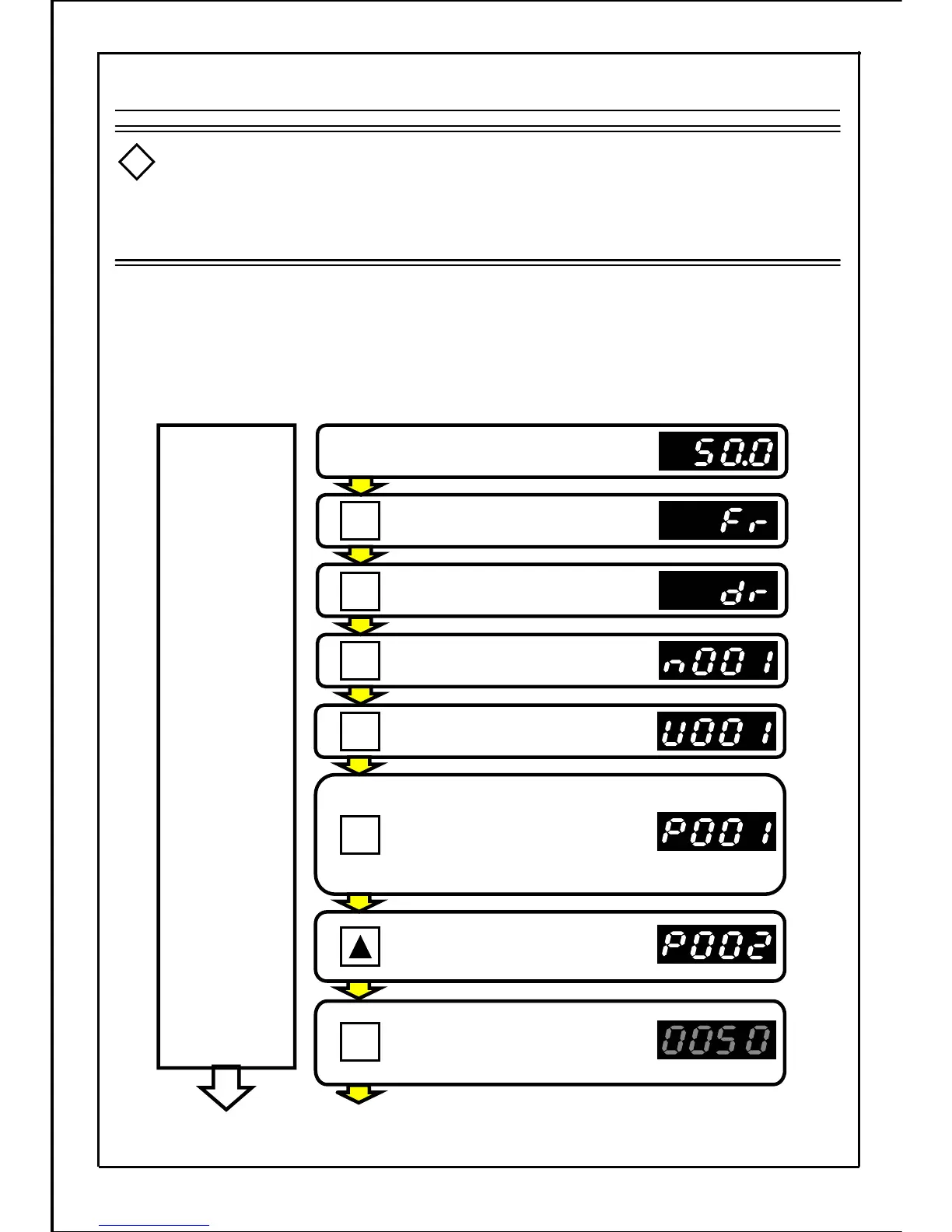
(Changing the parameter P002 data from "5.0" to "10.0")
Operation state (for 50.0Hz operation)
Press the MODE button.
Press the MODE button.
Press the MODE button.
Press the MODE button.
Press the MODE button, and enter
the "function setting mode."
(If a password is set, it must
be entered at this point. Refer
to page 139.)
Press the UP button once,
and change the parameter
No. to P002.
Press the SET button to display
the parameter P002 data.
(The main display will flicker.)
Control
motor with
current data
[Continued to next page]
55
9-1.2 Setting and Changing Function Parameters during Operation
Caution:
!
.
SET
MODE
MODE
MODE
MODE
MODE







 To Next Page