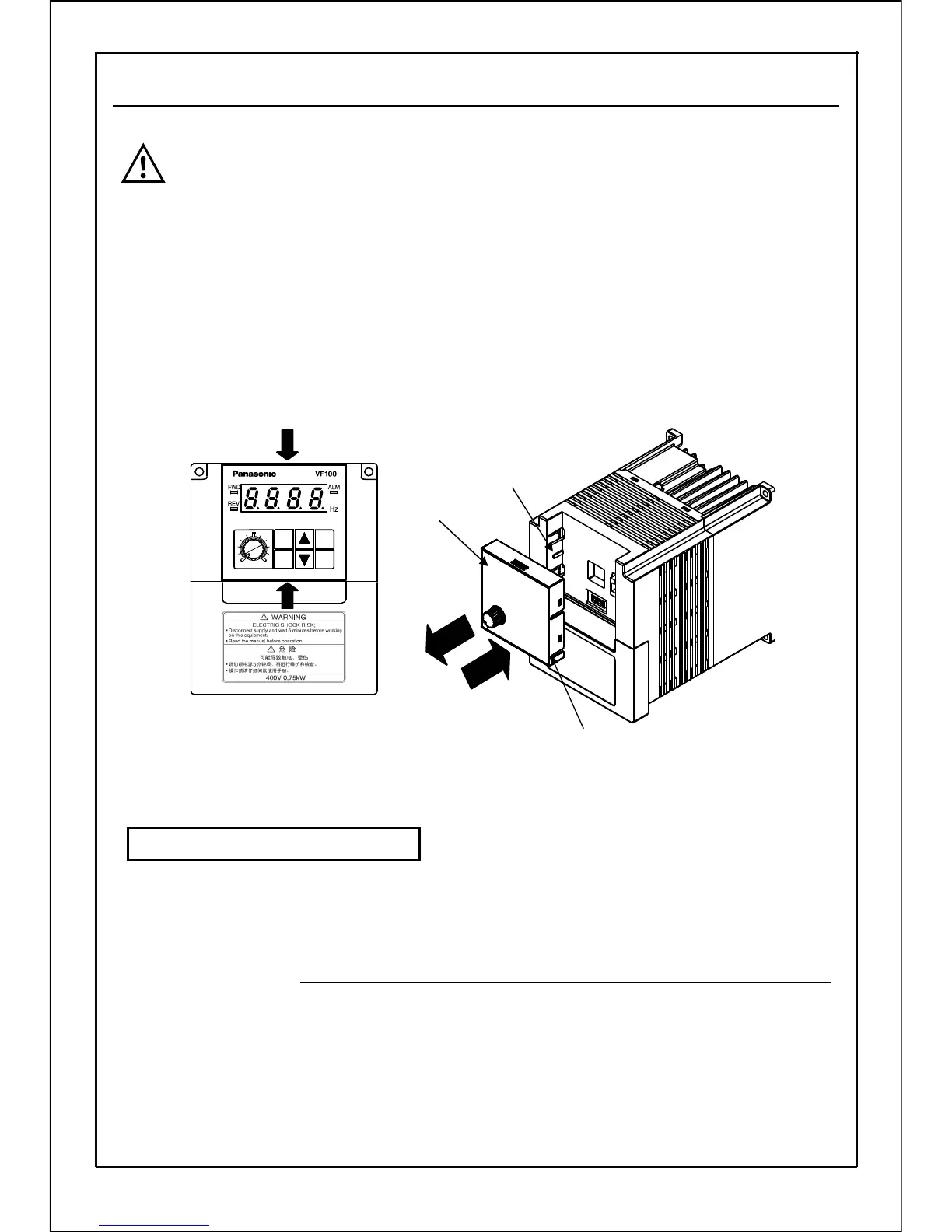
[Removal] ① Press up the center top and bottom part of the operation panel
vertically to remove it.
[Installation] ② Aim at the mounting position (Align transverse slot on operation
panel with flange on the frame.) and press down the center top
and bottom part of the operation panel vertically to install it.
② 拿住操作面板单元的上下中央部,对准安装位置(使操作面板
Note) After installation, confirm that the operation panel is fitted.
LAN cable on the market can be used to connect the unit of the inverter and the operation panel.
Use LAN cable only for the purpose of connecting the unit of the inverter and operation panel.
The inverter could be damaged if LAN cable is used to connect other machines.
LAN cable specifications: Max. length of connecting wire of 8Pin straight cable that is CAT5 or more is 5m.
① Turn off the power supply and remove the panel according to above descriptions.
② Insert one end of LAN cable to the unit of the inverter and the other end to connector (RJ45) on
the panel till click is heard.
Use with the removed operation panel
Note
Turn off the power supply before removing the operation panel.
Removing the operation panel during operation can cause the
operation to stop.
Hold by hand
Transverse slot (four)
Flange (four)
①
②
Operation panel
17
5-4. Removal and Installation of Operation Panel
6
MODE
SET
MIN. MAX.
RUN
STOP







 To Next Page