Chapter 1-First Time Installation and Configuration
Polycom, Inc. 1-15
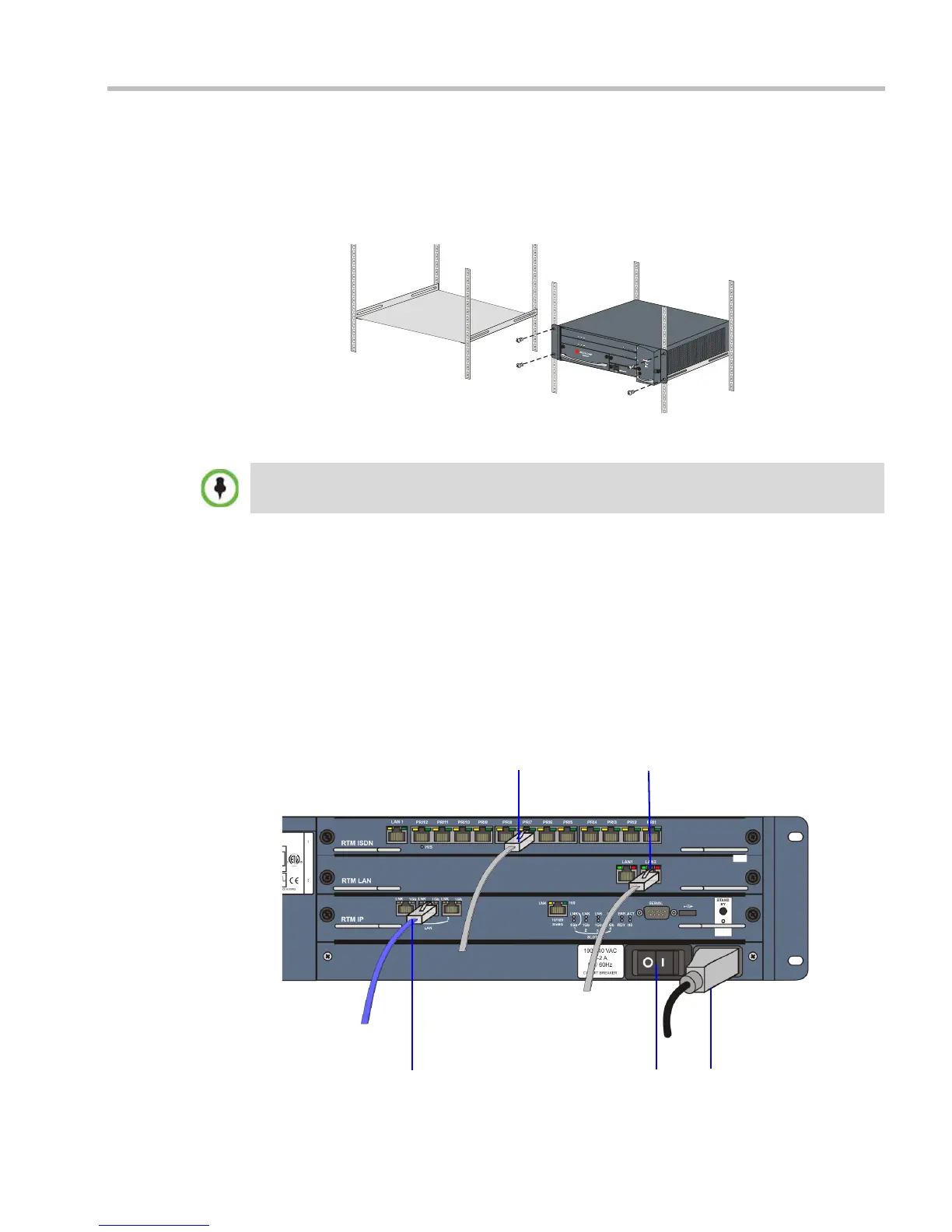
• Using a shelf:
— Install the shelf, supplied by the rack manufacturer, in the rack.
— Mount the RMX on the shelf.
— Fasten the RMX to the rack with screws through the four holes in the RMX’s front
mounting brackets.
Connecting Cables to the RMX 2000
Connect the following cables to the back panel:
•Power cable
• On the RTM IP card connect the LAN cable to LAN 2 Port.
• On the RTM LAN card connect the LAN cable to LAN 2.
— Optional. Connect the LAN cable to LAN 1.
With Multiple Networks and LAN Redundancy configurations, LAN 1 port is used.
For more information, see the RealPresence® Collaboration Server Administrator’s
Guide, "LAN Redundancy” on page 16-32
and "Multiple Network Services” on
page 16-49.
• Optional. On the RTM ISDN card connect the E1/T1 Cables to PRI Ports.
Do not remove the protective caps from LAN1, LAN3 and ShMG ports.
LAN 2 Connection
Power
Cable
Off/On
switch
E1/T1 Connection
LAN 2 Connection, (optional) LAN1














 To Next Page