Chapter 2-Basic Operation
Polycom, Inc. 2-23
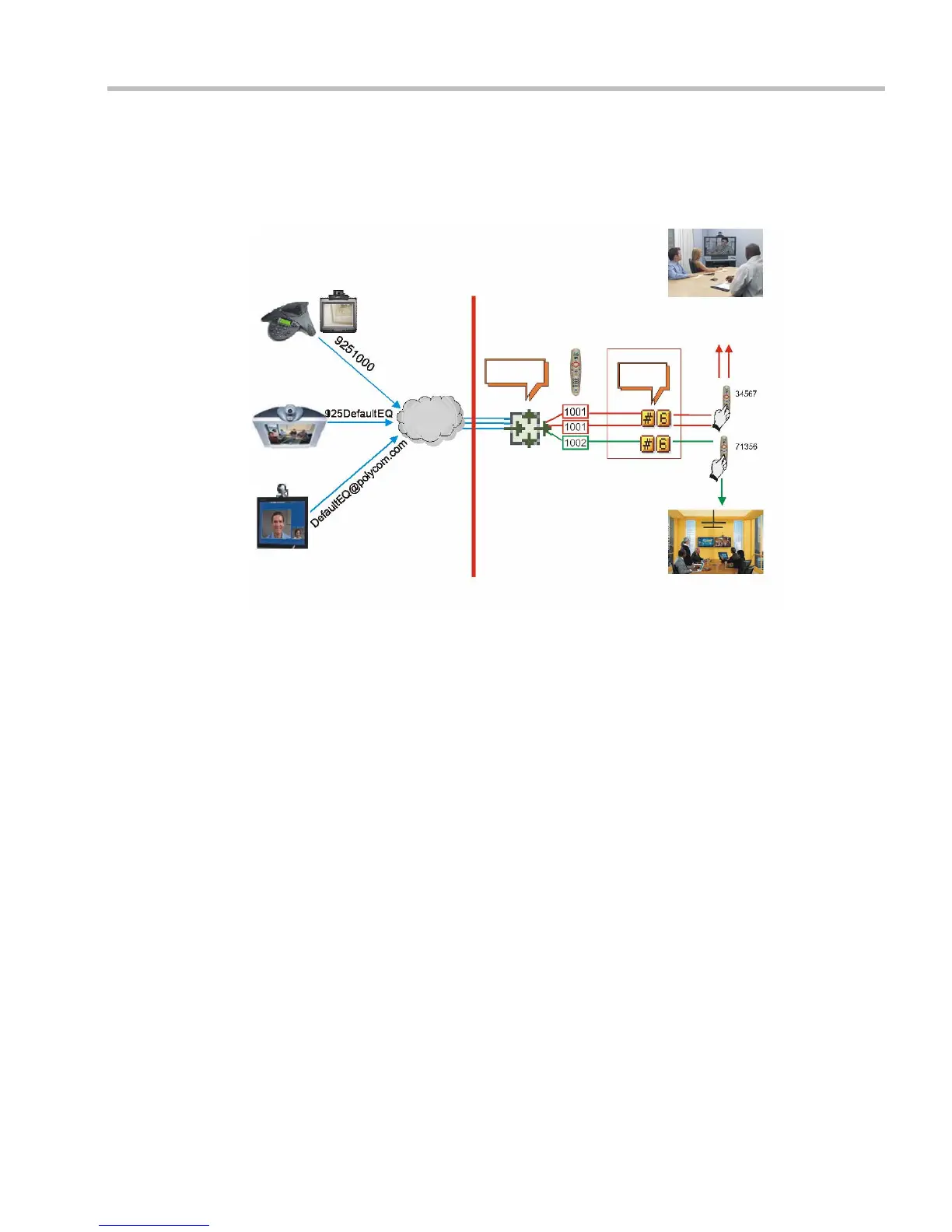
Entry Queue Access
Access via an Entry Queue allows all participants to dial the same entry point that acts as a
routing lobby. Once in the Entry Queue, participants are guided to the conference according
to the conference ID they enter.
Figure 2-1: Dial-in Connection via Entry Queue
Dialing is executed in the same way as for conferences, where the Entry Queue ID/Name
replaces the Conference ID/Name.
H.323 Participants
H.323 participants dial [Gatekeeper Prefix][Entry Queue ID/Name].
Example:
Prefix in gatekeeper 925
Entry Queue ID 1000
>> The participant dials
9251000
H.323 participants can bypass the Entry Queue IVR voice messages by adding the correct
Conference ID of destination conference to the initial dial string:
[
Gatekeeper Prefix][EQ ID][##Destination Conference ID]
Example:
Conference ID 1001
>> H.323 participants dial
9251000##1001
H.323 participants can also bypass the conference IVR voice messages by adding the
Conference Password to the initial dial string:
[Gatekeeper Prefix][EQ ID][##Destination Conference ID][##Password]
Example:
Conference ID 1001
Conference Password 34567
>> H.323 participants dial
9251000##1001##34567
ISDN/ PSTN
Endpoint
IP Endpoint
IP Endpoint
Network
MCU
“Conference
ID?”
“Conference
Password?”
Entry Queue
Name: DefaultEQ
Numeric ID: 1000
Dial-in Number: 9251000
Oak Room
Conference ID: 1002
Password 71356
Maple Room
Conference ID: 1001
Password 34567
Conference
IVR Service
MCU Prefix in
Gatekeeper - 925














 To Next Page