Polycom RealPresence Collaboration Server (RMX)1500/2000/4000 Deployment Guide for Maximum Security Environments
1-20 Polycom, Inc.
Connecting Cables to the RMX 4000
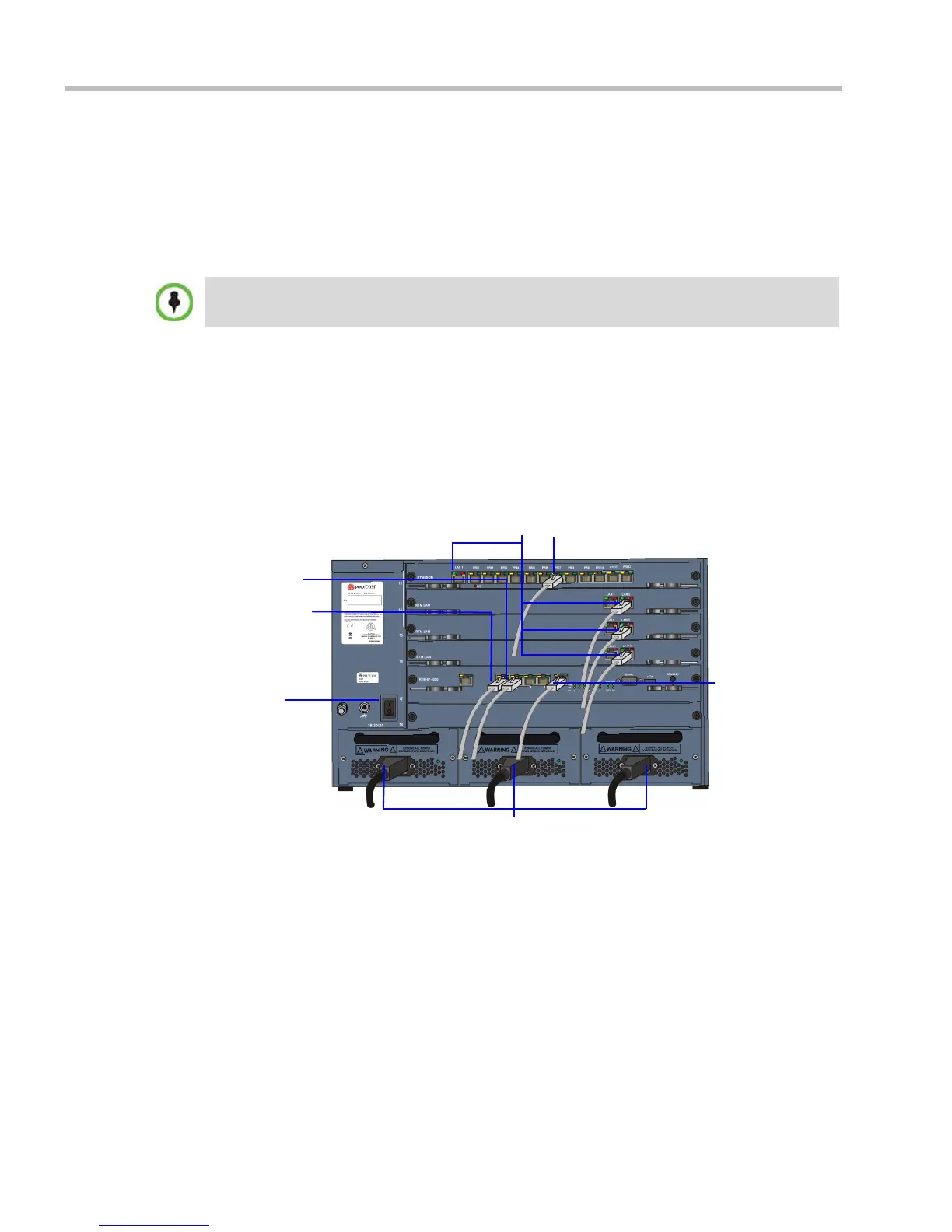
To connect the cables (AC and DC systems):
• RTM-IP 4000:
— Connect the Management Network cable to LAN 2.
— Connect the Signaling cable to LAN 3.
— Connect the Shelf Management cable to LAN 6.
• For each installed RTM LAN - Connect the LAN cable to LAN 2.
— Optional. Connect the LAN cable to LAN 1. With Multiple networks and LAN
redundancy configurations, LAN 1 port is used. For more information see the
RealPresence® Collaboration Server Administrator’s Guide,"LAN Redundancy” on
page 16-32
and "Multiple Network Services” on page 16-49.
— Optional. If RTM ISDN is installed, for each installed RTM ISDN:
— Connect the E1/T1 cables to their PRI Ports.
— Connect the LAN cable to LAN 1.
Figure 1-5 RMX 4000 Rear Panel View with AC Power and Communication Cables
When an NTP Server is used for the RMX Time, the Shelf Management cable must be connected to
the shelf port.
LAN Connections to RTM LAN
Power Cables
Off/On
switch
E1/T1 Connection to RTM ISDN
Shelf
Management
Management
Network
Signaling
Network














 To Next Page