233
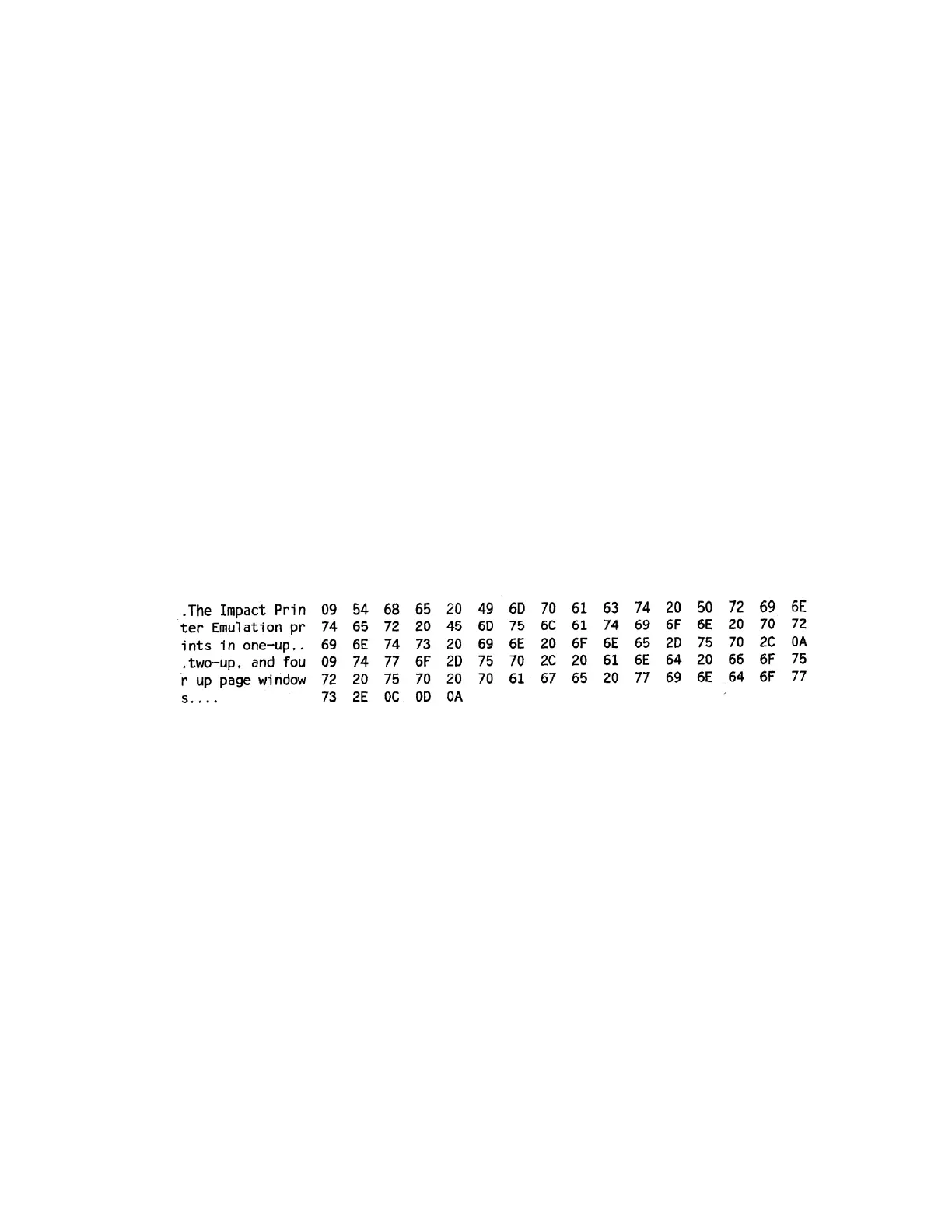
When enabled, the hex dump mode translates all host interface data to its
hexadecimal equivalent, then
prints the hex code and its printable symbol, if
one exists. Figure 17 shows a partial example of a hex
dump.
After the printer enters hex dump mode, all characters it prints (including any
in the printer's input buffer)
are printed in two forms: as a two-symbol
hexadecimal code and as the character's printable symbol (if it
has one). A
non-printable code is printed as a period [.] symbol. Up to 16 characters can
be printed per line
of hex dump printout. While the printer is in hex dump mode,
it does not act upon any control codes, other
than to print their hexadecimal
equivalents.
The 16 characters printed per line on the hex dump are formatted so that the
16 printable symbols are
printed in columns 1 through 16. The 17th column is
blank. Column 18 contains either a p (PI line active) or
a blank (PI not active).
Columns 19 and 20 contain the hexadecimal code for the first character,
followed
by a blank. The PI line condition and hexadecimal code for the
second character are printed in columns 22,
23, and 24, followed by a blank.
The third through 16th characters are printed in a similar manner. The
hexadecimal code for the 16th character is printed in columns 78, 79, and 80.
NOTE: Values will vary based on printhead width.
Subsequent printing observes the current setting for skip-over perforation,
form length, and top-of-form
position parameters.
IMPORTANT You must have a minimum of 4.1 inches of media installed and have Media >
Image > Label Width set to 4.1 inches. If not, the hex dump data will be
truncated and lost.
If a fault occurs while printing a hex dump, the printer reverts to the normal
fault state. When the fault is
cleared, the printer resumes printing the
hex dump (either a partial line with a form feed or nothing at all).
Top-of-Form
remains unaffected.
Figure 17 Sample Hex Dump
To begin a hex dump, first place the printer OFFLINE and enable the Hex Dump
Mode option from the
control panel:
Enable the Tools > Diagnostics > Hex Dump Mode menu.
For IPDS jobs, enable Application > IPDS Setup > Hexdump Mode menu.
Next, place the printer back ONLINE and send data to the printer from the host computer. Any data
received from the
host is “dumped” to the printout.
To cancel a hex dump, first place the printer OFFLINE and disable the menu(s) affected. The paper may
then be advanced
to the next Top-of-Form.
Controlling Print Quality
Three factors have the greatest effect on print quality:
The amount of heat applied by the printhead (print intensity)
The speed at which media is moving under the printhead (print speed)
The amount of printhead pressure.












 To Next Page