24
Loading Ribbon
For direct thermal media (no ribbon required), go to “Loading Media” section.
IMPORTANT Clean the printhead, platen roller, and media sensors every time you change the
ribbon. See Cleaning the Printhead, Platen Roller and Media Sensors page 45.
IMPORTANT Please DO NOT push the ribbon release button when you are loading the ribbon.
The ribbon release button is used to remove the used ribbon.
1. Raise the media cover.
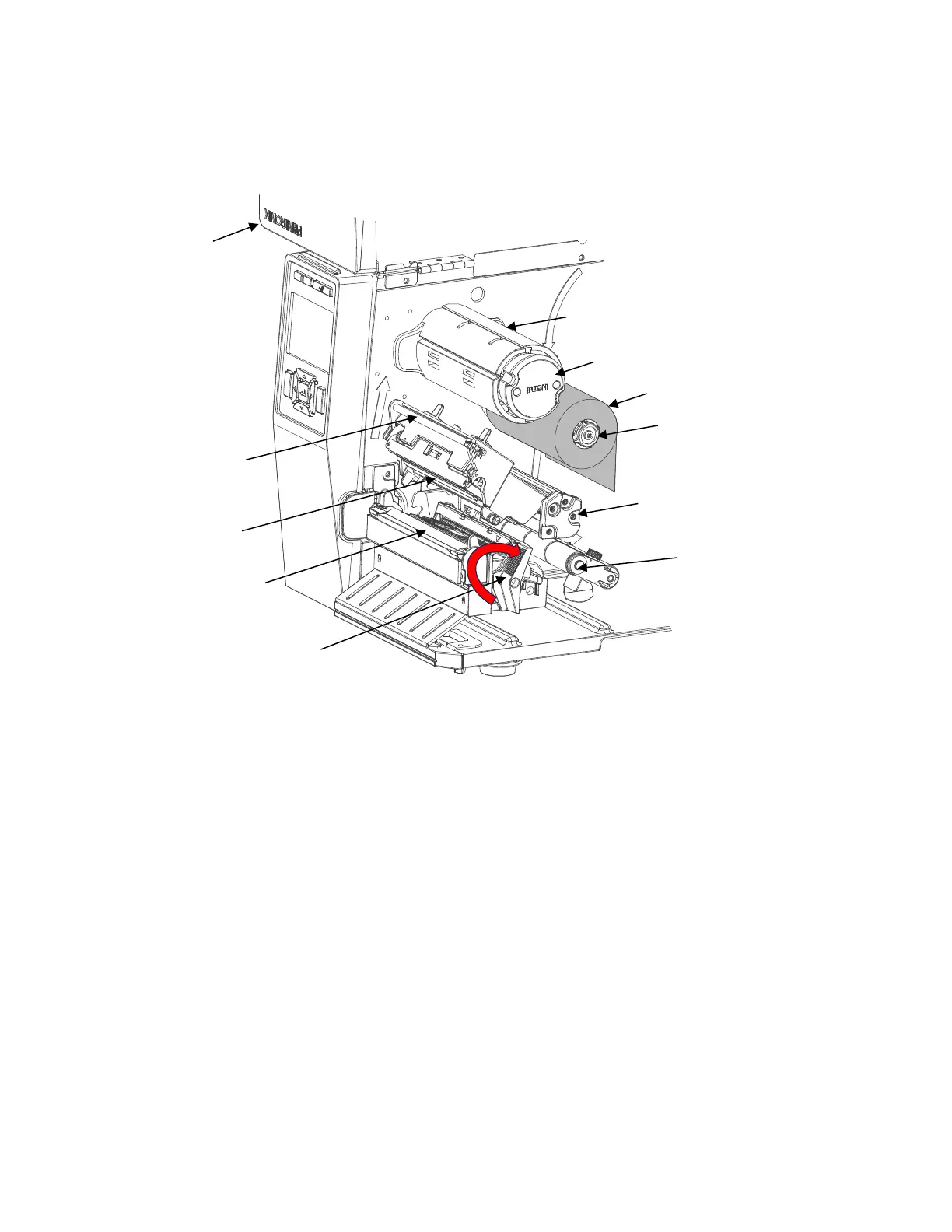
2. Slide the ribbon roll onto the ribbon supply spindle until it is flush with the flange.
3. Open the pivoting deck by rotating the deck lock lever fully clockwise until the deck swings
upward.
4. Thread the ribbon between the upper support and media damper and then through the open
space between the printhead and platen.
5. Wrap the ribbon onto the ribbon take-up spindle. Keep the ribbon flat and without wrinkles. Wind
the ribbon clockwise about 3~5 turns onto the ribbon take-up spindle until it is smooth and properly
stretched tight where it will not slip on the take-up spindle when the spindle is turned clockwise.












 To Next Page