Original Orientation
119
4
Original Orientation
The original can be set either in sideway or lengthway orientation, but to assure-
that the top/bottom orientation of the original comes out correctly when thes-
canned file is displayed on a computer, the correct placement must be selected.
Note
❒ When using Scan to Print function, original orientation is not required to set.
When Using Send Scan Function
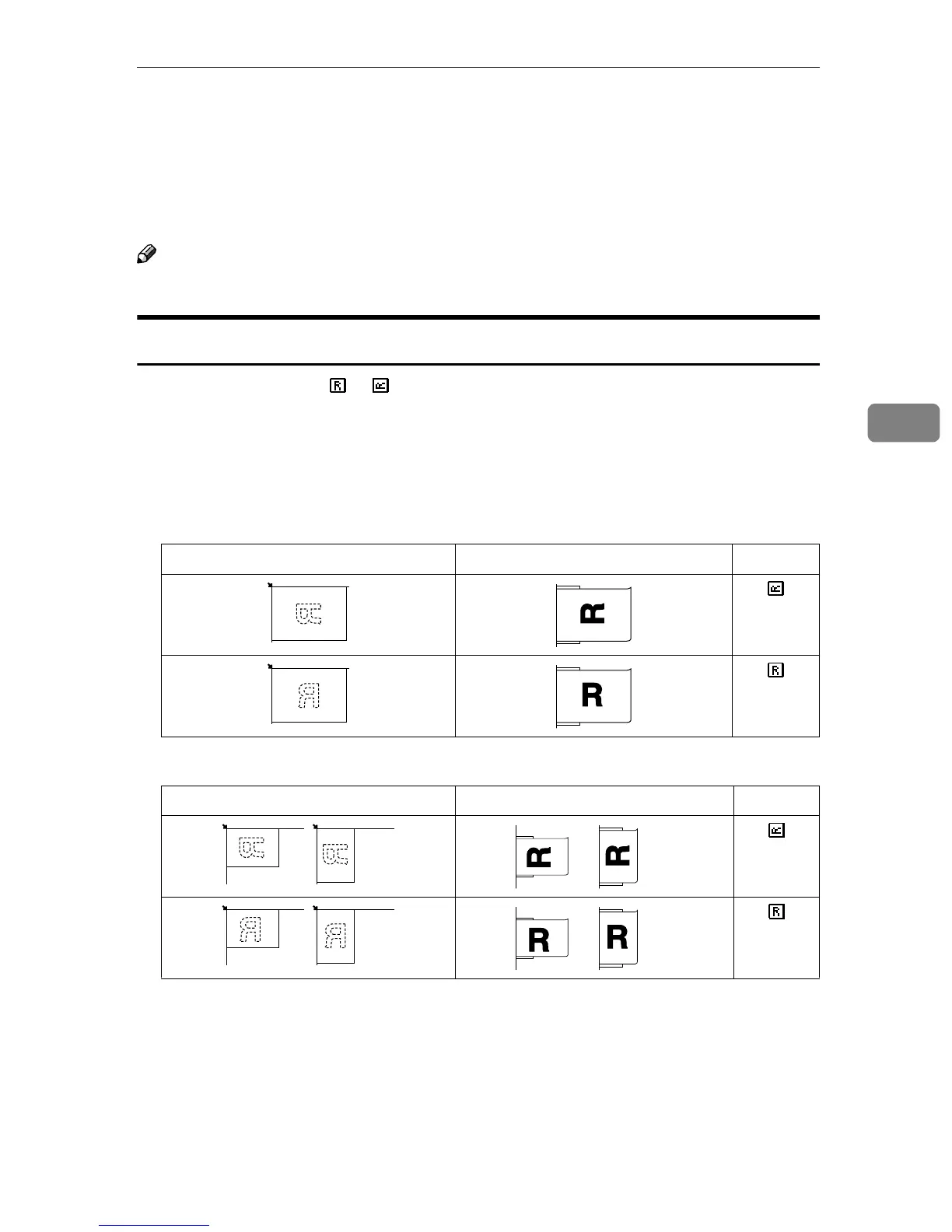
Select “1 Sided” of the or in the [Settings]→Settings for each Users→[Original
Settings] for the send scan function in with one sided originals.
Settings made in [Original Settings] is valid when the [File Type] is set to [PDF]. See
p.78 “File Type” for details.
❖
❖❖
❖ Simplex originals in A4, B5, 8
1
/
2
” ×
××
× 14”, 8
1
/
2
” ×
××
× 11” (the originals with 215mm (8
1
/
2
”)
or more length)
❖
❖❖
❖ Simplex originals in A5, 8
1
/
2
” ×
××
× 5
1
/
2
” (the originals with 215mm (8
1
/
2
”) or less length)
Exposure Glass ADF Settings
Exposure Glass ADF Settings



 To Next Page