5
1. What You Can Do With This
Machine
This section introduces various functions of this machine, and provides most ba-
sic information such as control locations and standby screens, etc.
Outline
Scan to E-mail
You can directly send a scanned data as an attached file from this machine. The
e-mail destinations can be pre-registered, or entered directly using the bundled
USB-keyboard. On keyboard entry, you can use the LDAP server you are cur-
rently accessible.
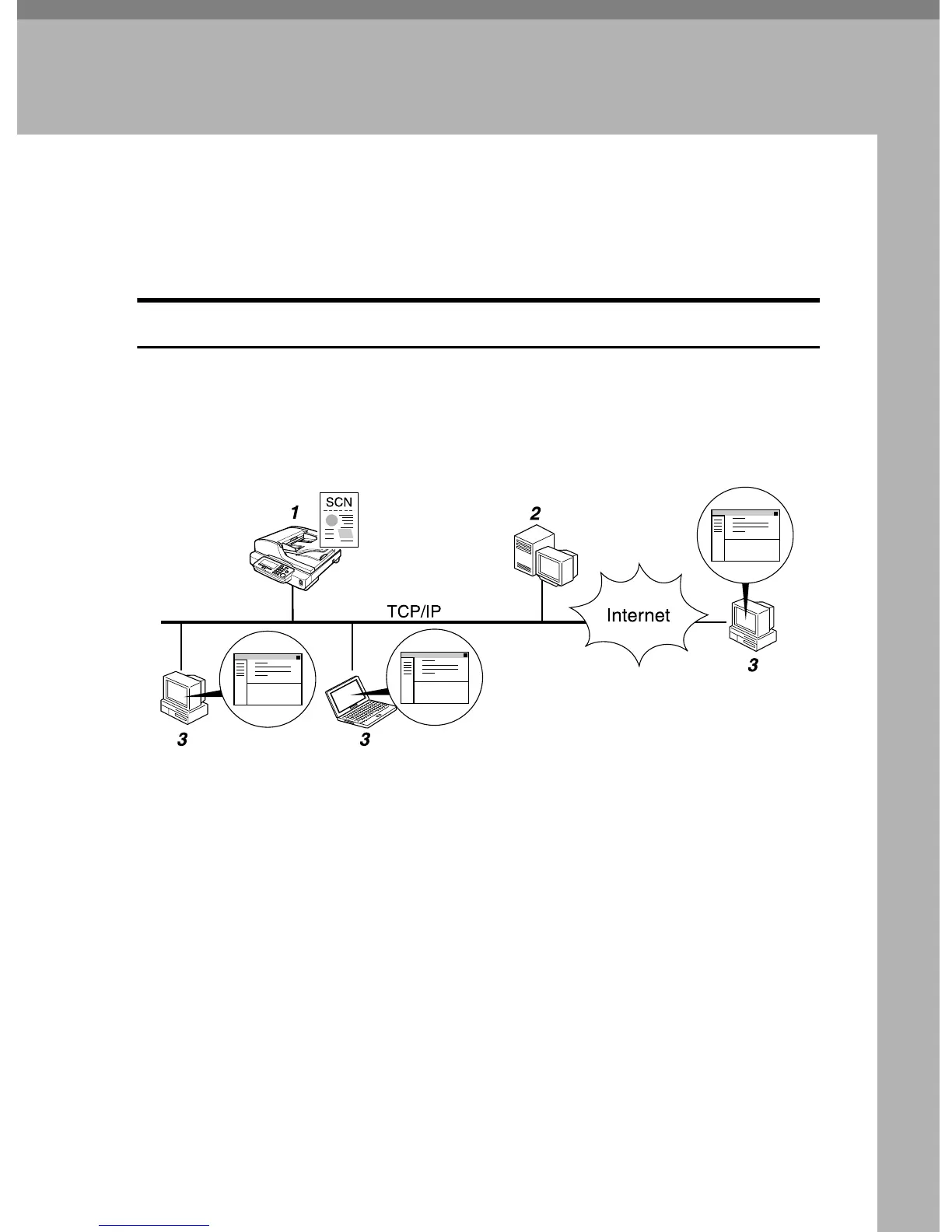
1. This machine
Connect this machine to a network
(TCP/IP) using a 100BASE-TX, or
10BASE-T cable. Use the bundled USB-
keyboard for the user authenticate pro-
cesses, direct entry of E-mail destination,
and search for E-mail address using
LDAP server.
2. SMTP server
You need to have an access to an e-mail
server that supports SMTP (Simple Mail
Transfer Protocol), to use “Scan to E-
mail” function. However, it is not essen-
tial to have an e-mail server inside the
LAN where this machine belongs.
3. E-mail client software
Use e-mail client software (such as Mi-
crosoft Outlook) to receive e-mail mes-
sages and scan file attachments that are
generated by this machine.
AFJ038S



 To Next Page