What You Can Do With This Machine
8
1
3. Client computer
You can browse scanned files saved to an
FTP server from a client computer. You
need to have an FTP client program on
the computer to connect to an FTP server.
Process Flow
A
AA
A
Specify an FTP server, file name, and make necessary settings for scanning
using the control panel of “1.This machine.”
B
BB
B
Originals are scanned by “1.This machine.”
C
CC
C
The scan data is saved in the specified folder on “2.FTP server”.
D
DD
D
You can use the scan data from “3.Client computer”.
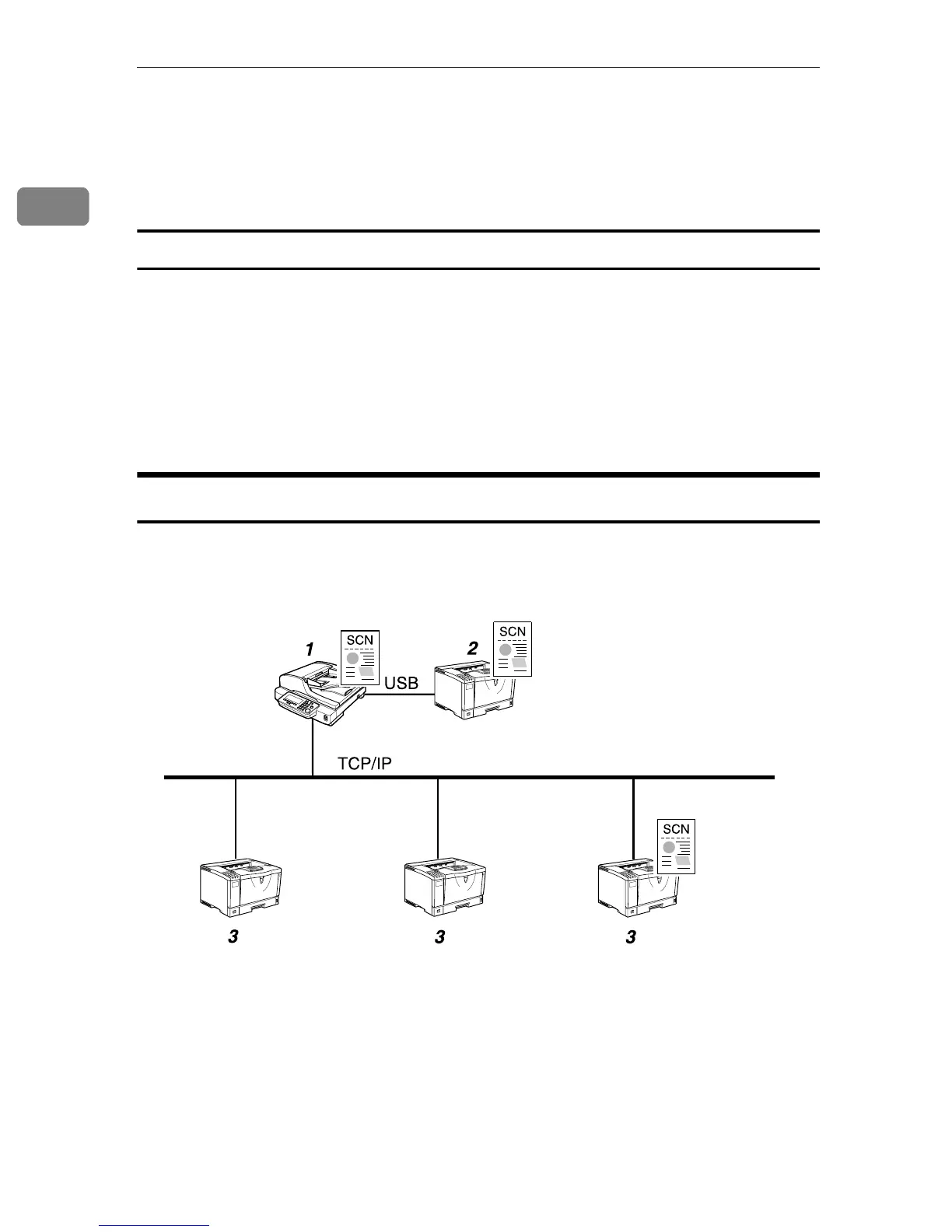
Scan to Print
You can send scan files directly to a printer, so it is possible to use this machine
like a copier.
1. This machine
When you use a network printer, connect
this machine to a network (TCP/IP) us-
ing a 100BASE-TX or 10BASE-T cable.
When using a local printer, connect the
printer cable to the USB port of the USB in-
terface card installing at the PC Card slot.
For the user authenticate processes, con-
nect the bundled USB-keyboard via the
other USB port of the USB interface card.
2. Local printer
A printer connected to this machine us-
ing a USB cable. It is necessary to register
the printer to this machine.
3. Network printers
Printers connected to a network (TCP/IP)
using a 100BASE-TX or 10BASE-T cable. It
is necessary to assign a fixed IP address to
each of the network printers. It is neces-
sary to register the printer to this machine.
AFJ042S



 To Next Page