Appendix
208
11
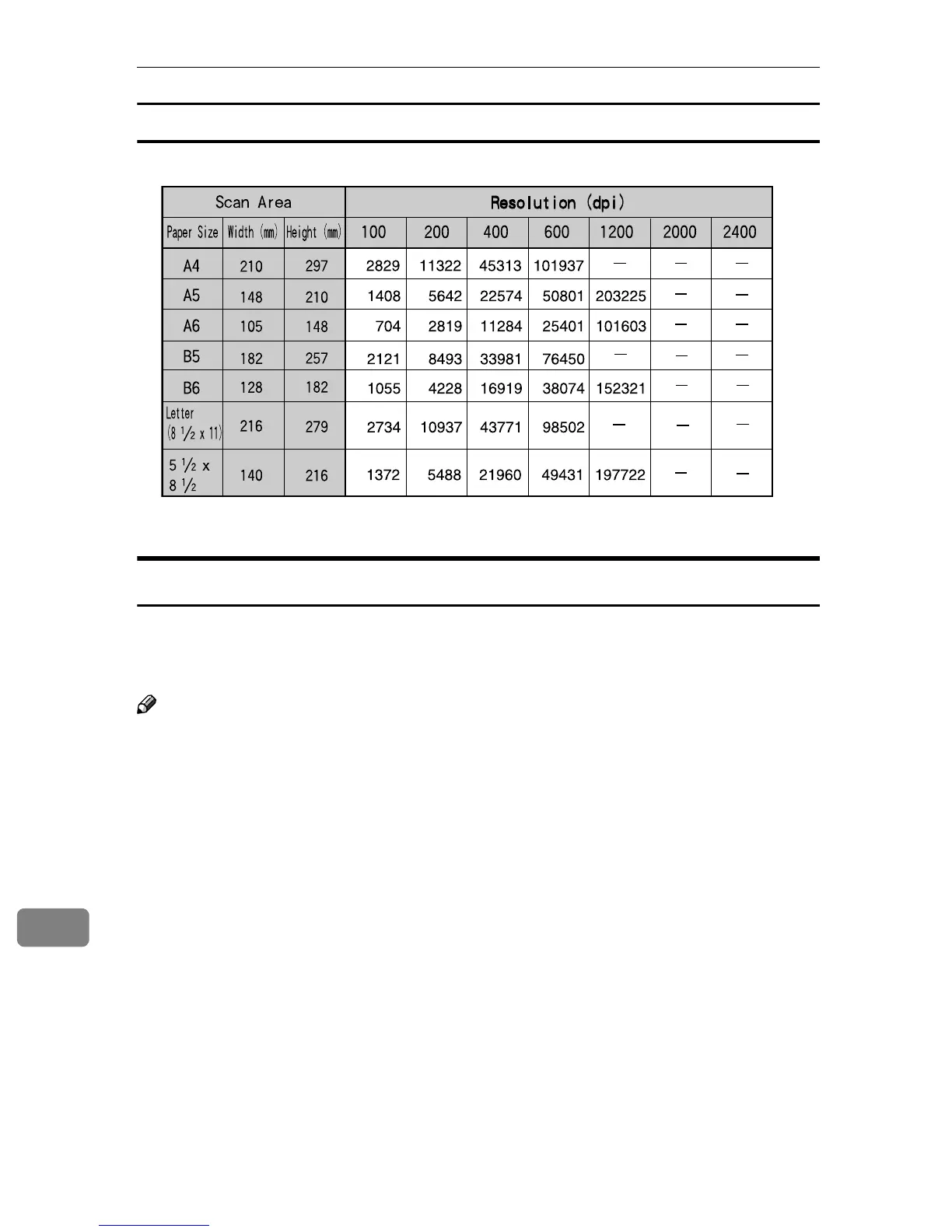
When [16770K colors] is selected
*1 This size can be configured on the USB TWAIN menu.
When Using this Machine for Sending Scan Data
The following tables show file sizes in accordance with the scan area and reso-
lution settings, when scanning is performed using Scan to E-mail, Scan to File
(SMB/FTP), or the delivery server function.
Note
❒ In the following tables, each of the values inside of white cells display the data
size in KB, determined by the scan area to the left and the resolution at the top.
❒ The following tables show file sizes without compression.
❒ Actual file sizes may vary depending on the file type setting (single page, PDF
or multi-page TIFF).
❒ A “×” in a cell means that the combination of the relevant settings is not avail-
able.
❒ A “” in a cell means that the combination of the relevant settings is available
only when you perform scanning with a compression setting.



 To Next Page