Outline
9
1
Process Flow
A
AA
A
Perform a Print Scan operation using the control panel of “1. This ma-
chine.”
B
BB
B
Originals are scanned by “1.This machine.”
C
CC
C
The scan data is interpreted to a printer language and sent to either “2.Local
printer” or one of “3.Network printers” you specified.
D
DD
D
The scan data is printed from the printer (either “2.Local printer” or one of
“3.Network printers”) you specified.
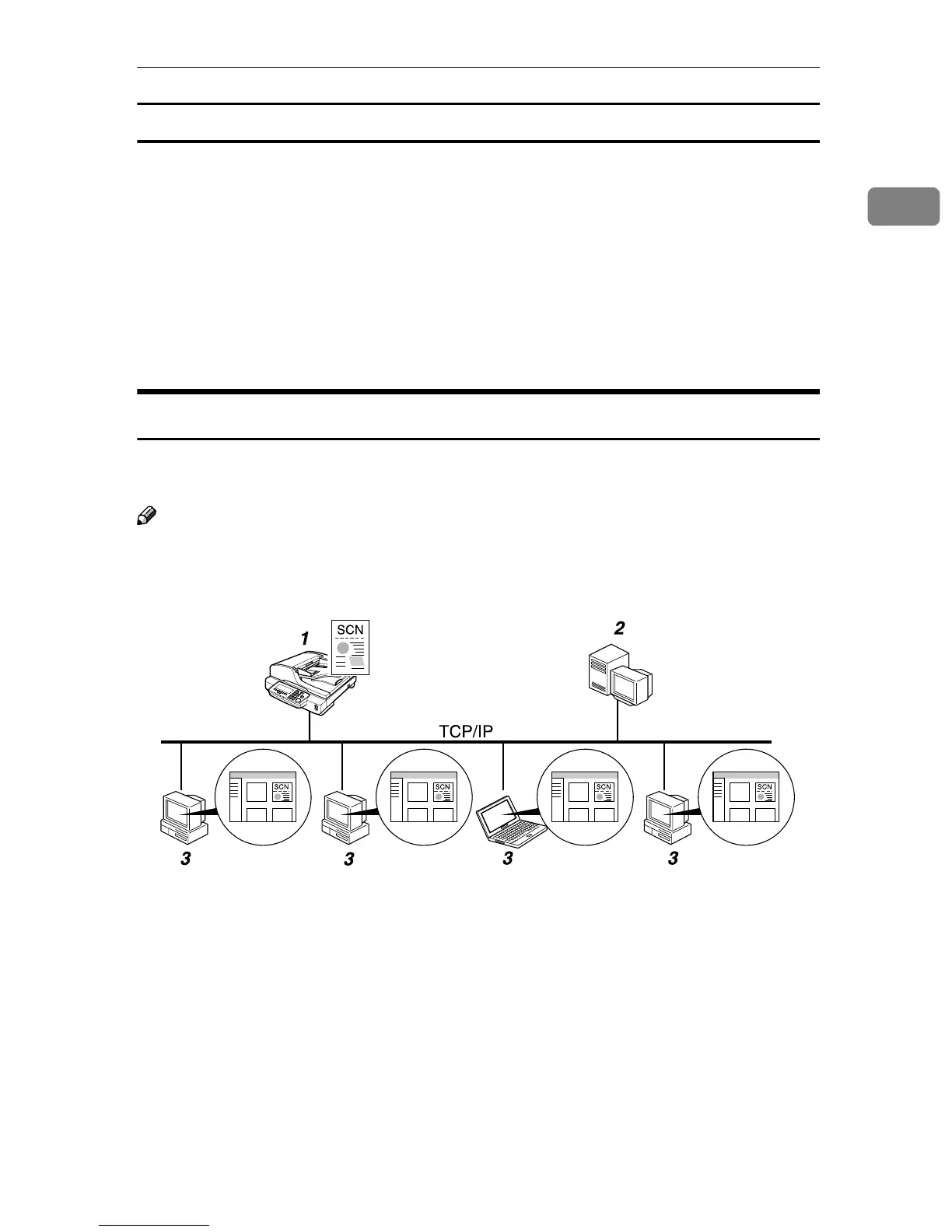
Delivery Server
By using ScanRouter V2/Professional, it is possible to deliver scan data that is
scanned by this machine to multiple destinations.
Note
❒ To use the delivery scanner function, a delivery server installed with the op-
tional ScanRouter V2/Professional is required.
1. This machine
Connect this machine to a network
(TCP/IP) using a 100BASE-TX or
10BASE-T cable. You can connect up to
two machines to a network where you
have a computer (a delivery server) with
ScanRouter V2/Professional.
2. Delivery server
A delivery server with ScanRouter
V2/Professional installed, which manag-
es destinations including E-mail address-
es, shared folders, groups, etc., and
document data files sorted by each of the
destinations.
3. Client computer
You can browse document data files on a
delivery server from a client computer,
by using DeskTopBinder Lite. You can
also save those files on the local hard disk
of the client computer, as necessary.
AFJ041S



 To Next Page