Appendix
196
11
D
DD
D
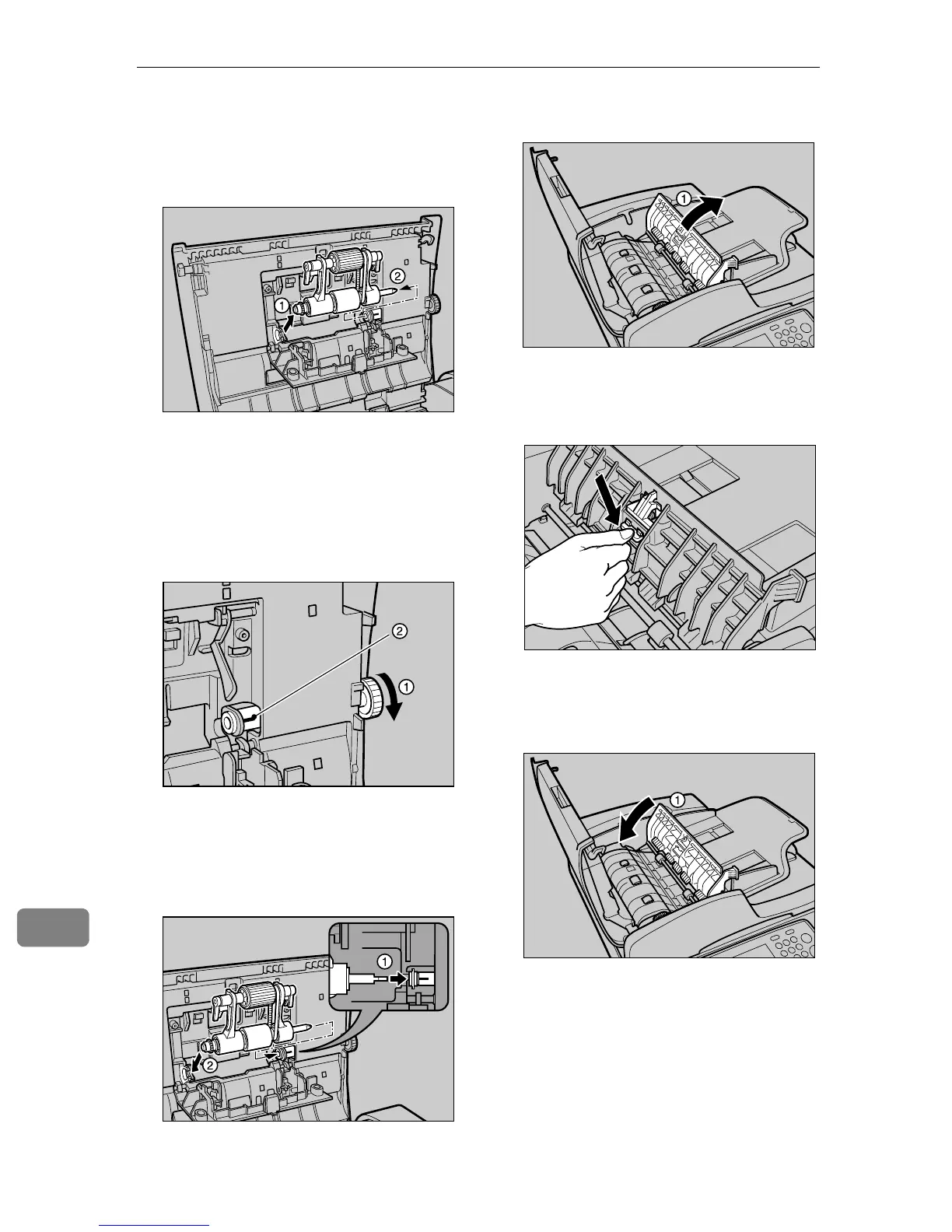
Detaching the left side of the Pick
Roller Unit A
AA
A, then detach the
right side as well sliding it to the
leftward, and remove the Unit.
E
EE
E
Replace with a new Pick Roller
Unit.
A
By rotating the gear of the right
side of the ADF cover A, expose
the mark B.
B
Insert the right side shaft of the
Pick Roller Unit A, aligning
with the mark, and insert the
left side of the shaft as well B.
F
FF
F
Close the Pick Roller Unit cover.
G
GG
G
Open the cover A
AA
A.
H
HH
H
Press down the ADF Pad from the
rear.
* The ADF Pad is removed.
I
II
I
Close the cover A
AA
A.
AFJ018S
AFJ019S
AFJ020S
AFJ021S
AFJ022S
AFJ023S


 To Next Page