Setting Up the Scanner
24
2
1. 140 mm (5.5”) or more
2. 50 mm (1.96”) or more
3. 190 mm (7.48”) or more
4. 378 mm (14.88”) or more
❖
❖❖
❖ Installation environment
Important
❒ Do not set up the scanner in any of the following types of locations. Doing
so creates the risk of malfunction of the scanner.
• In a location exposed to direct sunlight
• In a location where the scanner will be subjected to blowing air or radi-
ant heat, such as near an air conditioner or heater
• In a location near other electronic devices, such as a radio or television
set
• In a location subject to extreme temperatures or humidity
• Near a humidifier
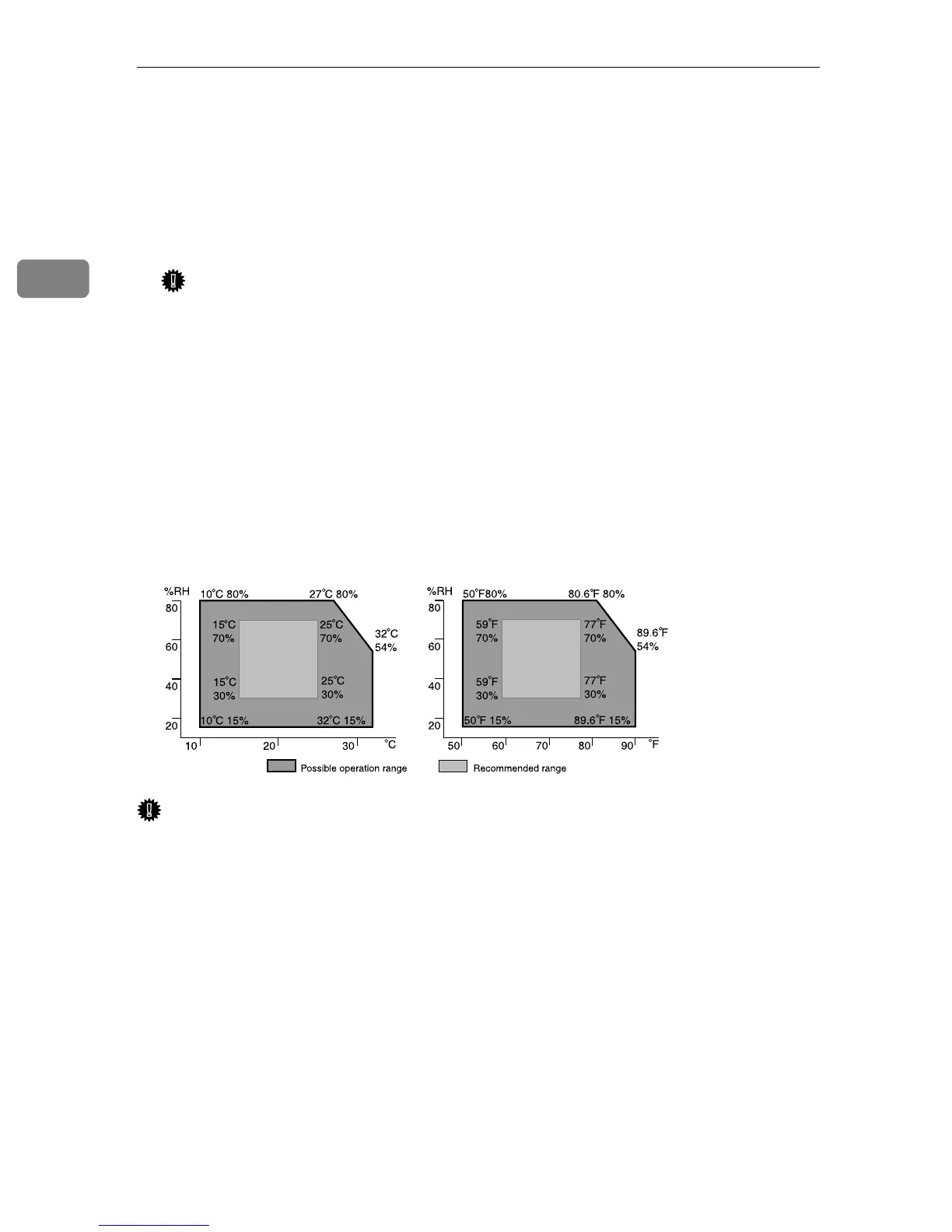
Set up the scanner in a location where the temperature and humidity will fall
within the ranges shown below.
Important
❒ Save the box and cushioning material in which the scanner was packed so
that they can be used if it is necessary to transport the scanner in the future.
❒ When the machine is moved from a cold location to a warm location, sudden
temperature changes cause condensation inside of the scanner. Wait one hour
or more before turning on the scanner to allow the condensation to evaporate.
ADC123S



 To Next Page