Configuring the Scanner Settings
44
3
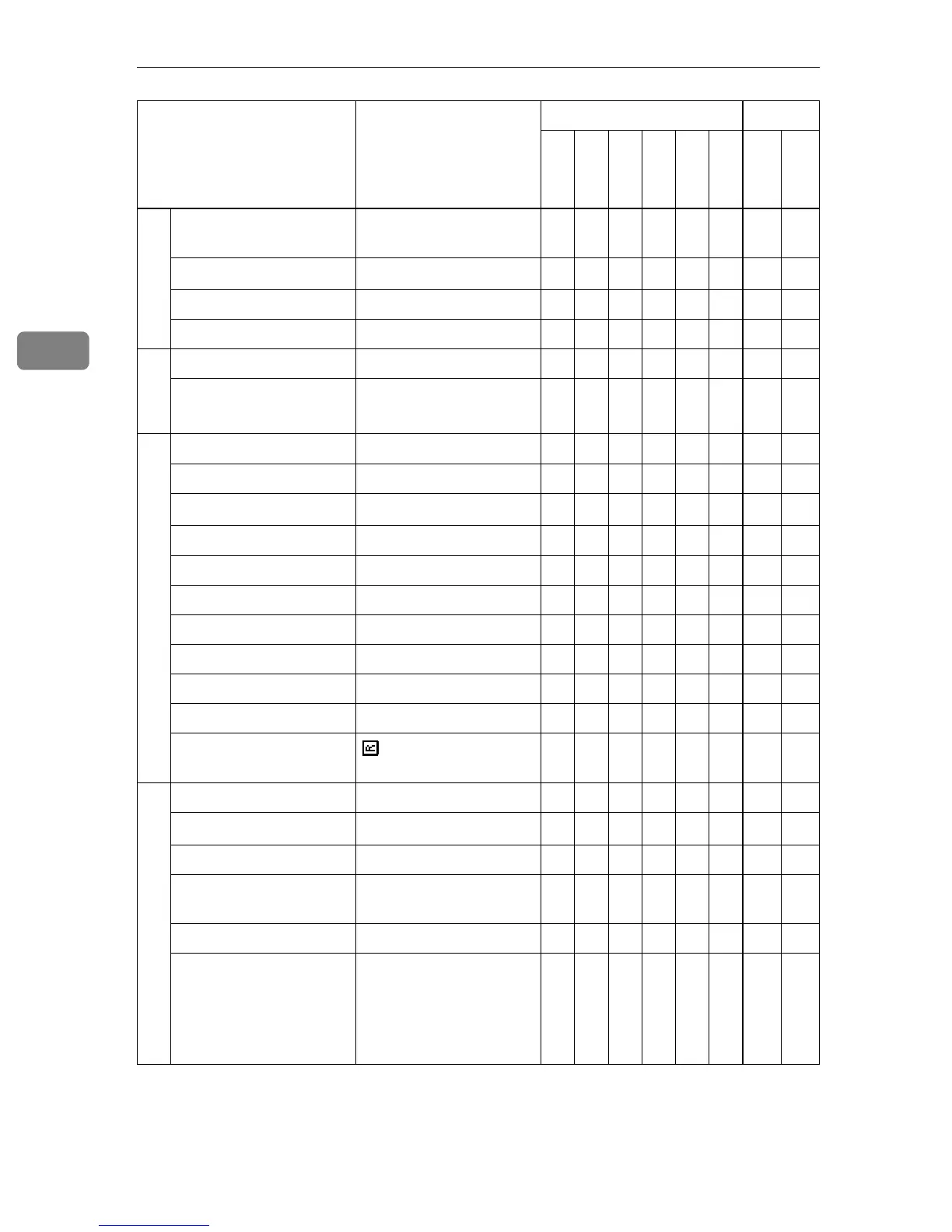
SNMP
*5
Community Name 1 to
10
public
*7
bb× b
Access Type 1 to 10
read-only
*7
bb× b
Protocol 1 to 10 TCP/IP bb×
Manager IP Address 0.0.0.0 ×
Password
Current Password (null) × b
New Password (null) × b
Scan Settings(WSM), Scan Settings
*8
Scan Type Binary:Text bbbb b b
Resolution 100dpi bbbb b b
Scan Size
8
1
/
2
x11
bbbb b b
Position 0 bbbb b b
Scanning Area 0 bbbb b b
Image Density 4 bbbb b b
Filter None bbbb b b
Inversion Off bbbb b b
Erase Color None bbbb b b
File Type Single Page bbbb b b
Original Setting/
Orientation
: 1 Sided
bbbb b b
Print Settings(WSM), Print Settings
*8
Image Density 4 bbb
Original Size (Scan Size)
8
1
/
2
x11
bbb
Reduce/Enlarge 1 bbb
Duplex 1 Sided Orig. -> 1 Sided
Print
bbb
Create Margin Off bb×
Quality/Speed Speed bb×
Setup Item Default
Purpose Method
Delivery
E-mail
SMB
FTP
Print
TWAIN
Scanner
Web



 To Next Page