Order No.
35 MHz: F 8042
40 MHz: F 8043
41 MHz: F 8044
FX-30
12.13SWASHPLATE SETTINGS
This function is used to program the mixer functions required
to actuate the swashplate of a model helicopter. It is not avai-
lable if you select the swashplate type SWH1, as no mixers are
required for the collective pitch function with this configura-
tion.
If you activate a model helicopter with any of the other swash-
p
late types, you can access this menu to set and reverse the
stick travels of the roll-axis (aileron), pitch-axis (elevator) and
collective pitch (PIT) functions. The essential mixer functions
can also be programmed at this point.
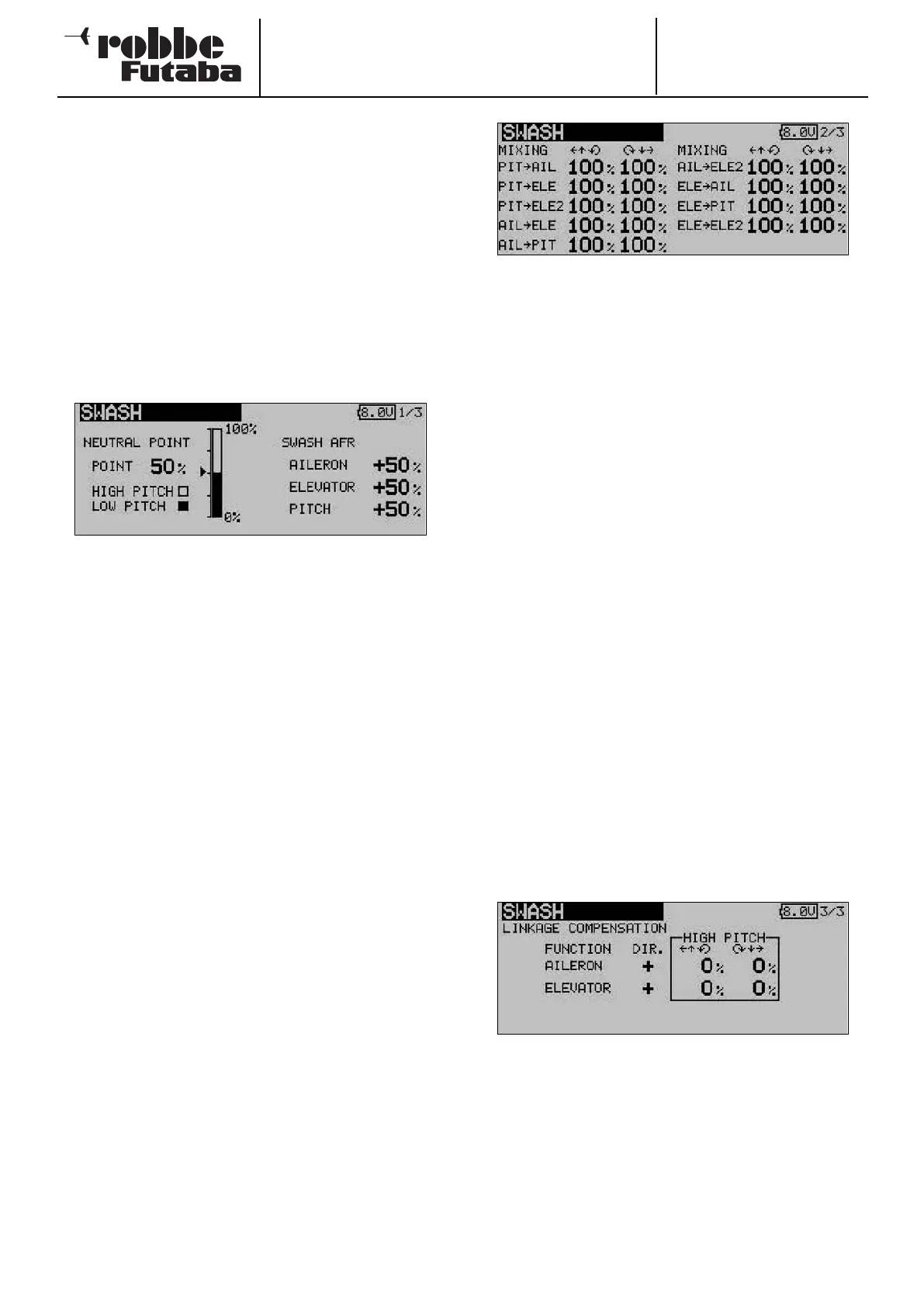
Use the 3-D hot-key to mark the ‘Swashplate’ option in the
Base menu, and confirm your choice with EDIT. The screen
now looks like this:
• Neutral point adjustment
The first step is to optimise the neutral point setting, which
is entered as a percentage value. First adjust the servo out-
put arms mechanically, so that the neutral point is close to
50%. Now mark the ‘Point’ field and adjust the position of
the collective pitch stick until the servo output arms are
exactly at 90° to the pushrods. Press the ‘Enter’ button,
and read off the displayed percentage value; this figure is
also displayed in bar-graph form.
• Adjusting stick travel
The swashplate travel settings can be optimised for the
roll-axis, pitch-axis and collective pitch functions: mark the
corresponding field, and enter the required percentage
value using the ‘3-D hot-key’. The adjustment range is -
100% to +100%; the default setting is 50%. Holding the
rotary knob pressed in for about one second restores the
default setting.
You should now use the servo reverse function to correct
the direction of servo rotation where necessary, so that all
the servos move in the same direction when you operate
the collective pitch stick. With these settings correct, set
the appropriate direction of rotation for the pitch-axis and
roll-axis functions by changing the + / - prefix where
necessary.
It is important to set the control travels to the largest possi-
ble value without the pushrods or servos striking their end-
stops. Check the maximum control travels carefully when
the collective pitch, roll-axis and pitch-axis functions are at
their extremes of travel. Remember that the swashplate
may bind if you set excessive travels, although this varies
according to the method of actuation and the design of the
rotor head.
The swashplate menu has several display levels (pages); the
page indicator at top right indicates this. You can access the
other levels by pressing the S1 button. The screen changes,
and the display for adjusting the mixer rates looks like this:
• Setting the mixer rates
The mixer rate set-up procedure is explained using an HR-
3
swashplate as an example. The procedure for the other
swashplate types is identical, but the actual settings will
need to be slightly different.
First move the throttle stick to the neutral position, and
adjust the pushrod lengths so that the swashplate is
exactly horizontal. Fine-tuning can be carried out using the
‘Servo centre offset’ option.
The mixer rate for the roll-axis function (AIL -> PIT) is opti-
mised first. Mixer values can be set as percentages sepa-
rately for the left and right side of travel. Set the values in
such a way that there are no adverse effects on the pitch-
axis and collective pitch functions when the roll-axis func-
tion is operated over its full travel.
The next step is to optimise the mixer rate for the pitch-
axis functions (ELE -> ROL and ELE -> PIT). Mixer values
can be set as percentages separately for the left and right
side of travel. Set the values in such a way that there are no
adverse effects on the roll-axis and collective pitch func-
tions when the pitch-axis function is operated over its full
travel.
The final step is to optimise the mixer rate for the collective
pitch functions (PIT -> ROL and PIT -> ELE / ELE2). Mixer
values can be set as percentages separately for the left
and right side of travel. Set the values in such a way that
the swashplate remains horizontal even when the throttle
stick is moved over its full travel.
Activate the last display page, and the following screen appe-
ars:
In this sub-menu you can compensate for the unwanted
effects of pushrod non-linearity.
First move the throttle stick to a position where the rotatio-
nal speed is as low as possible. Now move the roll-axis
stick (aileron) over its full travel from left to right. Set the
compensation value for that function in such a way that
there is no adverse effect on the collective pitch and pitch-
axis functions. The values can be entered individually for
each side of centre, and are entered using the ‘3-D hot-
key’.
36



 To Next Page